Tuner
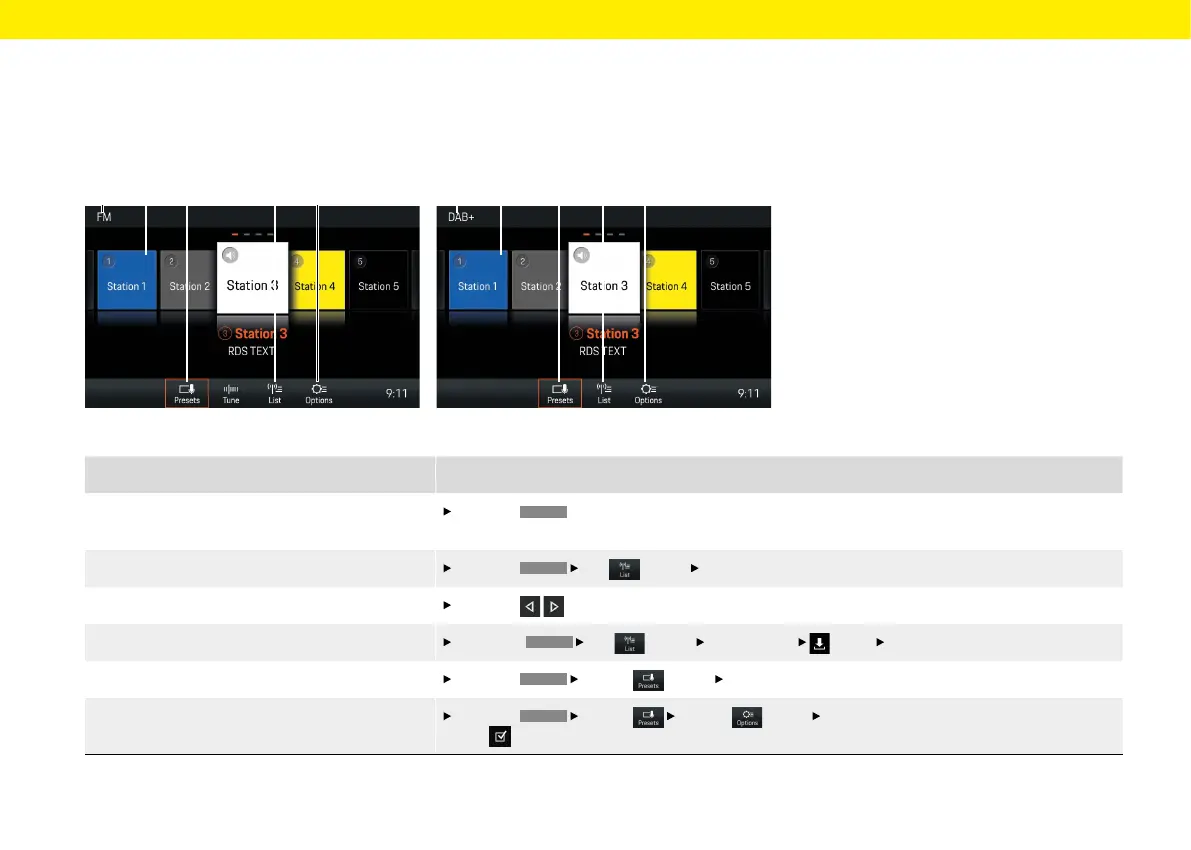
Fig.: FM reception range Fig.: DAB+ reception range
A C D EB A C D EB
What do I want to do? What do I have to do?
Set the reception range
Press the
TUNER
button repeatedly until the desired reception range (AM, FM or DAB+) is displayed
inthe header (see A).
Select a station from the list
Press the
TUNER
List
(see D)
Select station button.
Select station using the Skip button
Press the
the buttons repeatedly until the desired station is played.
Store a station from the station list
Select the
TUNER
List
(see D)
Select station
Select
Select station button.
Select a saved station
Press the
TUNER
Presets (see C)
Select desired station button (e.g. B).
Switch on/o Trac Announcements
Press the
TUNER
Presets
Options (see E)
Activate or deactivate Trac announcements
(TA) checkbox button.
Brief overview
This brief overview is no substitute for the complete
descriptions in the "Tuner" chapter. In particular,
safety and warning notices are not replaced by this
brief overview.
36



 To Next Page