Media
Selecting media source
Select USB and Bluetooth® from the media
asfollows:
Press the
HOME
Media button andse-
lect the desired media source.
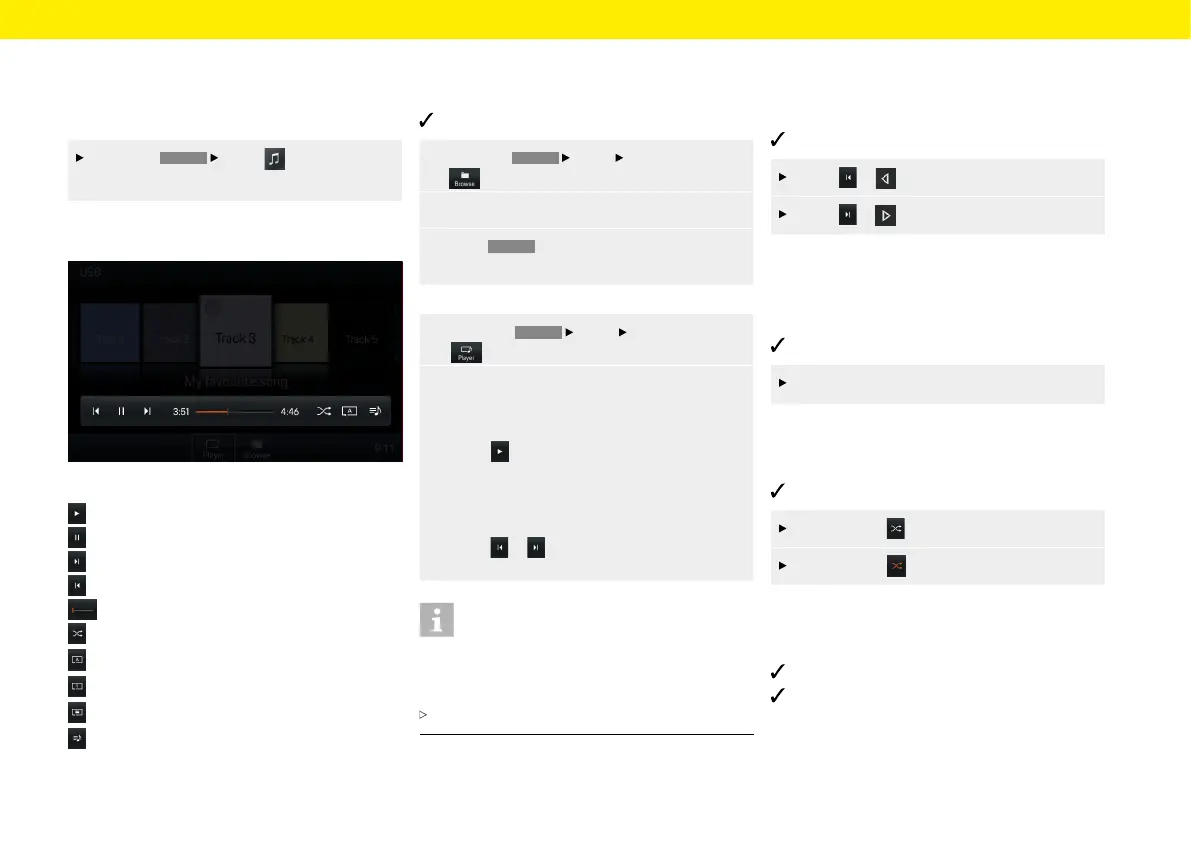
Media player control elements
Fig.: PCCM Plus media player
Play media
Pause media
Skip forward to media track
Skip back to media track
Fast forward/back
Shue music
Repeat all
Repeat track
Repeat folder
Display album list
Playing music
To play media tracks, proceed as follows:
Audio source is selected.
1. Press the
HOME
Media
Select Browse
button.
2.
Select desired folder or media track.
3. Press
BACK
to navigate back in the folder
structure.
– or –
1. Press the
HOME
Media
Select Player
button.
2.
In Coverow view, swipe le or right until the
desired album is displayed larger in the centre.
– or –
select to play an album
– or –
press the right-hand knob
– or –
press or .
Information
Audio formats must have certain properties so that
they can be played via the media function. For infor-
mation on the audio formats supported:
Refer to the Technical Data chapter.
Skipping forward/back
To skip forward and back (while media tracks
areplaying), proceed as follows:
Media source is selected.
Press or to skip back.
Press or to skip forward.
Fast forward/back
To fast forward and back (while media tracks are
playing), proceed as follows:
Media source is selected.
Slide the time bar to the desired position.
Shue on/o
To activate/deactivate shue, proceed as follows:
Media source is selected.
Press Shue . Shue is activated.
Press Shue again to deactivate shue.
Repeating music track
To activate/deactivate repeat, proceed as follows:
Media source is selected.
Music tracks are selected.
41



 To Next Page