2
1. This lock should only be used as described in this manual.
2. The lock’s factory default setting is unlocked. After providing power,
establishing an admin, and pairing the lock to the app, will you be able to
change the setting to “Private” mode.
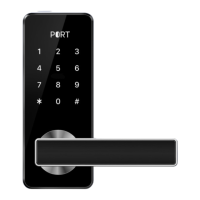
3. The door swing direction on the lock is not reversible. Please make sure the
direction of the lock handing is consistent with the direction of the door.
4. There is a protective lm on the front touch panel and handle. This lm can be
removed whenever needed.
5. This device requires four (4) AA batteries. Do not mix old and new batteries.
Never insert objects into the lock.
6. Verify the door surface is at and level before you start the installation
process. Installation on doors or surfaces that are not at and/or level may
cause the lock to malfunction or fail to operate properly.
7. This smart lock is compatible with the TTLock app (available on iOS and
Android). The lock will function without the app, but not all features will be
accessible.
8. This lock must be installed on a door with minimum thickness between 35mm
and 50mm.
9. IMPORTANT: When installing outdoors in uncovered areas, using Port
Canopy is highly recommended to protect this lock from exposure to rain.
Important Guidelines
This user manual will guide you through the function and usage of Shield. Please
follow all the instructions of this manual. If you have questions not answered by
this manual, please contact our customer support.
Before Getting Started


 To Next Page