ENGLISH
6
heat. Place the charger in a position away from any heat
source. The charger is ventilated through slots in the top
and the bottom of thehousing.
• Do not operate the charger with a damaged cord
orplug.
• Do not operate the charger if it has received a sharp
blow, been dropped or otherwise damaged in any
way. Take it to an authorized servicecenter.
• Do not disassemble the charger; take it to an
authorized service center when service or repair
is required. Incorrect reassembly may result in a risk of
electric shock, electrocution orfire.
• Disconnect the charger from the outlet before attempting
any cleaning. This will reduce the risk of electric shock.
Removing the battery pack will not reduce thisrisk.
• NEVER attempt to connect 2 chargerstogether.
• The charger is designed to operate on standard
120V household electrical power. Do not attempt to
use it on any other voltage. This does not apply to the
vehicularcharger.
WARNING: Shock hazard. Do not allow any liquid to
get inside the charger. Electric shock mayresult.
WARNING: Burn hazard. Do not submerge the
battery pack in any liquid or allow any liquid to
enter the battery pack. Never attempt to open the
battery pack for any reason. If the plastic housing of
the battery pack breaks or cracks, return to a service
center forrecycling.
CAUTION: Burn hazard. To reduce the risk of injury,
charge only PORTER-CABLE rechargeable battery
packs. Other types of batteries may overheat and burst
resulting in personal injury and propertydamage.
NOTICE: Under certain conditions, with the charger
plugged into the power supply, the charger can
be shorted by foreign material. Foreign materials
of a conductive nature, such as, but not limited to,
grinding dust, metal chips, steel wool, aluminum
foil or any buildup of metallic particles should be
kept away from the charger cavities. Always unplug
the charger from the power supply when there is no
battery pack in the cavity. Unplug the charger before
attempting toclean.
Charging a Battery
PORTER-CABLE chargers are designed to charge PORTER-
CABLE battery packs. Charge times are: PCC690L in
40–80mins., PCC691L in 70–140 mins., PCC692/PCC692L
in 40–80 mins., and PCC695L/PCC699L in 65-240 mins.
depending on the pack beingcharged.
1. Plug the charger into an appropriate outlet before
inserting the batterypack.
2. Insert the battery pack into thecharger.
3. The LED will flash indicating that the battery is
beingcharged.
4. The completion of charge is indicated by the LED
remaining on continuously. The pack is fully
charged and may be used at this time or left on
thecharger.
5.
Recharge discharged batteries as soon as possible after use
or battery life may be greatly diminished. For longest battery
life, do not discharge batteries fully. It is recommended that
the batteries be recharged after eachuse.
Charger Diagnostics
This charger is designed to detect certain problems that can
arise with the battery packs or the power source. Problems
are indicated by one LED flashing in differentpatterns.
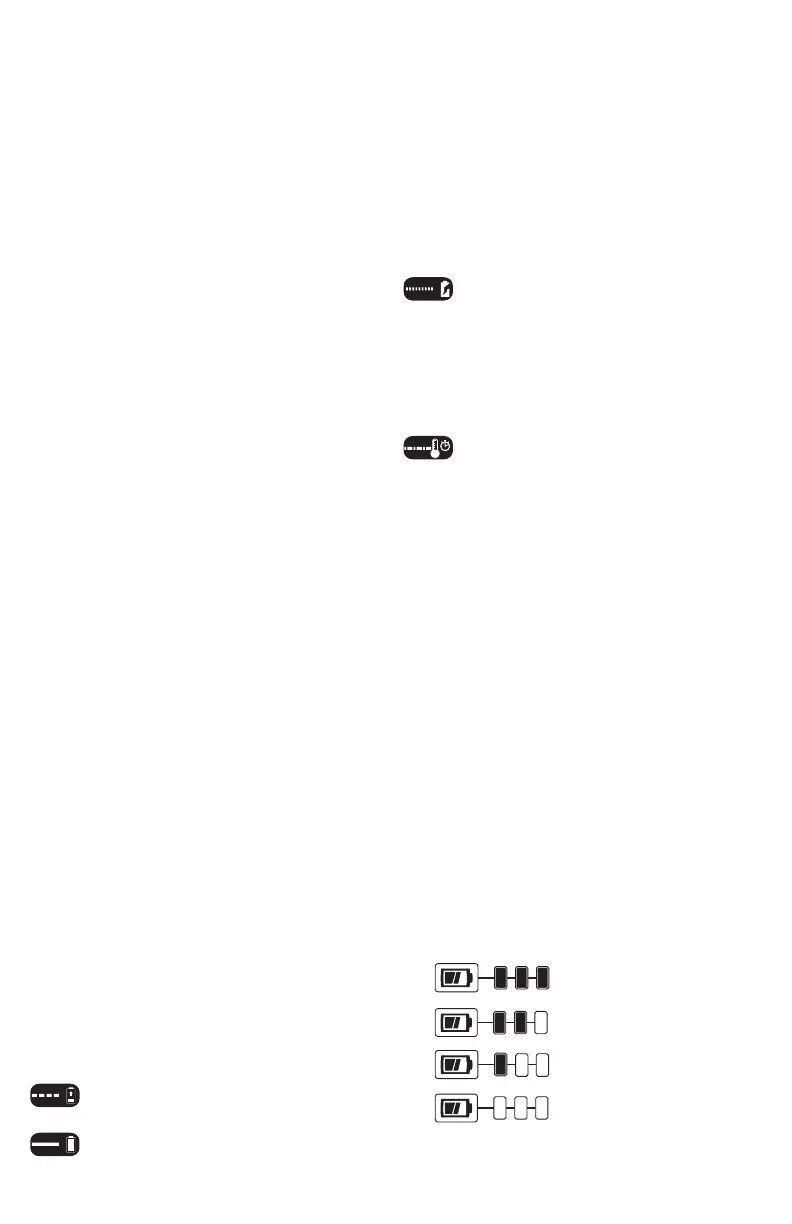
Bad Battery
The charger can detect a weak or damaged battery. The
LED flashes in the pattern indicated on the label. If you see
this bad battery blink pattern, do not continue to charge
the battery. Return it to a service center or a collection site
forrecycling.
Hot/Cold Pack Delay
When the charger detects a battery that is excessively
hot or excessively cold, it automatically starts a Hot/Cold
Pack Delay, suspending charging until the battery has
normalized. After this happens, the charger automatically
switches to the P ack Charging mode. This feature ensures
maximum battery life. The light flashes in the pattern
indicated on thelabel.
Leaving the Battery in the Charger
The charger and battery pack can be left connected with
the LED glowing indefinitely. The charger will keep the
battery pack fresh and fully charged. This charger features
an automatic tune-up mode which equals or balances the
individual cells in the battery pack to allow it to function at
peak capacity. Battery packs should be tuned up weekly or
whenever the battery no longer delivers the same amount
of work. To use the automatic tune-up mode, place the
battery pack in the charger and leave it for at least 8hours.
State of Charge Indicator (Fig. B)
Some PORTER-CABLE tools include a state of charge
indicator which consists of three green LED lights that
indicate the level of charge remaining in the batterypack.
The state of charge indicator is an indication of approximate
levels of charge remaining in the battery pack according to
the followingindicators:
75–100% charged
51–74% charged
< 50% charged
Pack needs to be charged
To actuate the state of charge indicator, press and hold
the state of charge indicator button. A combination of the
three green LED lights will illuminate designating the level







 To Next Page