7
DRY PICK-UP
WET PICK-UP
1. To reduce the risk of damage to the vacuum, do not run motor with float in
raised position.
2. Wet pick up accessories should be washed periodically.
NOTICE
NOTICE
A dry filter is necessary to pick up dry material. If you use the vacuum to pick up dust
when the filter is wet, the filter will clog quickly and be very difficult to clean. If the
filter gets wet, replace it before continuing to do dry pickups.
1. Remove dry reusable filter and replace it with foam filter when you do wet pickups.
2. This wet/dry vac is equipped with a float mechanism which will rise automatically to
cut off the airflow when the liquid in the tank reaches a predetermined level. When this
happens, turn off vac, unplug the power cord, and empty the dust tank. You will know
that the float has shut the airflow off because the suction ceases and the motor noise
becomes higher in pitch due to increased motor speed. The liquid capacity may vary
with the rate of pickup.
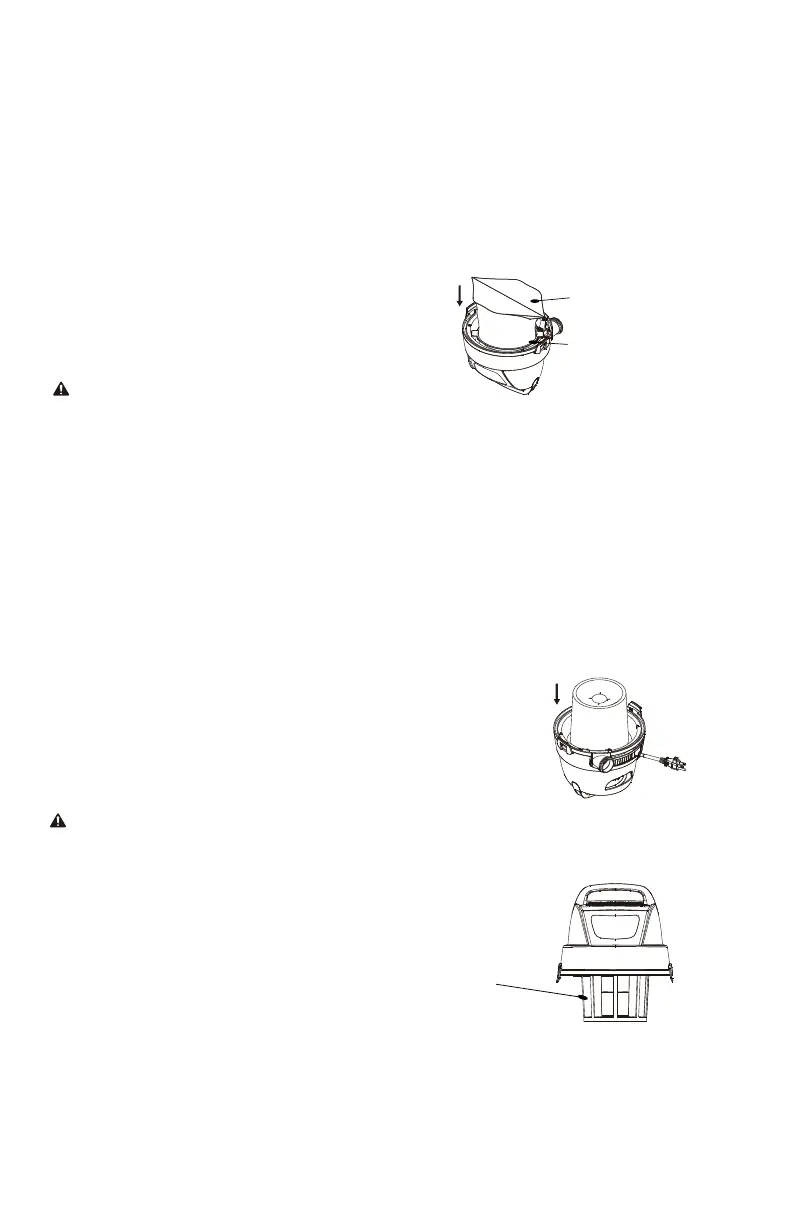
1. The filter must always be in correct position to reduce the risk of leaks and possible
damage to the vacuum. Make sure that the filter is completely covering the filter
cage and that the clamp ring is as close to the lid as possible. Make sure there are no
gaps between the filter and the lid. (See illustration). It is very important to assemble
the filter to the cage without allowing any possible leaks or tears. Any leaks will allow
the picked up debris to be blown out of the blower port and back into the
surrounding environment.
2. When using the vacuum to pick up very fine dust, it will be necessary to empty the
dust tank and clean or replace the filter at more frequent intervals to maintain peak
vacuum performance.
Float in raised position
Reusable dry filter
Clamp ring


 To Next Page