Need help?
Do you have a question about the Postek C168 and is the answer not in the manual?
Lists potential corrective actions for printer issues, including environmental and maintenance tips.
Details technical specifications for the C168 printer models, including printing, media, and interfaces.
Covers power adapter specifications and instructions for unpacking and inspecting the printer.
Provides initial considerations for setting up the printer, focusing on space and connectivity.
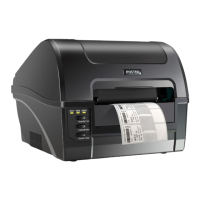
Identifies and labels the main external components and controls of the printer.
Illustrates and lists the various interface ports available on the printer.
Step-by-step guide for connecting the printer to its power source and host computer.
Provides critical warnings for maintenance and detailed instructions for cleaning the printhead.
Instructions for cleaning the platen roller and the interior of the printer.
Explains common error indications via indicator lamps and provides recommended solutions.
Addresses other common problems like vertical blank lines, print timeouts, and print quality issues.
Details recovery procedures after corrective action and how to handle persistent or uncovered troubles.
Provides pin assignments and host connection details for the RS232 serial port.
Details pin assignments for the 36-pin Centronics parallel interface.
 General
| Print Resolution | 203 DPI |
|---|---|
| Power Supply | AC 100-240V, 50/60Hz |
| Interface | USB, Serial, Ethernet |
| Supported Barcodes | Code 39, Code 128, UPC-A, UPC-E, EAN-13, EAN-8, Codabar, QR Code, Data Matrix, PDF417 |
| Operating Temperature | 5°C to 40°C |

 To Next Page