PRK-6000 Operation Manual
- 38 -
7.2 Replacement
7.2.1 Printing Paper
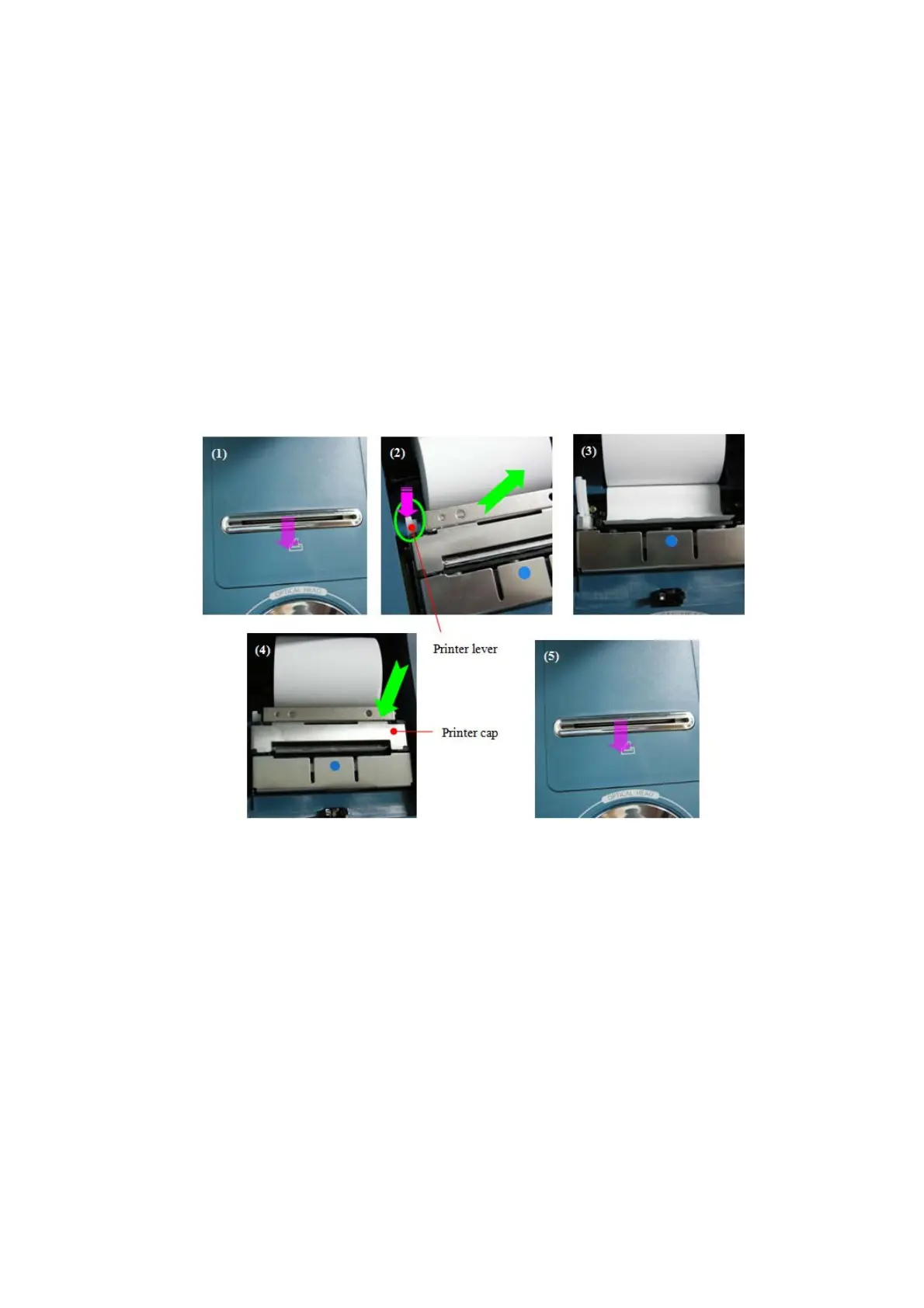
Replace the roll of printing paper as soon as possible if the red line appears in the paper.
(1) Open the printer cover.
(2) Remove the printer cap after pushing the printer lever, and then take ‘used paper out.
(3) Install a roll of new paper into the printer case, and then equip the printer cap.
(4) At this time, the printer detects the change of paper, and cuts the paper approximately
‘2cm’ for initializing paper settings.(It takes about 3 seconds to complete.)
(5) Remove the cutted paper, and then close the printer cover.
7.2.2 Chin Rest Paper
(1) Pull out the two pins on the chin rest.
(2) Insert the pins into the holes on the chin rest paper. More than 50 sheets of paper can
be attached.
(3) Insert the pins straight into the holes on the chin rest.
7.2.3 Fuses
(1) Turn off the power.
(2) Remove the power cord from the electrical inlet
(3) Insert flatblade screwdriver into notches in the fuseholder cover.
Then turn the screwdriver countclockwise
(4) Replace the fuses and reset the fuseholder cover in its original positions
Fuse rating: T3.15A 250V



 To Next Page