EasyManua.ls Logo

Powelectrics Metron 2 - Transmission Process - Flow Chart

Powelectrics Metron 2
45 pages
Print Icon
To Next Page IconTo Next Page
To Previous Page IconTo Previous Page
Loading...
19
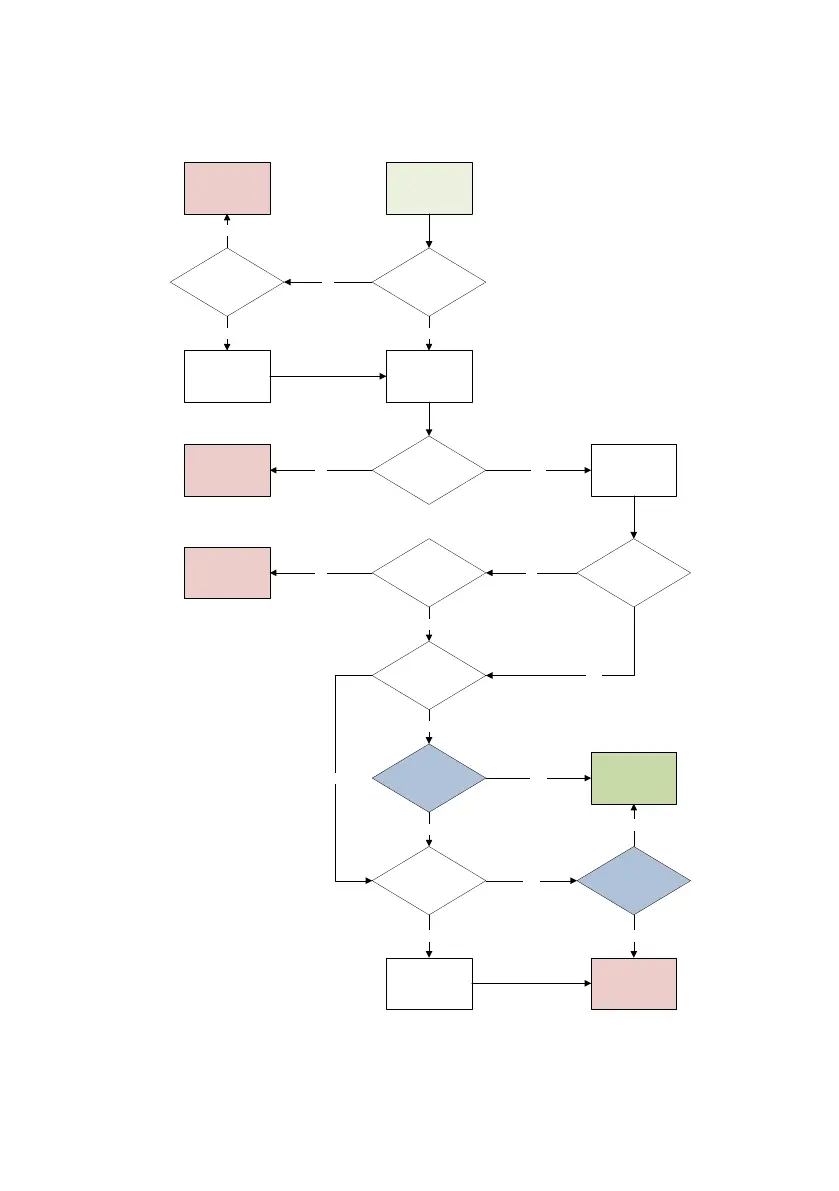
4.2.3 Transmission Process Flow Chart
Both the log and alarm process follow the same process for transmission. The blue diamonds are complete processes
that can be found separately.
Transmission
Triggered
Transmission is
cancelled, error
message displayed
Power Up Modem
(Typically < 60
seconds
Load Backup
settings into Normal
memory
No
Transmission is
cancelled, error
message displayed
Is it connected
to a network?
Are any GPRS
settings programmed?
Is a SIM inserted?No
Set up modem
Yes
No
Yes
Transmission
Complete
Yes
Follow ‘GPRS
transmit’ process.
Successful?
Retry for 300
seconds. Successful
network connection?
Transmission is
cancelled, error
message displayed
No
Yes
Follow ‘SMS
transmit’ process.
Successful?
Yes
Are any SMS settings
programmed?
No
Yes
Transmission is
cancelled, error
message displayed
No
Are there any
GPRS or SMS
settings available?
Are there any backup
GPRS settings?
Yes Yes
No
Yes
Set ‘Failed GPRS
transmit flag’ (retry
in 15 minutes)
No No

Table of Contents