35
1234,[output name],AUTO,
Would hand control back over to the threshold rule specified in [reference] if a rule has been configured.
When breaching the threshold the relay would be switched on, and then switched off when the alarm clears,
following the rules configured for call out delay and hysteresis. The state of the relays can be manually
overridden by sending one of the manual control commands, under this circumstance the threshold control is
then switched off. The threshold control of the output can be switched back on by sending the AUTO command.
Communcations configuration
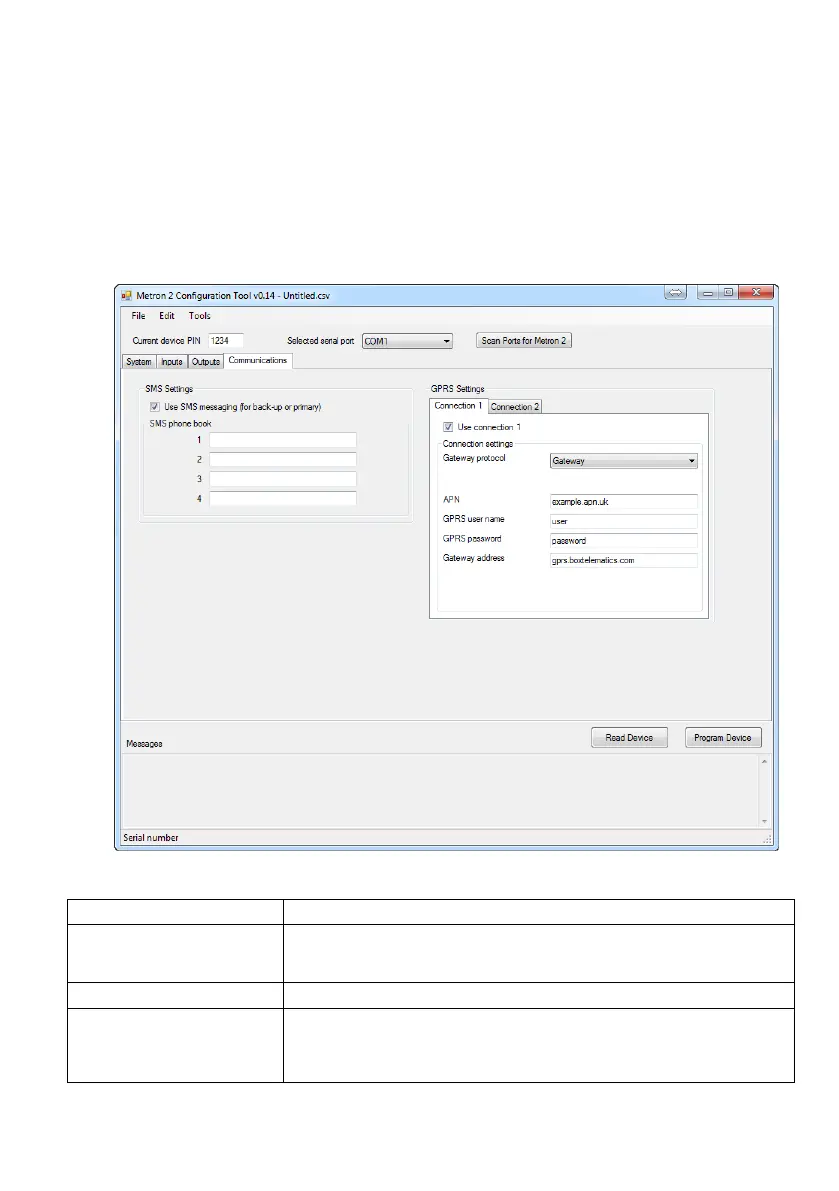
The communications tab sets all of the options for communicating using SMS and GPRS.
Each of these can contain a phone number that can be used for communication.
When you program an input, you can choose which of these phonebook entries
to communicate to.
You should tick the ‘Use connection’ box if you wish to use a GPRS connection.
You should set this to the protocol you wish to use
‘Gateway’: should be used with ‘SpotOn’ software
‘Bulk Protocol’: should be used with Metron View or compatible gateway
‘XML’: should be used with an XML compatible gateway


 To Next Page