34
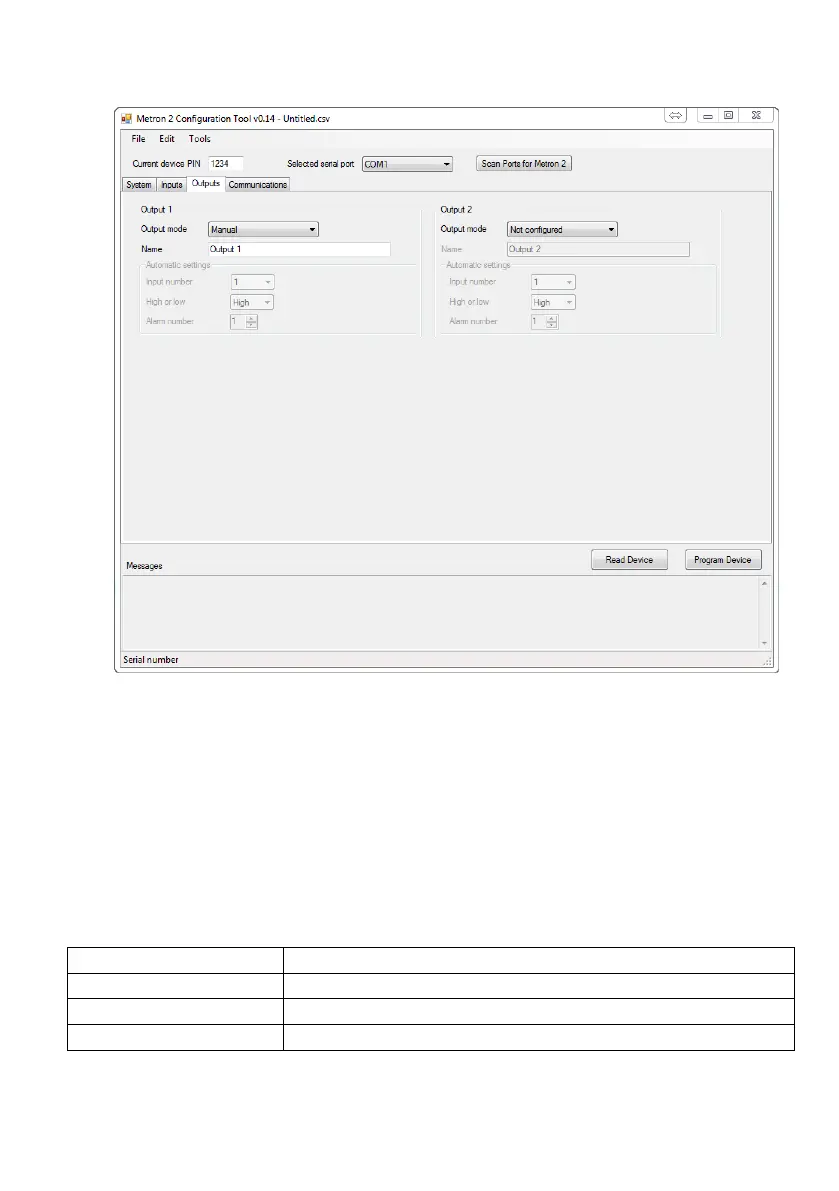
Output configuration
The outputs can be run in two different modes:
1/ Manual – This is when each output is manually controlled. When in the mode, the only thing you have to set
is the name of the output. The output can be controlled by sending the unit a text message:
PIN,[output name],ON,
Would switch the output on.
1234,[output name],OFF,
Would switch the output off.
2/ Automatic – You can program the unit to switch on and off the outputs by associating them with a specific
threshold on an input.
The input number of the threshold you wish to associate the output with
If the alarm that you wish to monitor is a ‘Hi alarm’ or ‘Lo alarm’
The number of the threshold that you wish for it to change state on.
You can override the automatic control of an output by sending one of the manual commands to the unit. If you
then wish to return it back to automatic, you can do this by sending:


 To Next Page