16
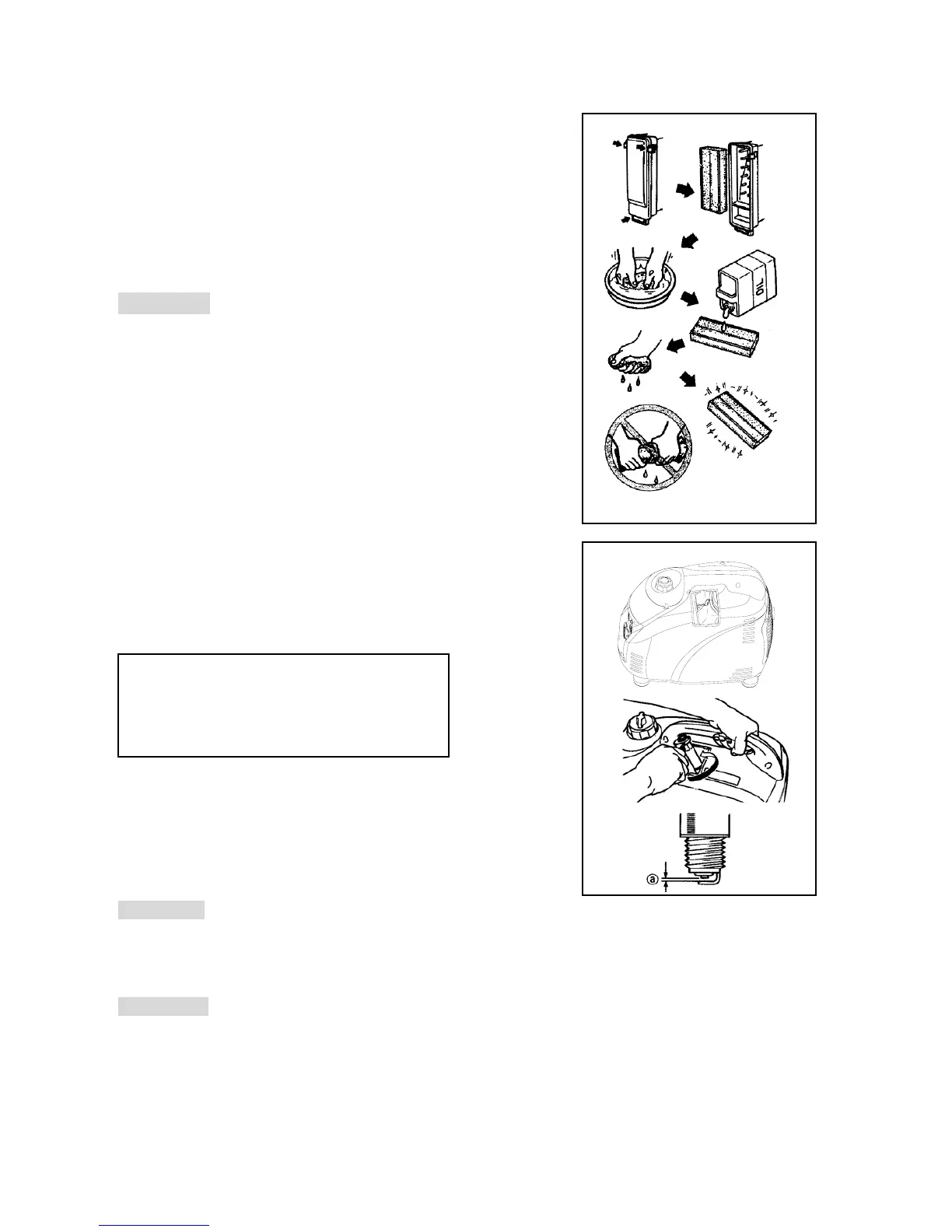
3. Wash the element in solvent and dry.
4. Oil the element and squeeze out excess oil. The element should
be wet but not dripping.
5. Insert the element into the air filter.
6. Install the cover
CAUTION: ──────────────────────
The generator should never run without the air filter element as this
may cause damage to the generator.
───────────────────────────
4)CLEANING AND ADJUSTING THE SPARK PLUG
1. Remove the cover.
2. Check for discoloration and remove the carbon.
3. Check the spark plug type and gap.
4. Install the spark plug.
5. Install the cover
5)FUEL TANK FILTER
1. Remove the fuel tank cap and filter.
2. Clean the filter with solvent. If damaged please replace.
3. Wipe the filter and insert it.
! WARNING Be sure the tank cap is tightened securely.
6)MUFFLER SCREEN
! WARNING
The engine and muffler become very hot during and after the generator has been running.
1. Avoid touching the engine and muffler while they are still hot.
Standard electrode color: Tan Color
Standard Spark Plug: CR4HSB (NGK)
Spark Plug Gap: 0.6-0.7 mm (0.024-0.028 in)


 To Next Page