27
WARNING! Never attempt to open the battery pack for any
reason. If the plastic housing of the battery pack breaks or
cracks, return it to a service centre for recycling; do not put
it into further use.
Removing or installing the battery pack
WARNING!
Always release the on/off trigger before insertion or
removal of the battery pack.
WARNING! Verify that the switch is in the OFF position
before inserting or removing the battery pack.
WARNING! Verify that the battery pack is removed and the
switch is in the OFF position before inspecting, adjusting
or performing maintenance on any part of the chainsaw.
WARNING! Read, understand and follow the instructions
contained in the section titled ‘Charging procedure’.
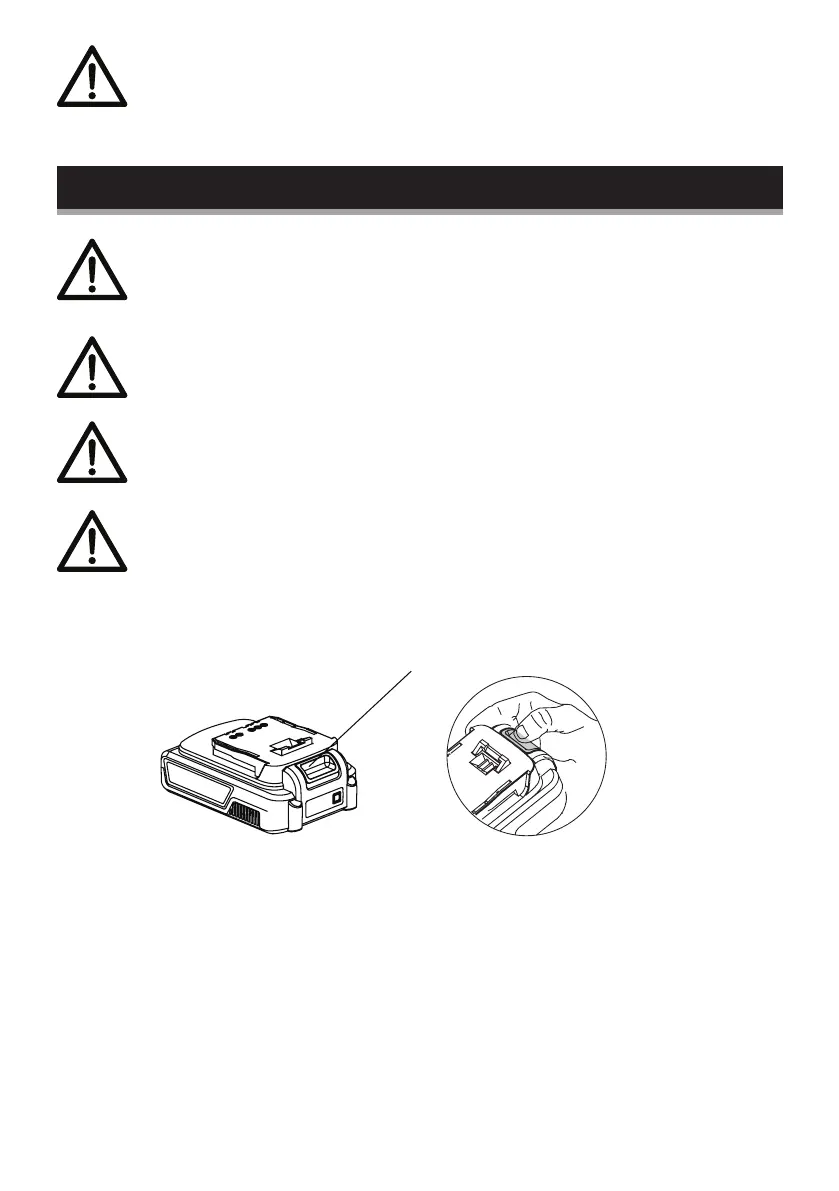
To remove the battery pack: Depress button (A) on the end of the
battery pack, and then remove the pack from the tool.
Install the battery pack: Align the ribs on both sides of the battery
pack with the slots in the housing, and slip it into place. Always
insert it all the way until it locks in place with a click sound. If not,
it may accidentally fall out of the tool, causing injury to you or
someone around you.
A


 To Next Page