28
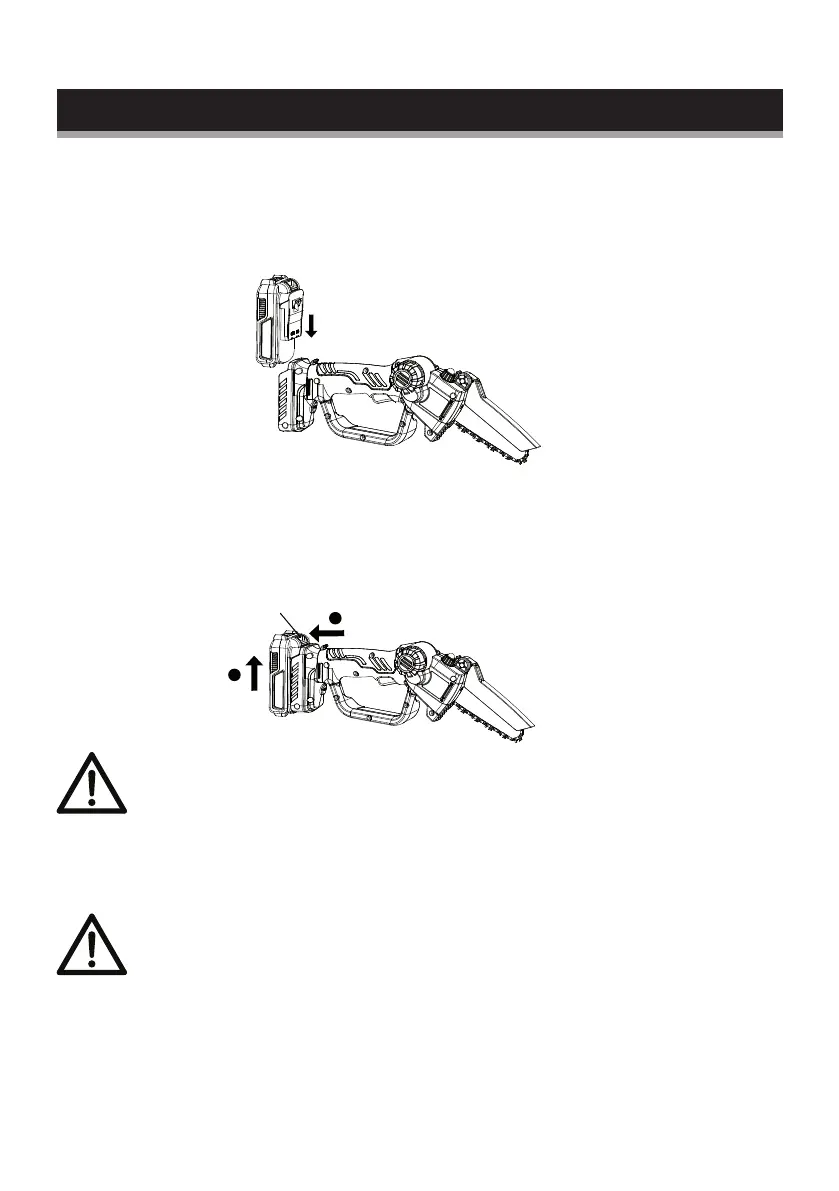
Removing the battery from the product
1. Press the battery pack lock button downward.
2. Pull the battery pack towards the operator, then remove it.
Attention! The battery cannot be charged immediately after
use, it should be left to cool down for a period of time (min.
30 minutes). The LED lights on the charger switching from
green to red mean the battery can be charged.
Switching on/off
NOTE: Hold the chainsaw away from yourself using both
hands. Stand in a secure and stable position.
1. Push the Lock-off button (9) and press the on/off switch (10) to
turn the product.
2. Release the on/off switch (10) to turn the product off.
Starting the chainsaw
Lock button
2
1
Operation
Installing the battery pack
1. Keep the battery pack in line with the holder on the device.
2. Push it forward until it reaches the bottom. Before starting, make
sure the battery pack is firmly locked in place.


 To Next Page