EasyManua.ls Logo

Powermatic 54HH - User Manual

Default Icon
40 pages
Print Icon
To Next Page IconTo Next Page
Loading...
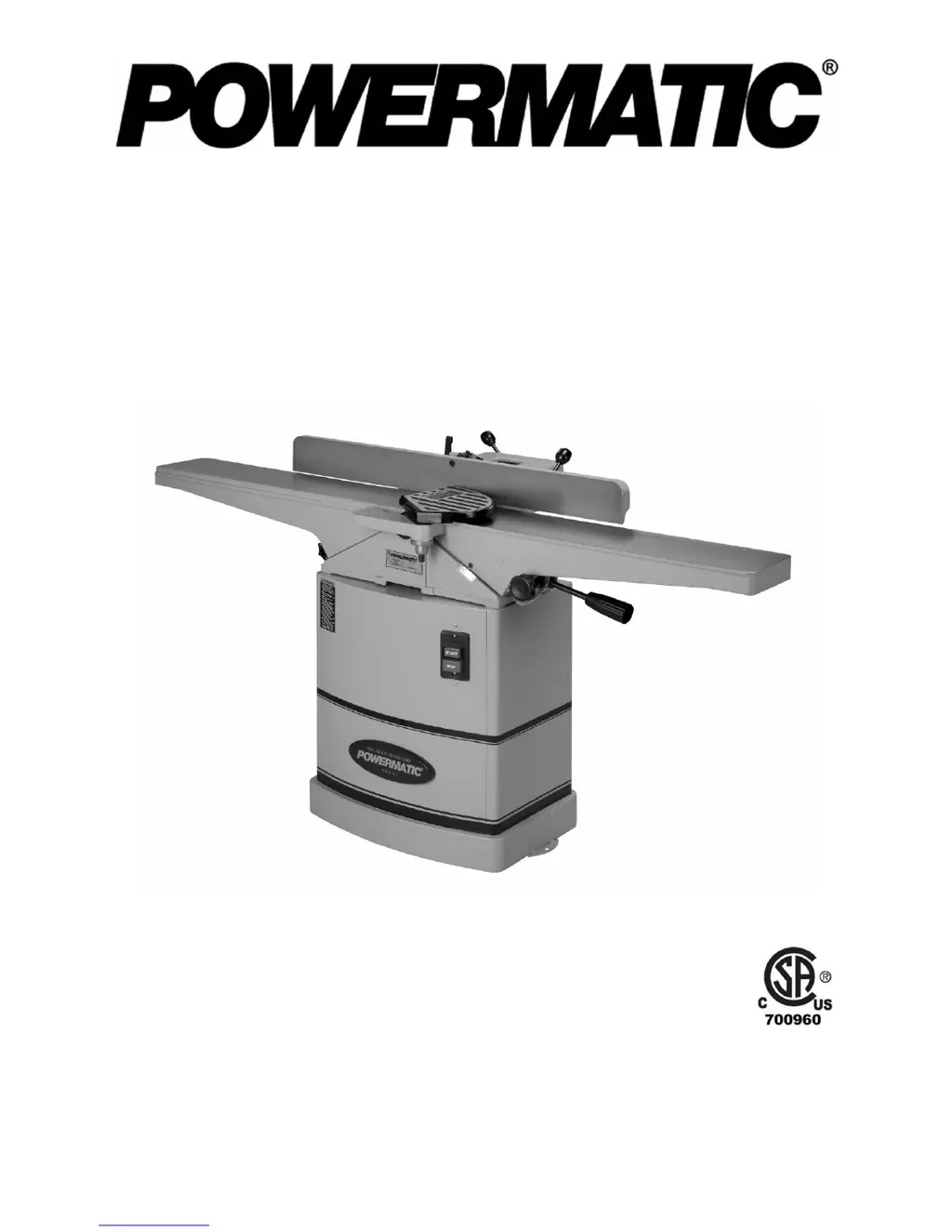
Operating Instructions and Parts Manual
6-inch Woodworking Jointer
Models 54A and 54HH
54A (1791279DXK) serial # 8040543557 and up
54HH (1791317K) serial # 8010540313 and up
WMH TOOL GROUP, Inc.
2420 Vantage Drive
Elgin, Illinois 60123 Part No. M-1791279DX
Ph.: 800-274-6848 Revision C 06/08
www.powermatic.com Copyright © 2008 WMH Tool Group, Inc.

Questions and Answers

  • J
    jimrhodesAug 12, 2025
    Why does my Powermatic 54HH Power Tool cutterhead slow down during operation?
    • J
      Javier MartinezAug 12, 2025
      The cutterhead on your Powermatic Power Tool might slow down while operating if you are feeding the workpiece too quickly or applying too much pressure. Try feeding more slowly or applying less pressure to the workpiece.
  • B
    Brittany PageAug 16, 2025
    What causes uneven knife marks on a Powermatic 54HH workpiece?
    • G
      gina07Aug 16, 2025
      Uneven knife marks on a Powermatic Power Tool workpiece may be due to knives that are nicked or out of alignment. Align the knives. Replace nicked knives or correct for small nicks.
  • U
    uhurleyAug 20, 2025
    Why won't my Powermatic 54HH start or keeps tripping the breaker?
    • K
      karenkimAug 20, 2025
      There are several reasons why your Powermatic Power Tool might not start, restart, or repeatedly trip the circuit breaker: * **No incoming power:** Verify the unit is connected to power, the on-button is completely pushed in, and the stop-button is disengaged. * **Building circuit breaker trips or fuse blows:** Ensure the jointer is on a circuit of the correct size. If the circuit size is correct, there may be a loose electrical lead. Check the amp setting on the motor starter. * **Motor overheated:** Clean the motor of dust or debris to allow proper air circulation. Allow the motor to cool down before restarting.
  • S
    sherrijonesAug 23, 2025
    What to do if my Powermatic 54HH Power Tool is causing chip out?
    • D
      Dustin LeeAug 23, 2025
      If your Powermatic Power Tool is causing chip out, consider these solutions: * Cut with the grain whenever possible. * Sharpen or replace dull knives. * Use a slower rate of feed. * Make shallower cuts. * Inspect wood closely for imperfections; use different stock if necessary if there are knots or imperfections in the wood.
  • W
    weberashleyAug 27, 2025
    How to fix “chatter” marks on my Powermatic 54HH workpiece?
    • K
      Kyle HarveyAug 27, 2025
      If you notice “chatter” marks on your workpiece when using your Powermatic Power Tool, it could be due to: * **Knives incorrectly set:** Set the knives properly, ensuring knife slots are clean and free of dust or debris. * **Feeding workpiece too fast:** Feed the workpiece slowly and consistently.
  • J
    joseph61Aug 31, 2025
    What causes fuzzy grain when using my Powermatic Power Tool?
    • S
      smithclaytonAug 31, 2025
      Fuzzy grain when using your Powermatic Power Tool can be caused by: * **Wood has high moisture content:** Allow the wood to dry or use different stock. * **Dull knives:** Sharpen or replace knives/inserts.
  • J
    Jordan MooreSep 3, 2025
    How to fix concave back end on Powermatic 54HH stock?
    • J
      Judith BryanSep 4, 2025
      If the finished stock is concave on the back end when using your Powermatic Power Tool, it's likely because the knife is higher than the outfeed table. Raise the outfeed table until it aligns with the tip of the knife.
  • A
    Andrew ChaseSep 7, 2025
    How to fix concave front end on Powermatic 54HH stock?
    • E
      Erika AlexanderSep 7, 2025
      If the finished stock is concave on the front end when using your Powermatic Power Tool, it is because the outfeed table is higher than the knife. Lower the outfeed table until it aligns with the tip of the knife.

Summary

Warranty and Service

Warranty Coverage Details

Details on what is covered, who is covered, and the warranty period.

Warranty Exclusions

Information on what specific conditions or parts are not covered by the warranty.

Service Procedures

Instructions on how to obtain service or repair for the product.

Legal and Limitations

Information on applicable state laws and limitations of the warranty.

Safety Warnings

General Safety Guidelines

Mandatory precautions including reading the manual, understanding labels, and proper training.

Personal Protection and Health

Guidance on appropriate clothing, eye/ear protection, and health risks from dust.

Operational Safety Precautions

Safety measures related to power connection, grounding, adjustments, guards, and securing the machine.

Operating Safety Warnings

Workshop and Operator Safety

Precautions for workshop environment, visitor safety, operator attention, and stance.

Safe Tool Operation Practices

Guidelines for correct tool usage, accessory selection, maintenance, and cleaning.

Safe Material Handling

Instructions for handling materials including size, push blocks, hand placement, and grain direction.

Safety Notices and Accessories

Safety Icon Definitions

Explanation of the meaning of Caution and Warning symbols used in the manual.

On-Off Switch Padlock

Information on the use of a padlock for the on/off switch for safety.

Introduction to the Jointer

Product Specifications

Key technical specifications including model, dimensions, motor details, and capabilities.

Unpacking and Shipping Contents

Initial Unpacking Steps

Procedures for opening shipping containers and checking parts for damage.

Included and Required Tools

Lists of tools provided with the jointer and those required for assembly.

Assembly Procedures

Initial Setup and Cleanup

Steps for locating the machine, unpacking, and preparing surfaces.

Attaching Bed to Stand

Instructions for securely mounting the jointer bed onto the stand.

Fence and Belt Installation

Attaching the Fence Assembly

Detailed steps for securing the fence to the jointer bed.

Installing the Drive Belt

Guidance on properly installing and tensioning the drive belt.

Component Installations

Pulley Cover and Guard Mounting

Instructions for installing the pulley cover and cutterhead guard.

Access Door and Dust Chute

Steps for attaching the access door and dust chute.

Electrical Setup and Operation

Grounding Instructions

Essential information for ensuring safe electrical grounding of the jointer.

Voltage Configuration

Procedures for setting up the jointer for 115V or 230V operation.

Adjustments and Setup

Extension Cord Guidelines

Recommendations for selecting appropriate extension cords based on amperage and length.

Fence Adjustments

Instructions for moving and tilting the fence to various angles.

Fence Alignment and Stops

90-Degree Fence Stop Calibration

Procedure to accurately set the fence to a 90-degree angle.

45-Degree Fence Tilt Stops

Adjusting the forward and backward tilt limits of the fence.

Table Adjustments

Infeed Table Height Calibration

Steps for adjusting the infeed table to set the desired depth of cut.

Infeed Table Travel Limiter

Information on setting the upper and lower range for infeed table adjustments.

Table and Knife Adjustments

Table Gib Fine-Tuning

Procedure for adjusting table gibs to eliminate play and prevent sagging.

Outfeed Table Height Setting

How to set the outfeed table height relative to the cutterhead knives.

Cutterhead Knife Calibration

Outfeed Table to Knife Alignment

Ensuring the outfeed table is correctly aligned with the cutterhead knife apex.

Model 54 A Knife Setting Procedure

Detailed steps for adjusting the cutterhead knives using cam mechanisms.

Cutterhead Knife Adjustment Details

Knife Height and Cam Adjustment

Fine-tuning knife position and ensuring proper contact with the straightedge.

Knife Replacement (Model 54 A)

Removing and Installing Knives

Step-by-step guide for safely removing and installing cutterhead knives.

Specialized Knife Settings and Maintenance

Rabbeting and Nick Correction

Setting knives for rabbet cuts and correcting minor nicks on the blades.

Model 54 HH Knife Insert Rotation

Procedure for rotating knife inserts to utilize all four edges.

Verifying Table Height Settings

Diagnosing Table Height Issues

Interpreting the results of cuts to determine if table height needs adjustment.

Jointer Operation Controls

Overview of Operating Controls

Identification and function of various control levers and knobs on the jointer.

Pre-Operation Checks

Essential checks to perform before operating the jointer for safety and readiness.

Basic Jointer Techniques

Safe Hand Placement

Proper hand positioning and movement during jointer operations to avoid injury.

Feeding Stock with Grain

Techniques for feeding wood into the cutterhead to ensure a smooth finish.

Jointer Operations

Surfacing Wood

Procedure for creating a single flat surface on a piece of lumber.

Edge Jointing Procedure

Steps for creating a square and flat edge on a board.

Advanced Cutting Techniques

Beveling Edges

Instructions for tilting the fence to create angled edges on wood.

Skewing for Shear Cutting

Technique for angling the fence to cut against the grain for specific woods.

Specific Cuts and Maintenance

Rabbet Cut Procedure

Steps for cutting rabbets (grooves) along the edge of a board.

Routine Maintenance

Guidance on blade care, cleaning, and lubrication of moving parts.

Cutterhead Removal and Reinstallation

Removing the Cutterhead Assembly

Detailed steps for safely disassembling and removing the cutterhead.

Troubleshooting Operating Issues

Common Operating Problems and Solutions

A table listing common operational issues and their corresponding remedies.

Troubleshooting Mechanical and Electrical Issues

Common Mechanical;Electrical Faults

A table detailing mechanical and electrical problems and their solutions.

Ordering Parts and Accessories

Information on how to order replacement parts and optional accessories.

Stand Components

Stand Parts List

A comprehensive list of all parts included in the jointer stand assembly.

Stand Assembly Diagram

Stand Component Identification

A visual diagram identifying components of the jointer stand.

Bed Components

Bed Parts List

A detailed list of all parts belonging to the jointer bed assembly.

Bed Assembly Diagram

Bed Component Identification

A visual diagram illustrating the components of the jointer bed.

Fence Components and Assembly

Fence Parts List and Diagram

A breakdown of fence parts and a diagram for assembly.

Cutterhead Components (Model 54 A)

54 A Cutterhead Parts List

A detailed list of parts for the Model 54A cutterhead assembly.

Cutterhead Components (Model 54 HH)

54 HH Cutterhead Parts List

A detailed list of parts for the Model 54HH cutterhead assembly.

Wiring Diagrams

Electrical Schematics (Early Serial Numbers)

Wiring diagrams for 115V and 230V systems for serial numbers up to 05060540312.

Wiring Diagrams for Later Models

Electrical Schematics (Later Serial Numbers)

Wiring diagrams for 115V and 230V systems for serial numbers 05060540313 and higher.

Powermatic 54HH Specifications

General IconGeneral
BrandPowermatic
Model54HH
CategoryPower Tool
LanguageEnglish

Related product manuals