2 Front and Rear Panel Reference Figures
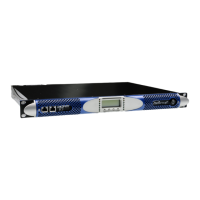
FIGURE 1: K Series front panel
On/Off switch
Ethernet + AESOP ports
(for both 2 or 4 ports versions, non
functional in models without AESOP)
DataCard slot
(for firmware updates, preset storage and step up)
Channel 1 meter LEDs
Channel 2 meter LEDs
Multifunctional keys
CLASS2
WIRING
Mains plug
Air vents
Channel 2 analog input or AES3
(depending on the position of the AES/EBU-
Analog button)
Channel 2 physical
link through output
Channel 2
output
Channel 1
output
Channel 1 physical
link through output
Channel 1 analog input
Channel 2 AES/EBU or analog input
selection button
(functional only for devices with retrofitted DSP
and/or KAESOP board)
Channel 1 and 2 output link
selection button
RS485 port
+ external
aux voltage
Serial remote ID
selection
FIGURE 2: K2/K3 2-port version rear panel








 To Next Page