8
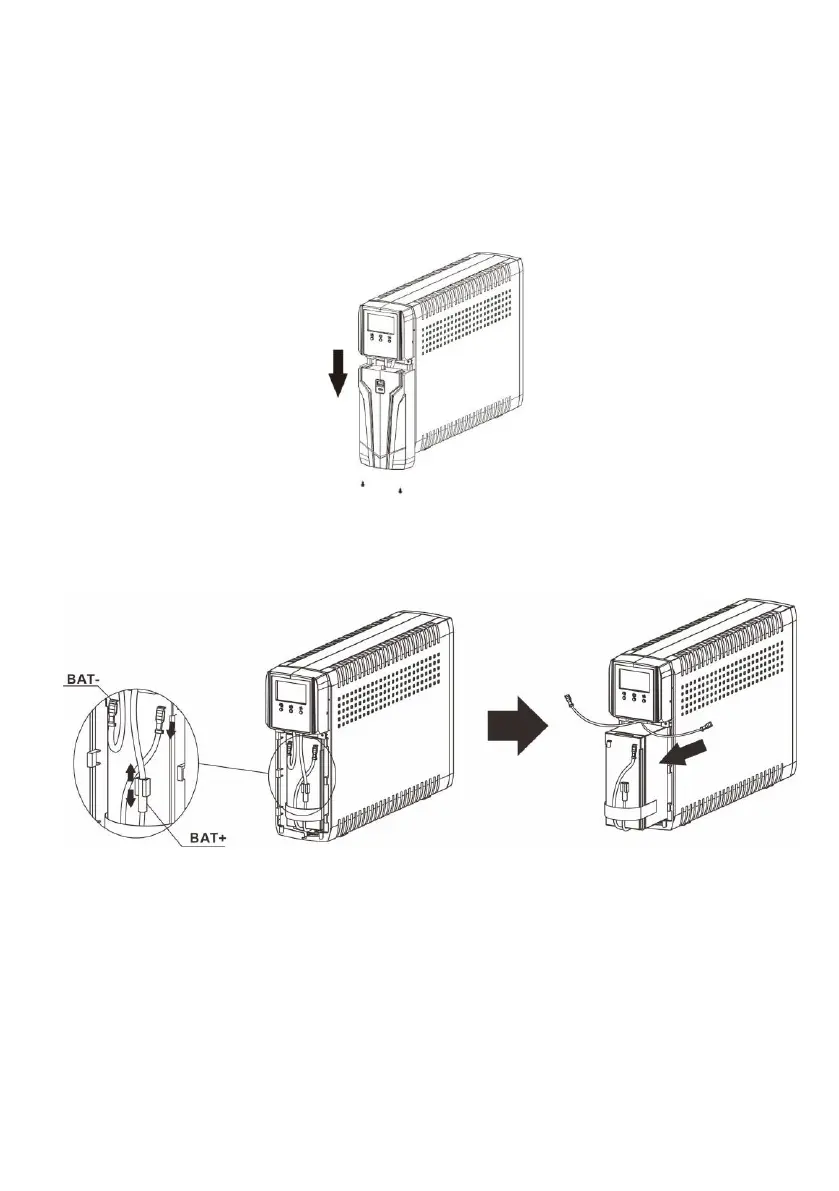
Please follow below steps to replace the batteries if necessary.
Step 1: Turn off the equipment that is plugged into the output of the UPS.
Step 2: Turn off the UPS.
Step 3: Remove AC input plug of the UPS from the AC wall outlet.
Step 4: Remove all equipment from the output sockets of the UPS.
Step 5: Remove battery cover by loosening two screws located on the bottom of the UPS and
slide the battery cover downward, then outward. Set it aside.
Step 6: Disconnect the battery wires (BAT+ and BAT-). Then, slide out the existing battery pack
from the UPS by grasping the battery tap.
Caution - Do not short the positive wire and negative wire of battery.
Caution - DO NOT pull the battery pack out by pulling the battery wires.
Step 7: Slide the new battery pack into the UPS.
Step 8: Verify proper polarity. Re-connect the battery connectors together.
NOTE- Some sparking might occur and this is normal.
Step 9: Re-install the battery cover onto the UPS. Now, the UPS is ready for normal operation.
NOTICE: Properly dispose of the old batteries at an appropriate recycling facility or return
them to the supplier in the packing material for the new batteries.



 To Next Page