⚫ Press and hold 2 seconds to turn on or off the UPS.
⚫ Hold “on/off” button for 10 seconds can reset the unit in case of
communication failure between remote panel and UPS.
⚫ Quick press 5 times to reset pairing when wireless transmission
fails.
⚫ Press and hold 0.5 second to switch display information.
⚫ Press and hold 2 seconds to enter the setting menu.
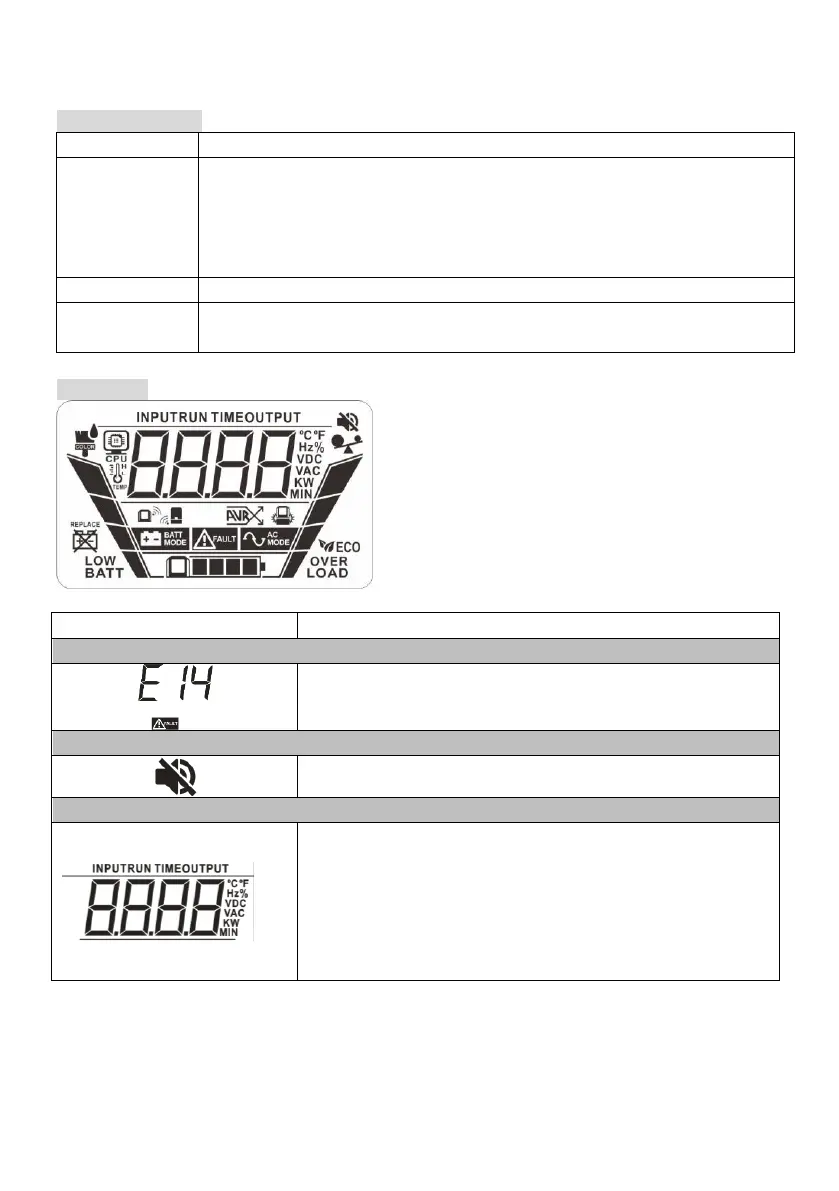
Input, Battery, Backup time, Output & Load information
Indicate the input voltage, input frequency, battery
voltage, battery capacity, backup time, output voltage,
output frequency, load capacity, load percentage, NiMH
battery, PC CPU speed, PC CPU temperature and PC CPU
load percentage.
K: kilo, W: watt, V: voltage, A: ampere, %: percent, ℃:
centigrade degree, Hz: frequency, min: minute.



 To Next Page