6
Step 5: Turn On the UPS
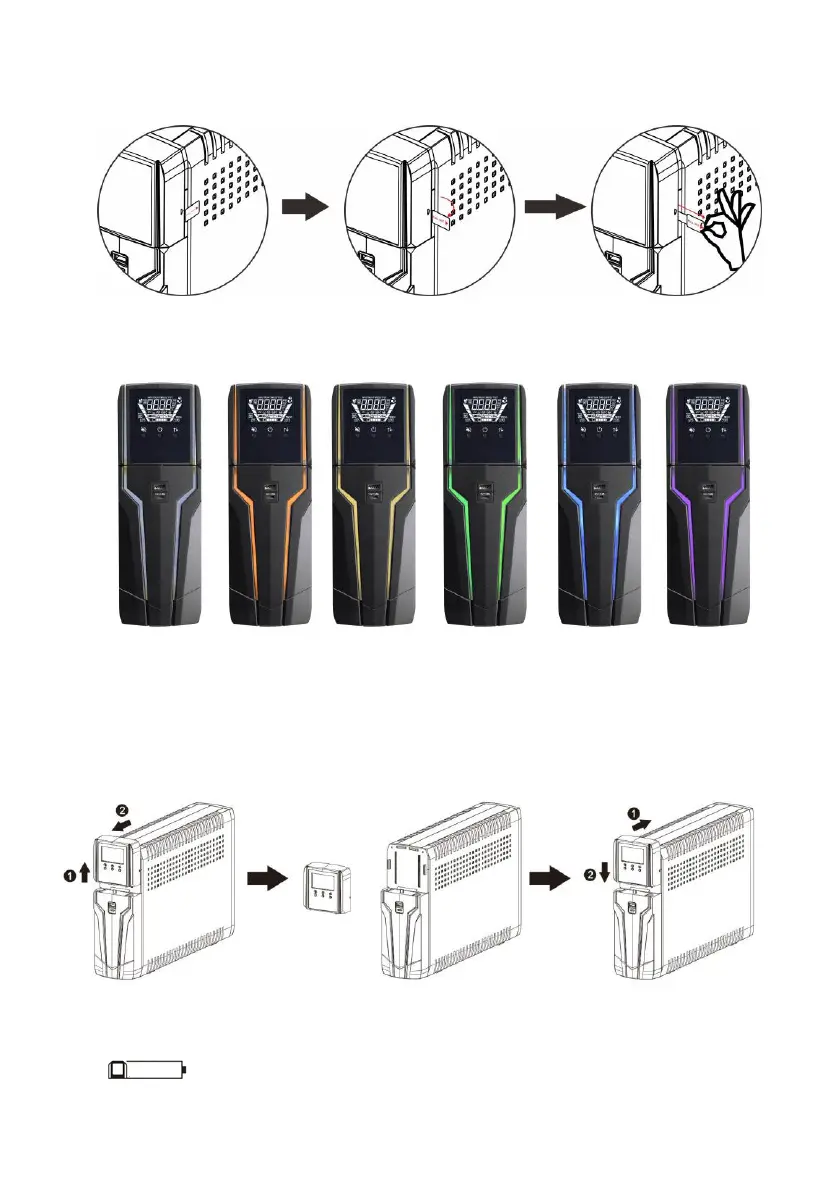
Before using the UPS, be sure to remove this label from LCD remote panel module.
To turn on the UPS, simply press the ON/OFF button on the front panel for 2 seconds. UPS will
beep once and LED bars will light up with different colors in order of light blue, orange, yellow,
green, blue, purple and scroll from bottom to top in 6 secs. Then, LCD will light on.
Remote panel operation
LCD panel can be removed from the base and place it closed around you when
playing PC game. Follow below charts to remove the remote panel. The distance
between remote panel and base should not be longer than 6m.
There is a NiMH battery installed on the back of remote panel. Once the remote panel is
installed on the base unit, it will automatically charge battery. When the battery capacity is low
level, icon will flash to remind users to charge remote panel.



 To Next Page