19
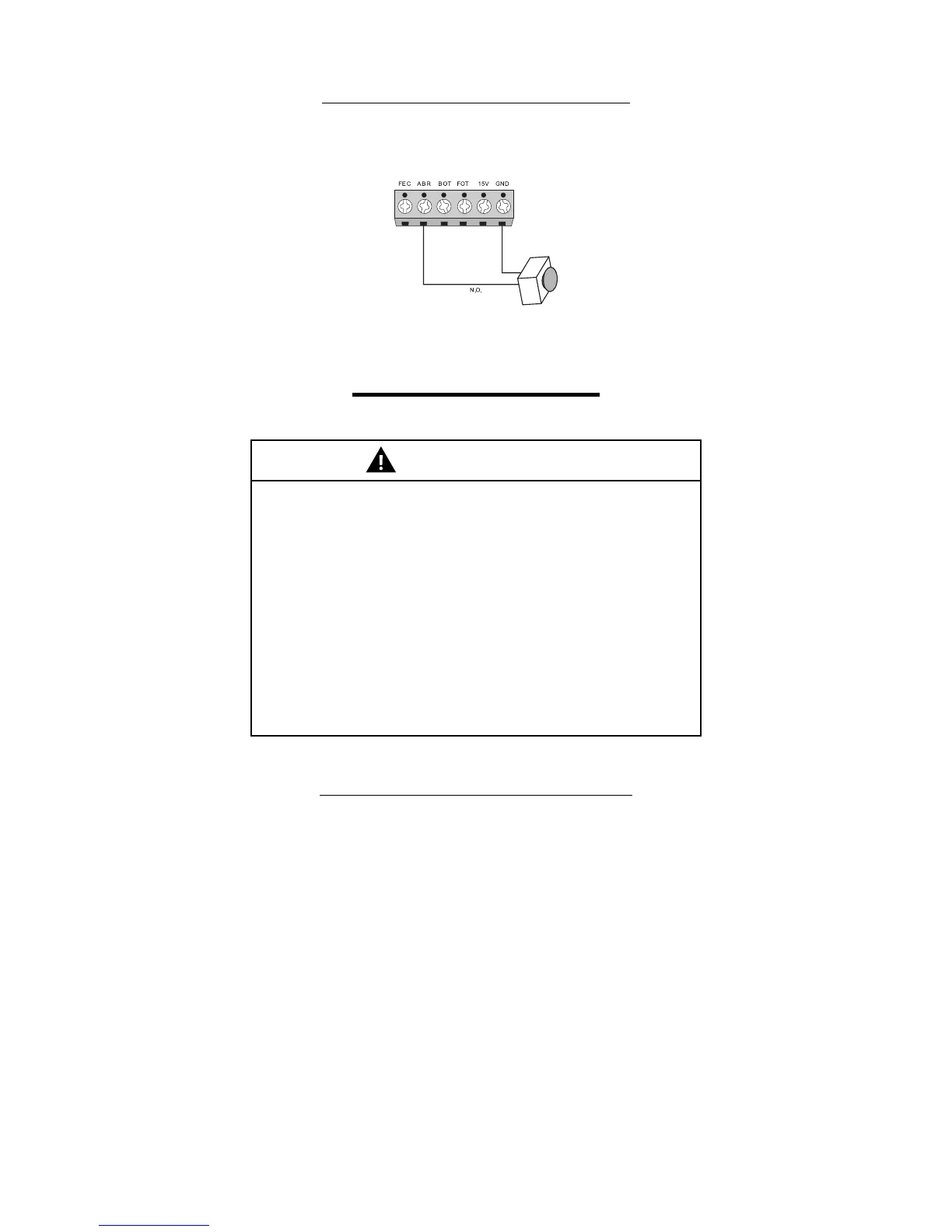
13.6 - ‘ABR’ audio alarm reset connection
Connection for an external reset button. This button is used to turn o the audio alarm and to reset the operator after a Hard Shutdown
has occurred.
Terminal block 1: GND (-);
Terminal block 5: ABR (N.O. Contact).
14 - FORCE ADJUSTMENT
IMPORTANT
To reduce the risk of SEVERE INJURY or DEATH:
1. Without a properly installed safety reversal system, persons
(particularly small children) could be SERIOUSLY INJURED or KILLED
by a moving gate.
2. Too much force on gate will interfere with proper operation of safety
reversal system.
3. NEVER increase force beyond minimum amount required to move
gate.
4. NEVER use force adjustments to compensate for a binding or sticking
gate.
5. If one control (force or travel limits) is adjusted, FOP for example, the
other control may also need adjustment (FME).
6. After ANY adjustments are made, the safety reversal system MUST be
tested. Gate MUST reverse on contact with a rigid object.
14.1 - ‘FOP’ High Speed Force Adjustment
Before starting the adjustment of the operating force, the operator must be recorded with the limit and operating normally, for more
information see topics "10" and "15".
In this condition sets the Dip Switch 6 (FOP) to the ON position and press the (‘-‘) button until the blue LED (OSC) ashes. Return the
Dip 6 to OFF position and give a command to move the gate, see if the gate can move. If not, enter the FOP function again (Dip 6 ON
position) and press the (+) button. Return the Dip 6 to OFF position and test again. Repeat this procedure until the gate can complete
the course of opening and closing. This setting is the same for both opening and closing cycle.
In this condition, the force is the minimum required to move the gate operator. Then enter the FOP function again and increase (‘+’
button) 1 level to ensure that the gate performs the operation even with debris on the gate’s track.
Once congured, return the DIP 6 to OFF position.


 To Next Page