12780 San Fernando Road, Sylmar, California 91342 | www.semcopackaging .com | Email: semcoinfo@PPG.com
|
9
8. Maintenance Preparation
Before carrying out any maintenance work, repairs, or cleaning, release the air from the mixer by
opening the main valve. This is done by turning the on/off valve to the off position. Also, disconnect
mixer from the compressed air supply.
Some preventative maintenance activities will require the removal of the rear or front panels. Listed below are
instructions.
Removing the rear panel
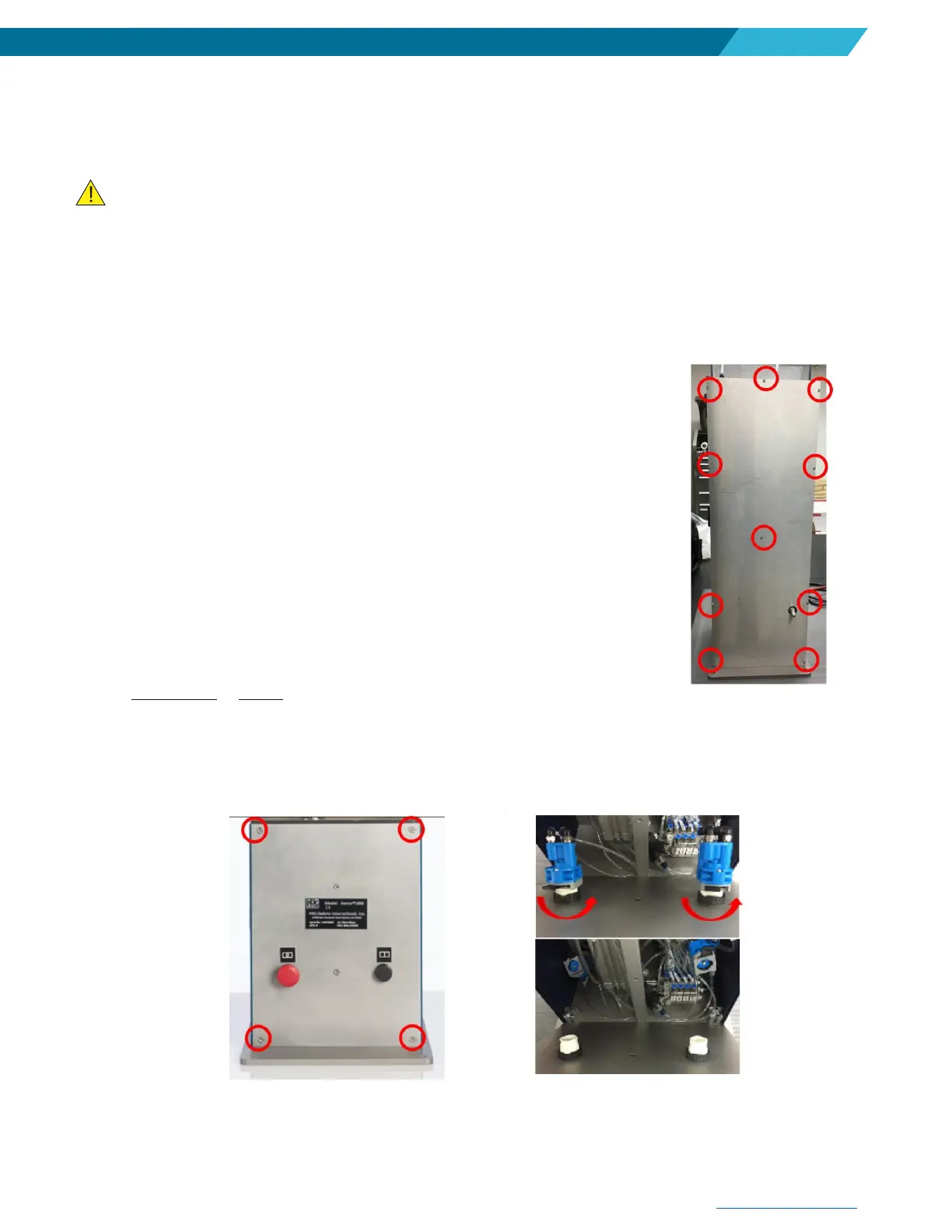
The rear panel is attached by 10 Allen wrench bolts.
1. Using Allen wrench, remove all 10 bolts from the rear panel.
2. When maintenance work is completed, re-install the bolts. Do not overtighten.
Removing the front panel
The front panel is attached by 4 Allen Wrench bolts.
1. Remove the four screws (McMaster-Carr 92125A210) using a 3 mm
Metric Allen wrench on the front lower panel of the mixer.
2. Remove the lever on the start & stop switches (on the inside panel) from
the lock position to unlock which will release the door panel from the
switches.
3. Reattach the start and stop buttons to the door panel and lock them in
place. Put door panel back on and screw in the four screws in the
corners of the front panel back on the machine. Do not overtighten.


 To Next Page