2
14
17
21
19
15
18
16
6X
13
3
Oberer Begrenzungsdraht
Upper boundary wire
Unterer Begrenzungsdraht
Lower boundary wire
Unterer Begrenzungsdraht
Lower boundary wire
Bluetooth
WiFi
Ladezustand
Power
Bestätigung
Conrm
Zurück zur Ladestation
Back to station
Zeiteinstellung
Time setting
Passworteinstellung
Password setting
Ein-/Aus
Turn on/o
Mähstart
Start working
20
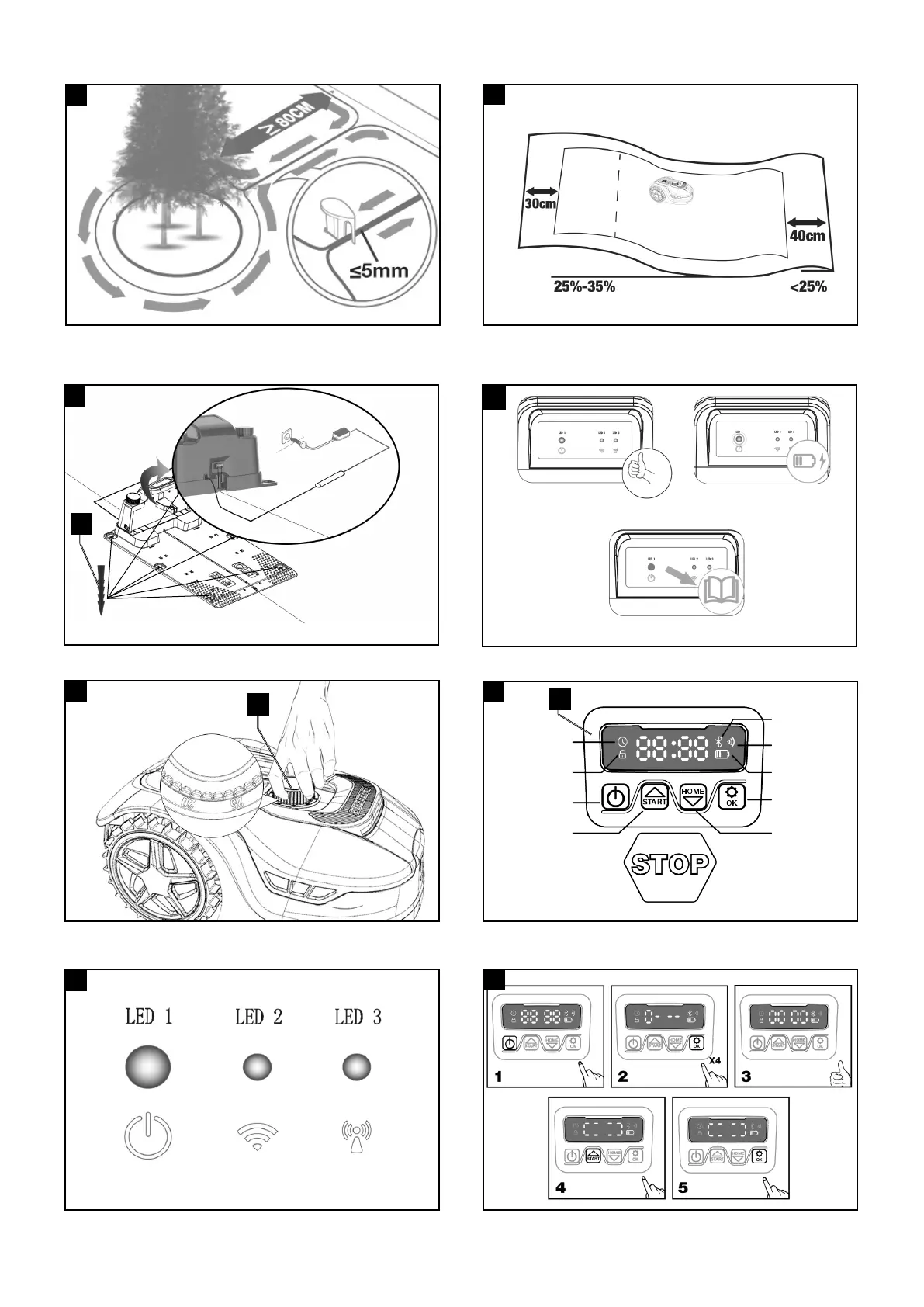
LED light status
Not turn on
Green light on
Green light on
Green light on
Not turn on
Not turn on
LED 1
LED 2
LED 3
illustrate
There is no power
Wi-Fi Disconnected
Wi-Fi Connected
Super-Link Disconnect
Super-Link Connected
Super-Link Connecting
Boundary wire is connected
right; mower is fully
charged
Mower is auto charging
Boundary wire is not
connected; OR boundary
wire is breaking
Action
Confirm that the power cord is connected properly
to the charger and that the charger is connected to a
suitable power supply.
N/A
N/A
N/A
N/A
N/A
Restart the charging stationcharging station.
Redock the mower.
Check the two ends of boundary wire connected the
wire terminal is reliable.
Check the boundary wire is not break.
LED light status
Not turn on
Green light on
Green light on
Green light on
Not turn on
Not turn on
LED 1
LED 2
LED 3
illustrate
There is no power
Wi-Fi Disconnected
Wi-Fi Connected
Super-Link Disconnect
Super-Link Connected
Super-Link Connecting
Boundary wire is connected
right; mower is fully
charged
Mower is auto charging
Boundary wire is not
connected; OR boundary
wire is breaking
Action
Confirm that the power cord is connected properly
to the charger and that the charger is connected to a
suitable power supply.
N/A
N/A
N/A
N/A
N/A
Restart the charging stationcharging station.
Redock the mower.
Check the two ends of boundary wire connected the
wire terminal is reliable.
Check the boundary wire is not break.
Grünes Licht an
Green light on
Grünes Licht blinkt
Green light ashing
LED light status
Not turn on
Green light on
Green light on
Green light on
Not turn on
Not turn on
LED 1
LED 2
LED 3
illustrate
There is no power
Wi-Fi Disconnected
Wi-Fi Connected
Super-Link Disconnect
Super-Link Connected
Super-Link Connecting
Boundary wire is connected
right; mower is fully
charged
Mower is auto charging
Boundary wire is not
connected; OR boundary
wire is breaking
Action
Confirm that the power cord is connected properly
to the charger and that the charger is connected to a
suitable power supply.
N/A
N/A
N/A
N/A
N/A
Restart the charging stationcharging station.
Redock the mower.
Check the two ends of boundary wire connected the
wire terminal is reliable.
Check the boundary wire is not break.
Rotes Licht blinkt
Red light ashing


 To Next Page
 Loading...