12
17
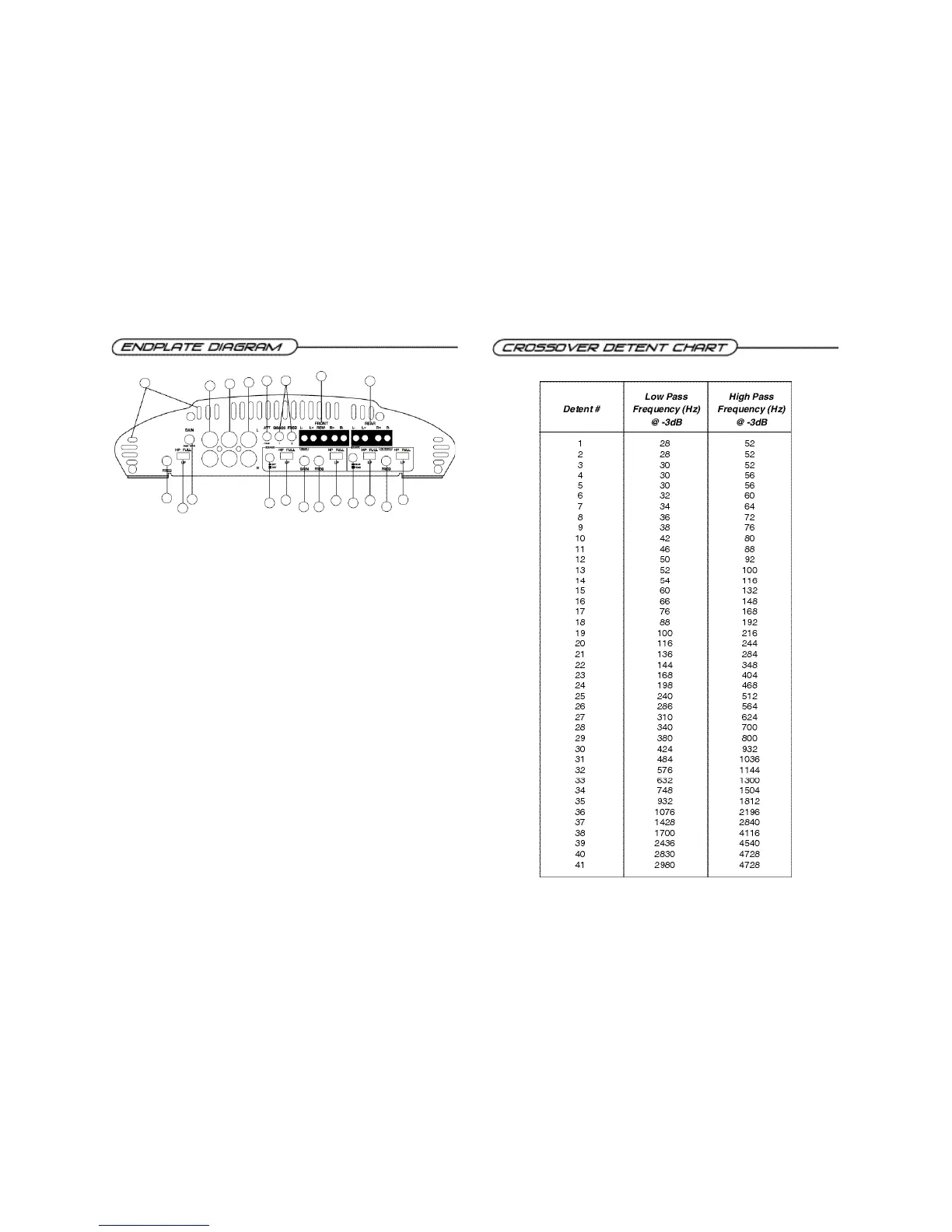
1. Cooling Plenums: Maintain a minimum 2” clearance around cooling plenums for proper amplifier
cooling.
2. Front Freq. Control: Move this detented control in a clockwise rotation to adjust the front
crossover frequency from 30Hz to 4kHz.
3. Front HP/LP/FULLSwitch: Select the desired crossover setting, HP/LP/FULLfor the speaker out-
put signal of the front channel.
4. Front Gain: Use this control to match the output level of the source unit to the front channel of the
amplifier.
5. Front Inputs: Plug in the front RCAleads from your source unit here.
6. Rear Inputs: Plug in the rear RCAleads from your source unit here.
7. RCAOutput: RCAoutputs provide HP/LP/FULL, 30-4kHz to another amplifier.
8. - 1 2 d B : Push this switch ‘ I N ’ for high voltage input (4V-12V) capability. This button pushed ‘ I N ’ must be
used for speaker level input on common ground head-units or for high voltage line drivers.
9. QBASS 1 & QBASS 2 Freq.: Use these switches, QBASS 1 & QBASS 2 to program the QBASS
PLUS circuit frequency.
10. Front Speaker/Remote Connector: Plug in the PowerLock™ connector here.
11. Rear Speaker Connector: Plug in the PowerLock™ connector here.
12. Rear Source INT/EXT Button: Select the in, ‘INT’position if you want to use the internal signal
path from the front crossover for the rear input, or the out, ‘EXT’position to use the external rear RCA
input.
13. Rear Source HP/LP/FULL Switch: Select the desired crossover setting, HP/LP/FULL for the
internal output signal of the rear channel.
14. Rear Gain: Use this control to match the output level of the head unit to the rear channel of the
amplifier.
15. Rear Freq. Control: Move this detented control in a clockwise rotation to adjust the rear
crossover frequency from 30Hz to 4kHz.
16. Rear HP/LP/FULLSwitch: Select the desired crossover setting, HP/LP/FULLfor the speaker out-
put signal of the rear channel.
17. Source Sum/Rear Button: Select the in, ‘SUM’position if you want to use the RCAoutput information
summed from the front and rear audio channels, or the out, ‘REAR’position to select the input off of
the rear channel, providing bandpass capability.
18. Output Source HP/LP/FULLSwitch: Select the desired crossover setting, HP/LP/FULLfor the
RCAoutput signal.
19. Output Crossover Freq. Control: Use this to adjust the output crossover frequency from 30Hz
to 4kHz.
20. Output Crossover HP/LP/FULLSwitch: Select the desired crossover setting, HP/LP/FULLfor
the output signal of the RCAoutput.
PCX 480/4125
1
2
3
4
5
6
7
8
9
10
11
12
13
14 15
16
17
18
19
20



 To Next Page