6
www.pregis.com 38-OM225-1
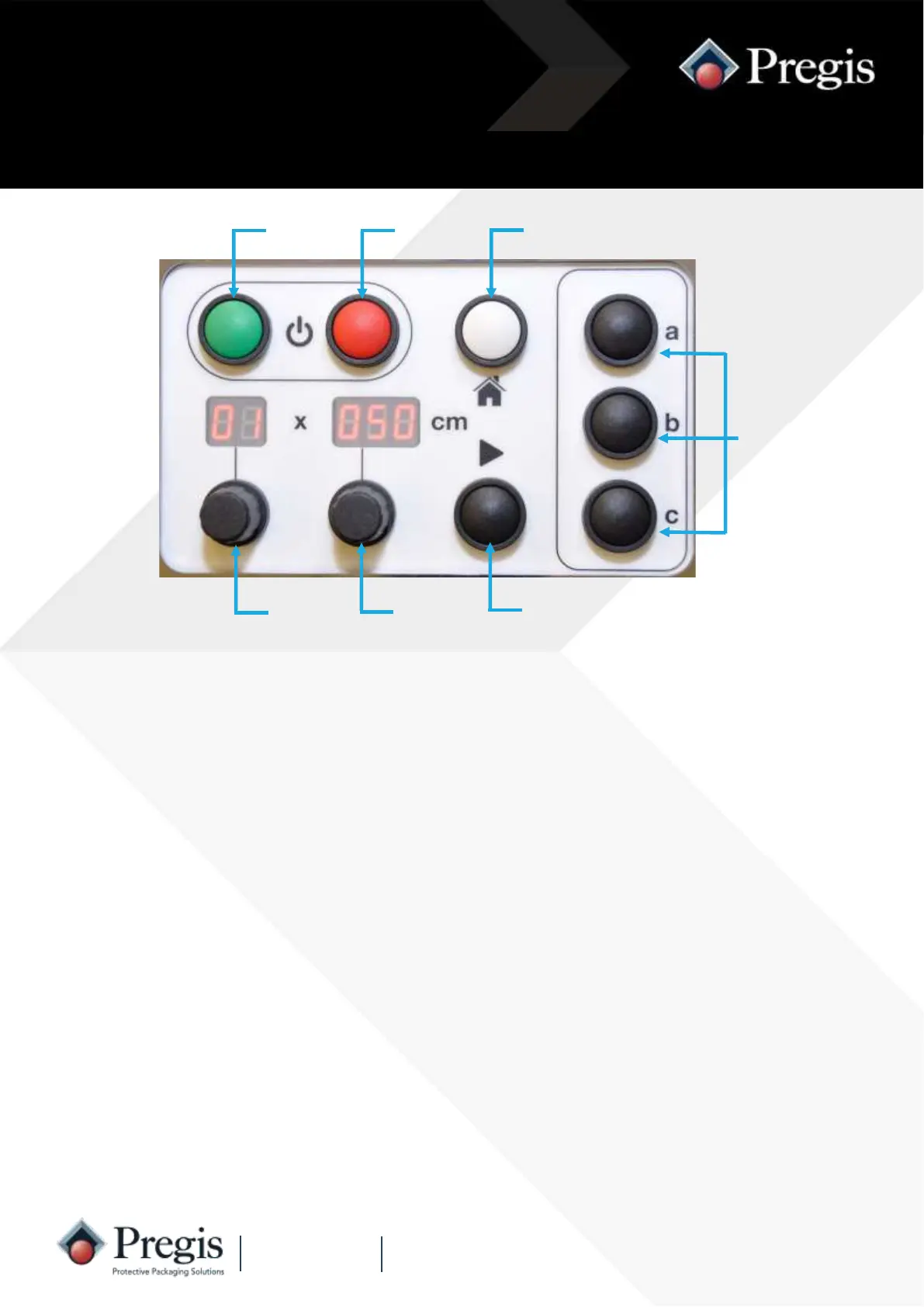
Machine Controls
‘Off’
Button
‘Home’
Button
Quantity
Knob
‘Length’
Knob
‘On’
Button
Preset
Buttons
‘Run’
Button
‘Off’ Button
Preset Buttons
‘Home’ Button
Length Knob
Quantity Knob
*Fault Indication*
‘Run’ Button
‘On’ Button Press the green ‘On’ button to switch the machine on.
The display will illuminate.
Press the red ‘off’ button to stop the machine in a controlled manner and switch
the machine off.
The display will show 5 ‘dots’.
Stops the machine producing packs if running more than one, cancels ‘A1’ or
‘A2’ semi automatic operation, or restores the last set of values for quantity and
length.
The three buttons can be programmed by the operator with commonly used
quantity and length combinations.
This is used to select the quantity of packs required from ‘A1’, ‘A2’ and 01 to 99
or continuous.
The pack length can be adjusted from 25cm to 999cm long on standard ma-
chines.
This button is pressed to initiate the cycle for single pack, semi-automatic and
continuous operation.
If the machine stops unexpectedly and F1, F2, F3 or F4 are displayed,
this indicates a fault (see troubleshooting, page 21).



 To Next Page