MAX PRO 18
©
Operator Manual
Original Printed in English
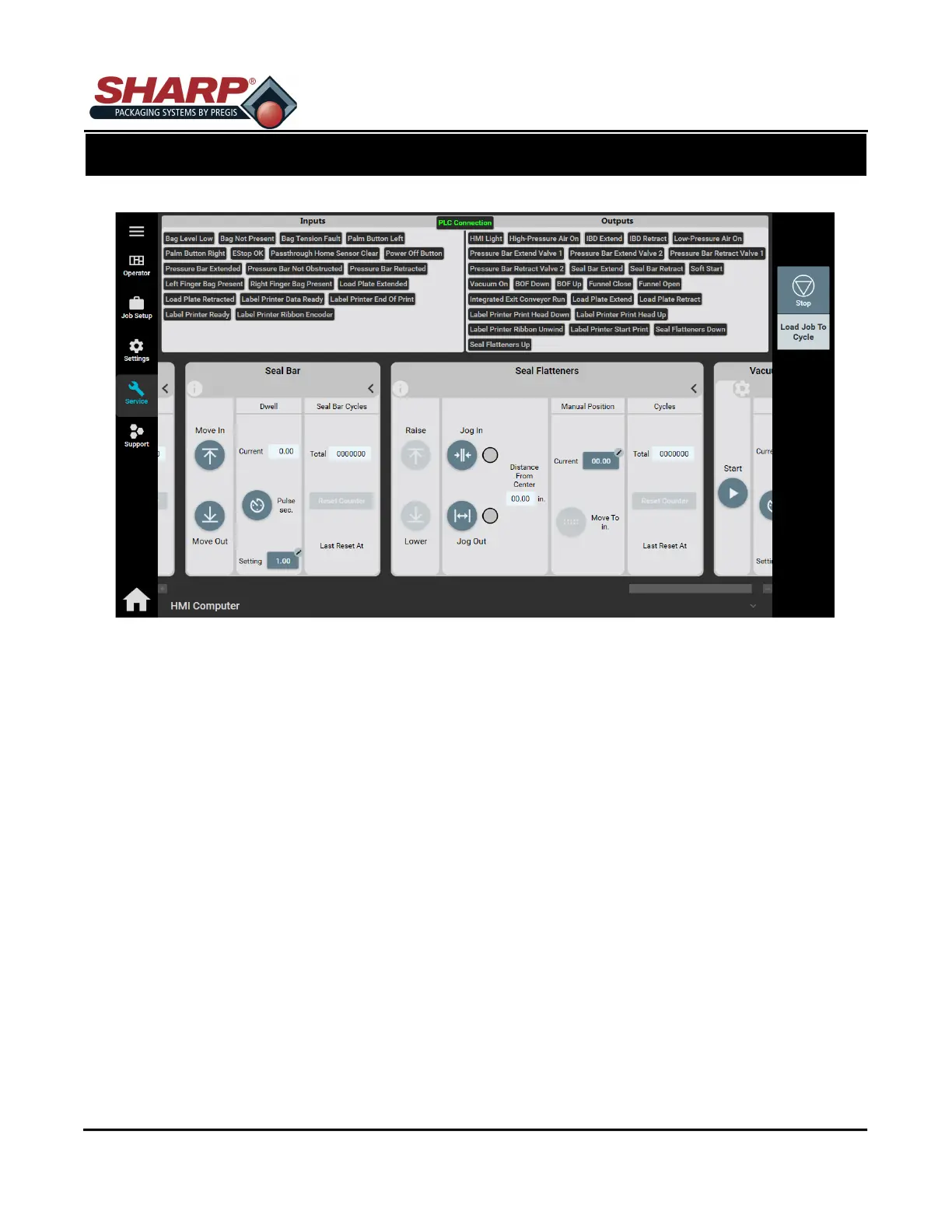
SERVICE SCREEN - SEAL FLATTENERS
Raise: Pressing button raised the Seal Flattener Fingers.
Lower: Pressing button lowers the Seal Flattener Fingers.
DISTANCE FROM CENTER
The distance that fingers are from the center of sealing area.
Jog IN: Moves fingers IN as long as button is pressed or until fingers reach center.
Jog OUT: Moves fingers OUT as long as button is pressed or until fingers are completely out.
MANUAL POSITION
Current: This setting determines the IN setting for the fingers.
Move To In.: This button moves the fingers to the Current Setting. If Current Setting is zero, fingers
will move to center of sealing area.
CYCLES
Totals: The number of completed Seal Flattener Cycles since the last reset.
Reset Counter: Resets the total cycles counter.
SCREEN NAVIGATION
SECTION 2 - CONTROLS
2-24



 To Next Page