MAX PRO 18
©
Operator Manual
Original Printed in English
MACHINE PLACEMENT
POWER CONNECTION
The Sharp MAX™ PRO 18
©
is equipped with a 3-
prong electrical cord for standard, properly grounded,
115 VAC, 50/60 Hz, 10 Amp (minimum) service.
The MAX™ PRO 18
©
requires two power cords. One
is for the bagger and the other is for the Printer.
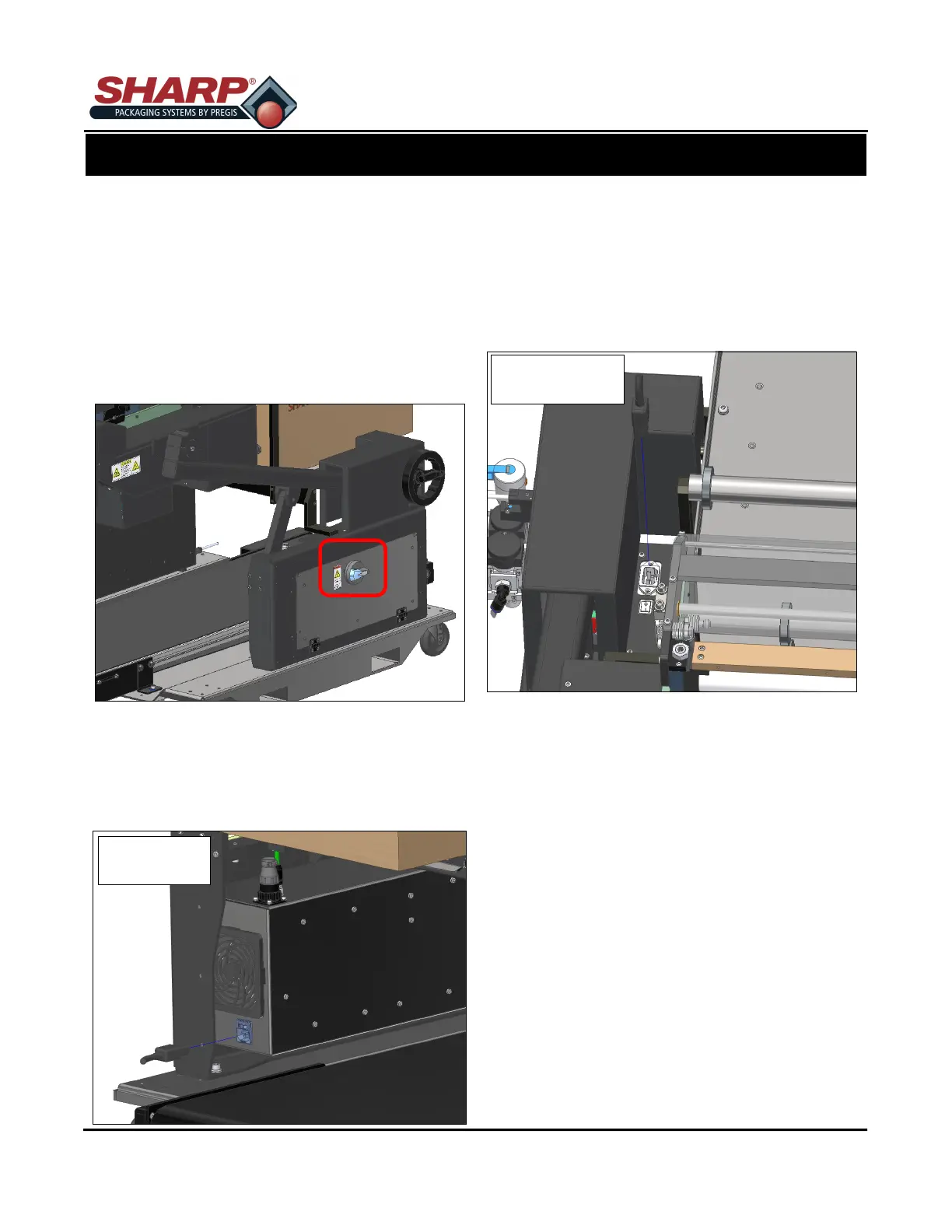
1. Before plugging the cord into the back of the ma-
chine, ensure that Main Power Switch is in the
OFF position.
2. Plug Male End of Power Cord into properly
grounded wall outlet or electrical drop.
3. Insert Female End of Power Cord into the Power
Entry Module on back of Electrical Box. The box is
in the Frame Assembly.
4. Turn the switch on the Power Entry Module to ON
position.
5. Plug the Male End of second Power Cord into a
properly grounded wall outlet or electrical drop.
6. Insert the Female end into Power Entry Module on
top of the Printer Control Box. The box is in the
Frame Assembly, opposite the Electrical Box.
7. Turn the switch to the ON position.
3-2
SECTION 3 - SET-UP & OPERATION
ELECTRICAL
BOX
PRINTER CONTROL
BOX



 To Next Page