
 Need help?
Do you have a question about the Premax PM-VC110 and is the answer not in the manual?
Basic safety precautions to reduce risk of fire, electric shock, or injury.
Lists the machine's primary features and detection capabilities.
Details on capacity, speed, dimensions, power, and note size.
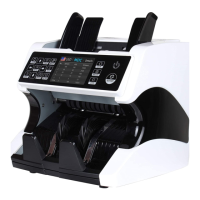
Labels and identifies key external parts of the banknote counter.
Steps to power on the machine and enter the main menu.
Instructions on how to prepare and load banknotes correctly for counting.
Explains the function of each button on the control panel.
How to select currency, including AUTO and MULT modes.
Details on Mix and Sort counting modes.
Details on Count, Auto/Manual, Batch, and Add counting modes.
How to use the SN button for serial number recording.
How to access and navigate the user menu using buttons.
Steps to enter the service menu via password.
Details on reading sensor values and performing CIS calibration.
Displays magnetic and metallic waveforms for analysis.
Options for auto diagnostics and resetting counted bill quantity.
Functions to acquire CIS images and adjust detection sensitivity.
Explains how to adjust detection sensitivity levels for different currencies.
Configuration for IP address and restoring default settings.
Displays main, image, FPGA, HW, and ID information.
Instructions for adjusting the machine's internal clock.
Options to change the display language of the machine.
How to adjust the screw to fix feeding issues like double or chained notes.
Steps to save counterfeit banknote image data to a USB drive.
Steps to update the machine's software using a USB drive.
Lists common error codes and their corresponding solutions.
Daily cleaning and care instructions for sensors and internal parts.
This document serves as a user manual for a multi-currency value counter, a machine designed for the fast, accurate, and reliable counting of banknotes. It aims to familiarize users with the product, optimize cash processing efficiency, and ensure a full understanding of safety information and operation sequences. The manual is intended for future reference.
The multi-currency value counter is a sophisticated device primarily used for counting and processing banknotes. Its core function is to provide a fast, accurate, and reliable method for counting various currencies. Beyond simple counting, the machine incorporates robust counterfeit detection capabilities, ensuring the authenticity of processed banknotes. It supports multi-currency mixed counting and automatic currency identification, making it versatile for diverse financial environments. The device also includes denomination sorting, allowing it to organize banknotes based on their value. Furthermore, it offers serial number recognition, recording the unique serial numbers of counted banknotes for enhanced tracking and security. This functionality is available for several currencies, including USD, EUR, GBP, CNY, TRL, and IDR. The machine is equipped with an add function to accumulate counting results from multiple counts and a batch function to count a preset number of bills. Reporting and printing functions are also available, allowing users to generate and print receipts of counting results.
The machine boasts a convenient user-friendly interface with a touch control panel and a 3.5-inch TFT display, facilitating easy operation and navigation through its various modes and settings. It supports a multi-language interface, catering to a diverse user base.
To begin using the machine, connect the power cable to both the machine and a power outlet. Switch on the machine using the power switch button. After a brief boot-up and self-test sequence, the machine will enter the main menu, ready for operation.
Proper placement of banknotes is crucial for accurate counting. Users should avoid counting wet, excessively dirty, or spoiled notes, as well as those that are torn, excessively spoiled, folded, or curved. Before placing notes, ensure they are free from foreign matter such as paper chips, rubber bands, clips, or dust. Folds or ends should be removed, and brand new notes, which may be slightly adhesive, should be spread and separated well. The banknote hopper guides should be adjusted to enclose the sides of the banknotes. Banknotes should be organized in a neat pile with a straight backside before being placed between the guides. The machine will automatically commence counting once banknotes are properly loaded.
The machine offers several counting modes to suit different needs:
The machine defaults to automatic counting mode, indicated by "AUTO" on the home screen, where it starts counting automatically. For manual counting, press the "A/M" button to turn off the "AUTO" indicator. In manual mode, the "RESTART" button must be pressed to initiate each count.
The batch mode allows users to set a specific batch quantity. By default, pressing the "BATCH" button sets the batch number to 100, with subsequent presses cycling through 50 and 0. Batch numbers can be adjusted using the arrow buttons: "←" to increase by 10, "→" to decrease by 10, "↑" to increase by 1, and "↓" to decrease by 1. Press "ESC" to exit batch mode. In batch mode, the machine counts the preset number of bills and stops, automatically continuing to count new batches once the stacker is cleared.
Activated by pressing the "ADD" button, this function accumulates the counting results of multiple counts to a running total. An "ADD" icon on the home screen indicates its activation, and pressing the button again deactivates it.
Accessing the user menu by long-pressing the "MENU" button reveals options such as "Service Menu," "Version Information," "Current Time Setting," and "Select the language." Navigation is done using arrow buttons, with "MENU" to confirm and "ESC" to quit. The "Service Menu" requires a password (default 9999) and provides access to advanced settings like "Read Sensor Values," "CIS Calibration," "MG MT Waveforms," "Password Setting," "Auto Diagnostic," "PCS Counted and Reset," "Acquire CIS Image," "Detection Level," "IP Address," and "Back to Default Setting."
To address counting errors like double notes, chained notes, or slant notes, or if banknotes are not feeding smoothly, the hopper adjusting screw can be turned. Turning clockwise (+) increases the gap between the resistance wheel and the banknote twiddling wheel gear, which helps when notes are not feeding smoothly. Turning anti-clockwise (-) decreases the gap, useful for reducing double or chained notes. Only minor adjustments (per dot or half a dot) should be made at a time.
If a counterfeit banknote is not detected, users can collect its data. Insert a USB drive into the USB port, select "CNT" mode, set the speed to 800 bills/min, and count the banknotes. The machine will automatically save the data to the USB drive.
To update the software, first turn off the machine. Copy the new software version to a USB drive using a computer. Insert the USB drive into the machine's USB port and turn the machine on. The update will start automatically. Once complete, the display will indicate "Upgrade Finish, Restart Please."
Regular care and preventative maintenance are crucial for extending the machine's lifetime and avoiding operational problems.
The machine's CIS sensors are factory-calibrated, but their sensitivity can decrease with regular use, leading to image errors. To resolve this, the machine can be re-calibrated using the white calibration paper provided with the machine. This process is guided through the "CIS Calibration" option in the service menu.
 General
| Model | PM-VC110 |
|---|---|
| Counting Speed (Notes) | 1000 notes/min |
| Display | LCD |
| Batch Preset Numbers | 1-999 |
| Stacker Capacity | 200 notes |
| Detection Method | UV, MG, IR |
| Power Supply | AC 220V, 50Hz |
| Counting Modes | Batch |

 To Next Page