Note: You can turn off the internal transceiver by pressing the frequency button until it
says "External." This is what we refer to as External Mode, or Companion Mode, and is
discussed in detail in Section II. Pressing it again restores transceiver function
The Splash Screen will display for approximately 3 seconds, as shown in Figure 2
below.
FIGURE 2: SPLASH SCREEN
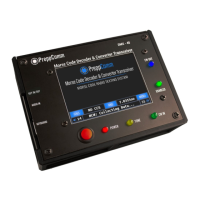
The Main Screen then is displayed, as shown in Figure 3 below.
FIGURE 3: MAIN SCREEN
3. Press the Menu Button, and the Main Menu screen will display, as shown in
Figure 4 on the following page.


 To Next Page