Hookup Diagrams 2.2
3.0 Hardware
硬件
3.1
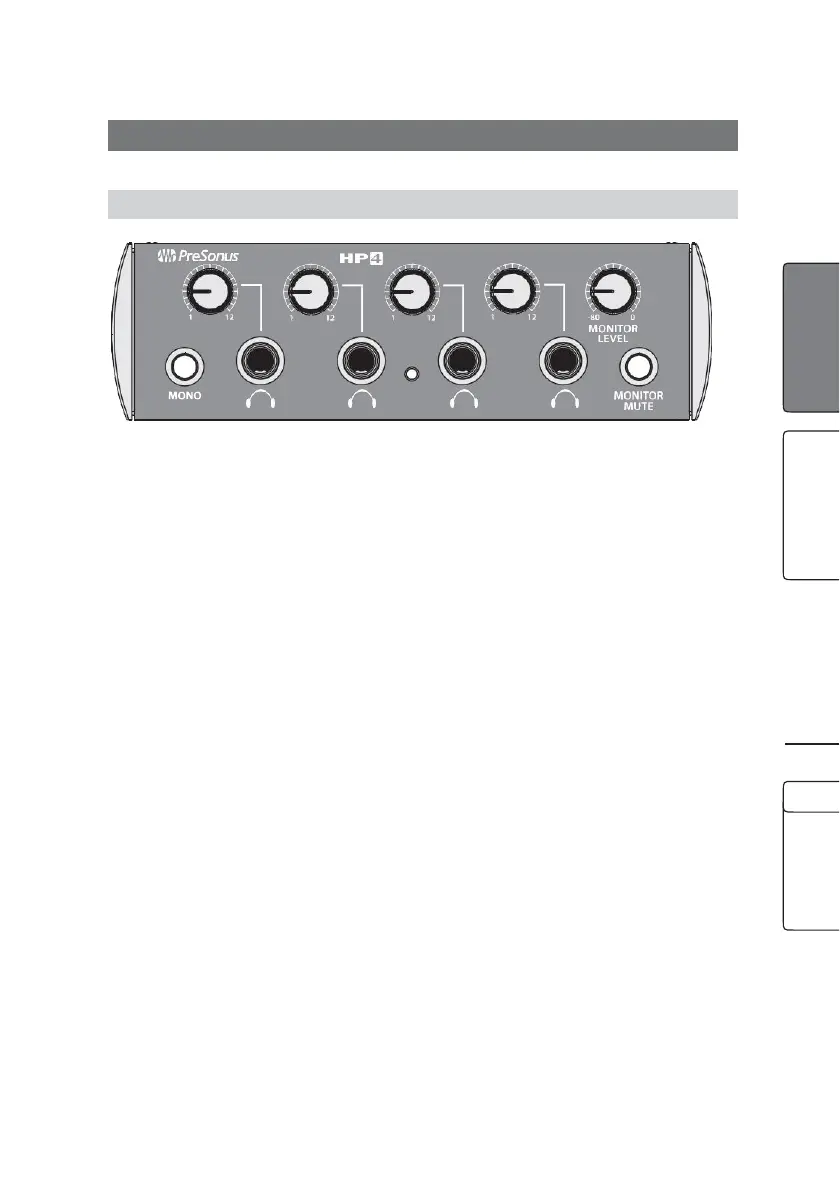
Front-Panel Layout 前面板布局图
HeadphoneVolume.TheHP4hasthe potential
to be very loud. (It goes to 12; 11 is for wimps!)
Pleasebe careful when you first start passing
sound through the unit. It is best to start with
the volume set at 1 and then slowly bring up
the volume.
HeadphoneVolume. HP4有可能变得非常响亮。
(它可以达到12;11是给胆小鬼的!)当你第一次
开始通过该装置传递声音时,请注意。最好从音量
设置为1开始,然后慢慢调高音量。
Note that the loudness of your headphones will vary depending
on their design and their input impedance. The output impedance
of the HP4 is 51Ω (ohms), and it will work fine with
professional and consumer headphones but the volume will
differ depending on which type of headphone you use.
Headphones with lower input impedances will generally be
louder than higher-impedance headphones. (In this case,
louder does not mean better!) Most professional
headphones have impedances between 150Ω and 600Ω.
Consumer headphones for CD players and the like often
have impedances between 8Ω and 32Ω. Broadcast headphones
are specialized, and you are unlikely to use them with an HP4;
their impedances are typically between 1.5 kΩ (kilohms) and 2 kΩ.




 To Next Page