6. Compressor Release. Sets the compressor release for the selected channel
or output bus. This sets the length of time the compressor takes to return
the gain reduction back to zero (no gain reduction) after crossing below the
compression threshold. Release can be set from 40 to 1,000 milliseconds.
Power User Tip: Very short release times can produce a choppy or “jittery” sound,
especially when compressing instruments that have a lot of low-frequency
components, such as bass guitar. Very long release times can result in an
overcompressed, or “squashed,” sound. All ranges of release can be useful, however,
and you should experiment to become familiar with different sonic possibilities.
7. Auto Mode button. When Auto mode is active, the Attack and Release
controls become inoperative, and a preprogrammed attack and release
curve is used. In this mode, the attack is set to 10 ms, and the release is set to
150 ms. All other compressor parameters can still be adjusted manually.
8. Soft Knee toggle button. Engages soft-knee compression. In normal operating
mode, the compressor is set for hard-knee compression, meaning that the
gain reduction applied to the signal occurs as soon as the signal exceeds the
level set by the threshold. When the Soft Knee button is engaged, the onset of
gain reduction occurs gradually after the signal has exceeded the threshold.
9. Compressor graph. This graph shows the point at which the
compressor threshold affects the signal. You can either use this graph
to adjust the threshold or the dedicated threshold control (#2).
10. Limiter On/Off. Turns on the limiter for the selected input channel. The ratio is ∞:1.
11. Limiter Threshold. Sets the threshold of the limiter for the selected
channel. When the signal’s amplitude (level) exceeds the threshold setting,
the limiter is engaged. The threshold can be set from -56 to 0 dB.
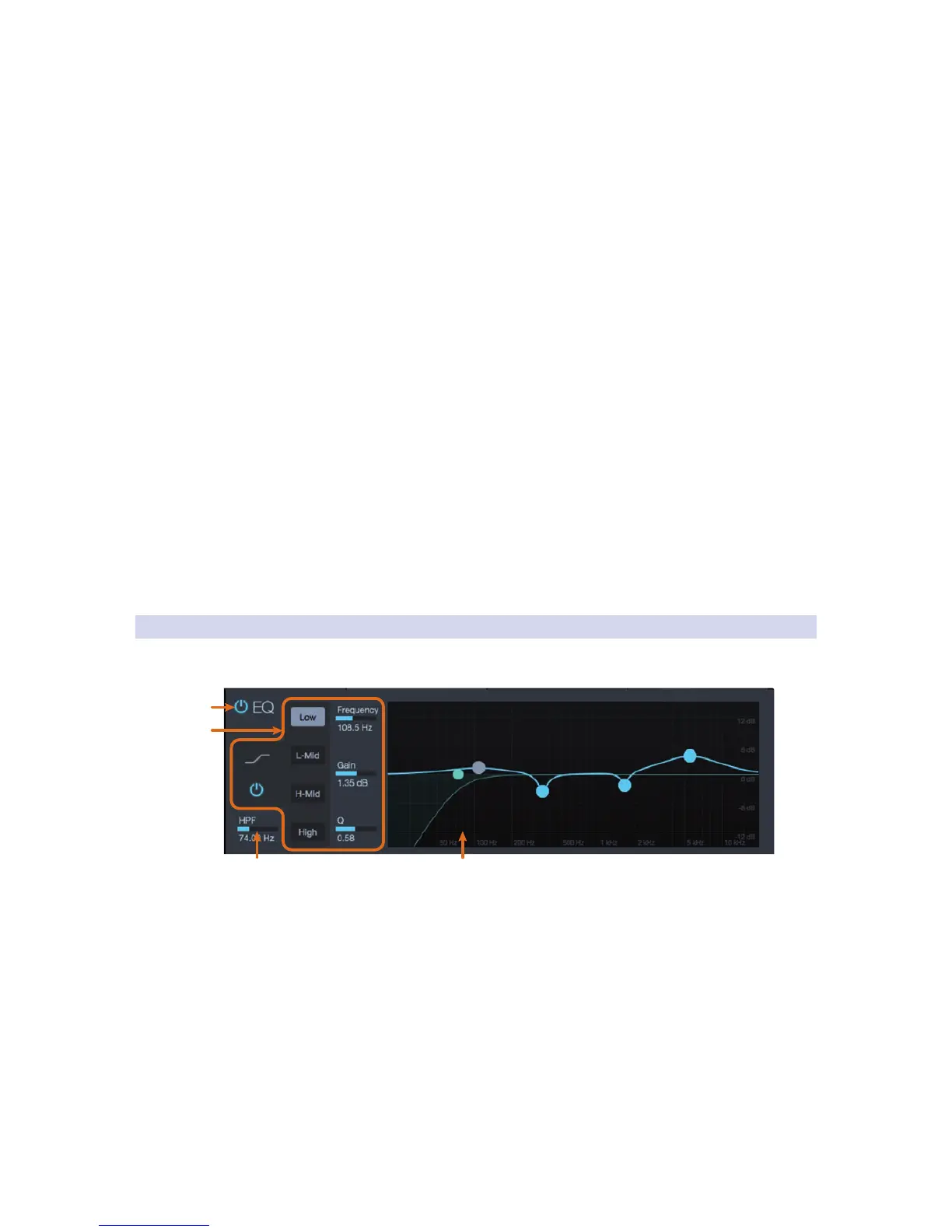
4.3.2 EQ Tab
The EQ tab displays the filtering controls for the highpass
filter and four-band fully parametric EQ.
1. Equalizer On/Off. Turns EQ on or off for the selected analog input channel.
2. EQ Band Select. Opens the controls for the selected EQ band.
• EQ Band On/Off. Enables/disables the currently selected EQ band.
• EQ Band controls. When each EQ band is selected,
the following controls will be available:
- Shelf EQ On/Off (Low and High band only). Enabling the Shelf
button turns the Low or High band into a low-shelving EQ. A
low shelving EQ is like a bass-control knob on a stereo, while
a high shelving EQ is like the treble control. In this mode, the
Center Frequency control selects the shelving frequency.



 To Next Page