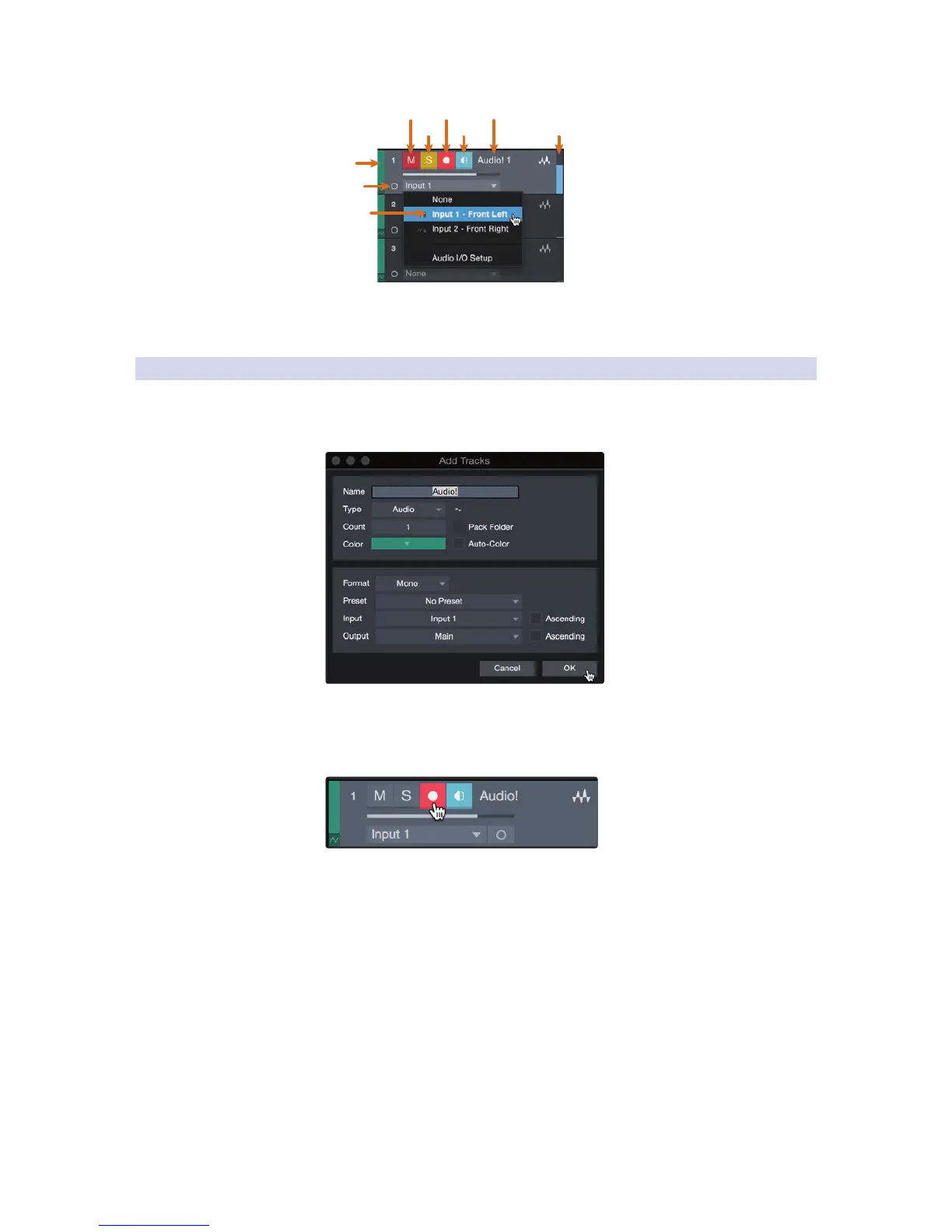
Mute
Custom
Track
Color
ST/Mono
Audio Input
Source Select
Solo
Rec
Arm
Monitor
Track
Name
Meter
Note: MIDI tracks are nearly identical to Audio tracks. The Input
Source list for MIDI tracks lists available external MIDI devices as well
as any virtual instruments that have been added to the Song.
5.3.3 Recording an Audio Track
1. To begin recording, create an audio track from the Add Tracks
window, set its input to Input 1 on your Studio 192-series
interface, and connect a microphone to the same input.
2. Select Record Enable on the track. Turn up the Input 1 level on your audio
interface while speaking/singing into the microphone. You should see
the input meter in Studio One Artist react to the input. Adjust the gain
so the input level is near its maximum without clipping (distorting).
You are now ready to start recording. For complete instructions, please consult the
Studio One Reference manual located in Help | Studio One Reference Manual.



 To Next Page