67
6 The Fat Channel
6.8 Fat Channel Screens
StudioLive™ Series III
Owner’s Manual
2
1
4
3
6
8 9
5
7
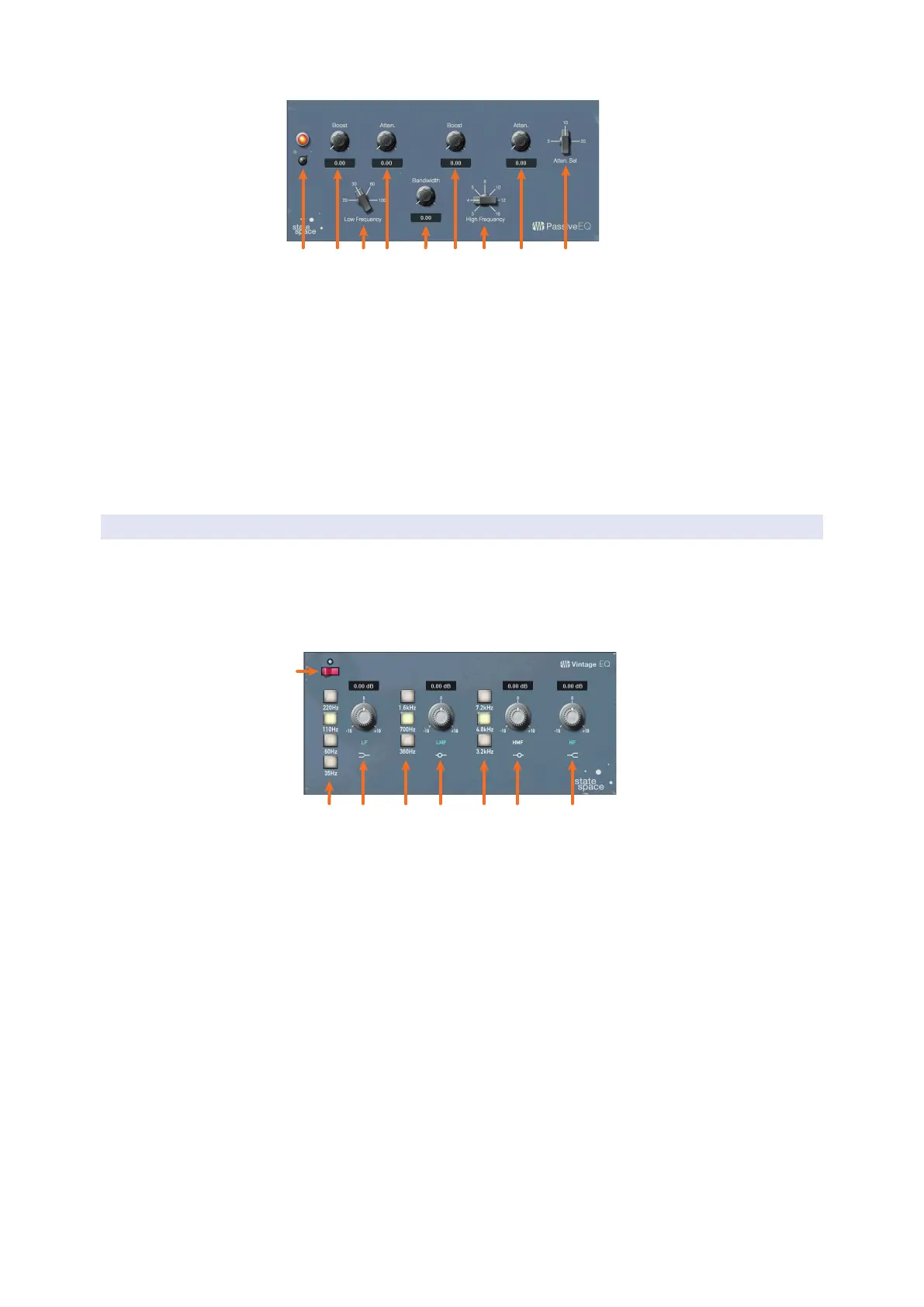
1. EQ On/Off. Enables/disables the EQ globally. Touch to toggle on or off
2. Low Boost. Boosts the Low Band.
3. Low Frequency. Sets the center frequency for the Low Band.
4. Low Attenuation. Attenuates the Low Band.
5. High Bandwidth. Sets the bandwidth (Q) for the High Band.
6. High Boost. Boosts the High Band.
7. High Frequency. Sets the center frequency for the High Band.
8. High Attenuation. Sets the attenuation for the High Band.
9. Attenuation Select. Sets the Frequency at which the attenuation begins.
6.8.5.3 Vintage 1970s EQ Overview Screen
When the Fat Channel is in Vintage EQ mode, the Touch Display shows an overview
screen, displaying the relevant parameters.
Power User Tip: For StudioLive models with dynamic Fat Channel displays, many of these
parameters can also be controlled from the encoders and buttons in the Fat Channel. See
Section 6.6.3 for details.
1
2
3
4
5
6
7
8
1. EQ On/Off. Enables/disables the EQ globally. Touch to toggle on or off.
2. Low Frequency. Sets the shelving frequency for the Low Band.
3. Low Gain. Sets the Gain for the Low Band.
4. Low-Mid Frequency. Sets the center frequency for the Low-Mid Band.
5. Low-Mid Gain. Sets the Gain for the Low-Mid Band.
6. High-Mid Frequency. Sets the center frequency for the High-Mid Band.
7. High-Mid Gain. Sets the Gain for the High-Mid Band.
8. High Gain. Sets the Gain for the High Band.









 To Next Page