3
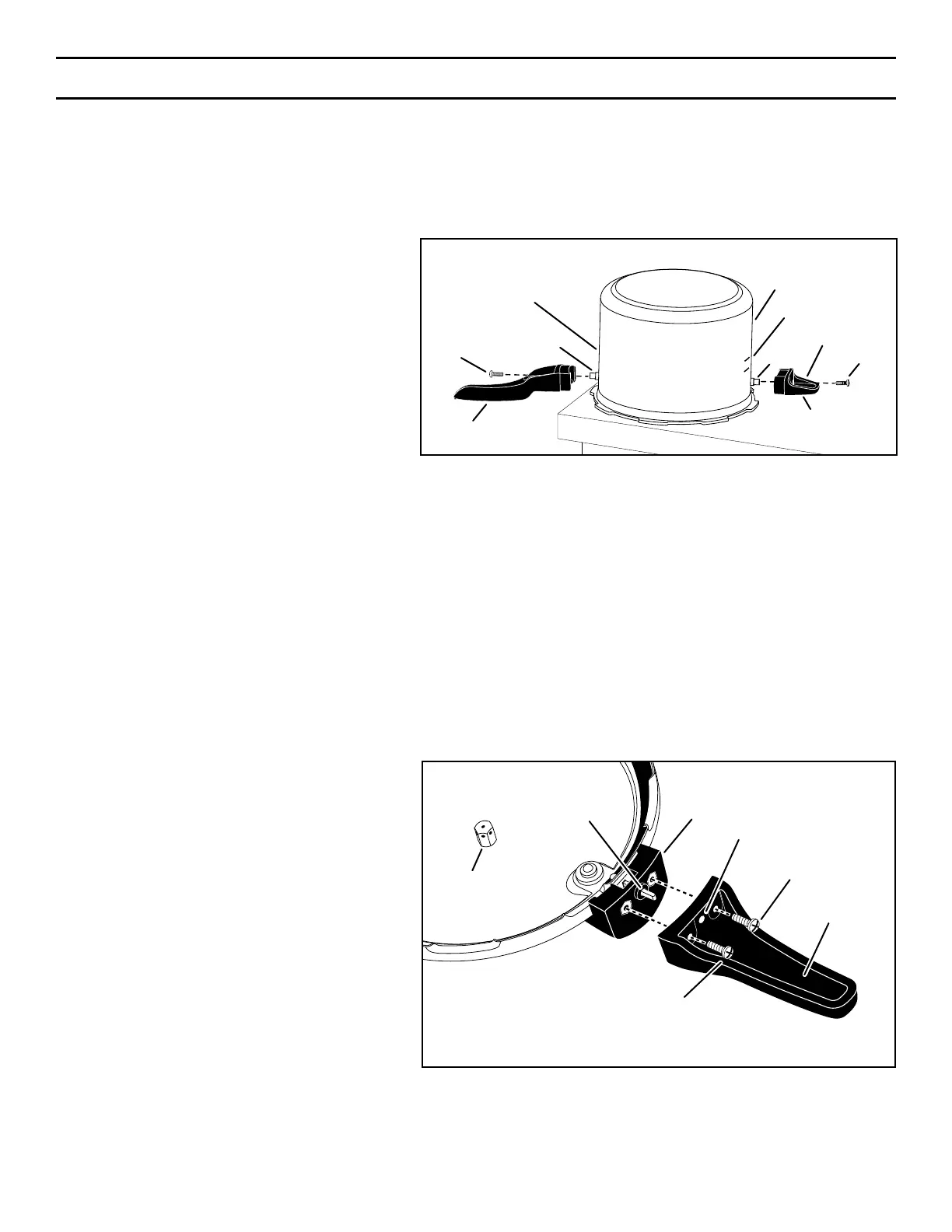
HANDLE INSTALLATION
Tools Required: Phillips screwdriver
NOTE: The pressure cooker handles can be found inside the pressure cooker body in individual plastic bags.
Attach Helper Handle to Cooker Body
(Does not apply to 4-quart pressure cooker, stock number 01241.)
1. Place pressure cooker body upside down on
table or counter (Fig. A).
2. Locate bag containing short helper handle. Take
out handle and remove tape on handle which
is holding screw in place. Remove screw from
handle and set aside.
3. Position helper handle, with indented side facing
up,ontothreadedpostunderlllines(Fig.A).
Insert screw into helper handle hole and, using
a Phillips screwdriver, fasten handle securely
topost.Whenproperlyinstalled,handleshould
ap
pear level with table or counter as shown in
Fig.
A. NOTICE:Overtighteningcanresultin
stripping of screws or cracking of handles.
To Attach Body Handle to Cooker Body
1. Locate bag containing long body handle. This is the handle that has one screw hole. Take out handle and remove tape which
is holding screw in place. Remove screw from handle and set aside.
2. Foreasierhandleinstallation,positioncookerbodysothreadedpostextendsoveredgeofcounterslightly.
3. Position long body handle, with facing down, onto threaded post which is under the model and series numbers (Fig. A).
4. Insert screw into handle hole and use a Phillips screwdriver to fasten handle securely to post. NOTICE:Overtighteningcan
result in stripping of screws or cracking of handles.
Attach Cover Handle to Cooker Cover
1. Locate bag containing cover handle. This handle has three holes, two of which contain screws. Take out handle and remove
tape which is holding two screws in place. Remove screws from handle and set aside.
2. Place pressure cooker cover upside down on
table or counter as shown in Fig. B, so vent pipe
bottom faces you.
3. Fit cover handle, with the indented side facing
up, onto cover handle mount so air vent/cover
lockstemtsthroughcenterholeofcover
handle (Fig. B).
4. Insert screws into holes on both sides of center
hole.UsingaPhillipsscrewdriver,fastencover
handle securely to cover handle mount.
NOTICE:Overtighteningcanresultinstripping
of screws or cracking of handles.
IMPORTANT: After placing cover on cooker
body, check positioning of handles. Follow step
4onpage5.Whenproperlyinstalled,body
handle and cover handle will line up with each
other without interference.
Screw
Helper Handle
(Does not apply to stock no. 01241)
Post
Screw
Post
Body Handle
Pressure Cooker Body
Model and Series
Numbers
Fill lines
Fig. A
Indented Side
Cover Handle
(indented side)
Cover Handle Mount
Center Hole
Air Vent/Cover
Lock Stem
Screw
Screw
Vent Pipe
Bottom
Fig. B





 To Next Page