22 www.pridemobility.com Jazzy 1113
V . COMFORT ADJUSTMENTS
Armrest Angle
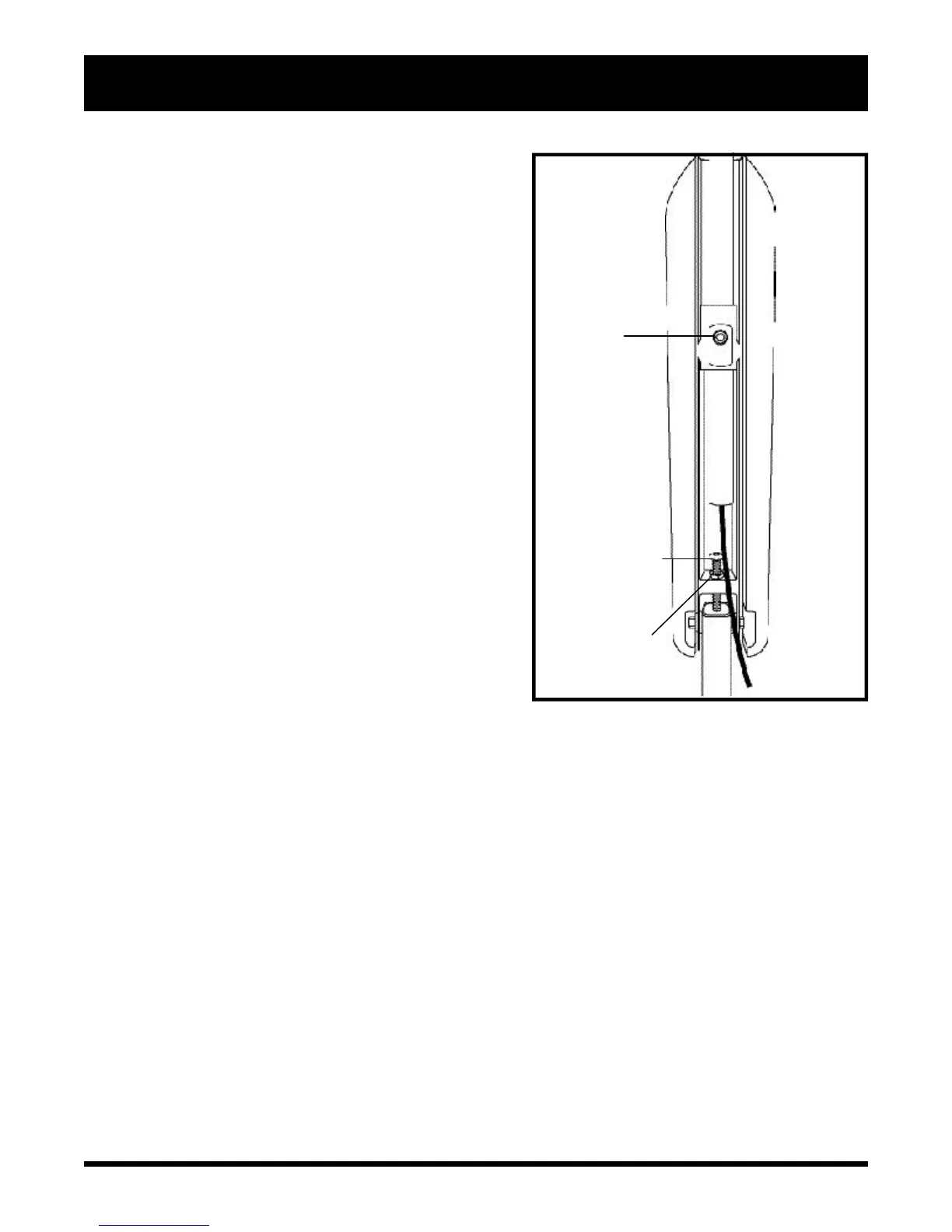
You can increase or decrease the armrest angle to fit your
specific needs. See figure 21.
To change the armrest angle:
1. Lift the armrest straight up so that it is perpendicular to
the floor.
2. Loosen the jam nut. See figure 21.
3. Loosen the adjustment screw.
4. Turn the screw clockwise to lower the front of the armrest
and anticlockwise to raise the front of the armrest.
5. Lock the adjustment screw into place by tightening the
jam nut.
Armrest Height (Optional)
Your power chair may be equipped with height-adjustable
armrests.
To change the armrest height:
1. Remove the ball detent pin from the armrest.
2. Move the armrest up or down to the desired height.
3. Align the holes and reinsert the ball detent pin.
Controller Extension
The controller can easily slide out away from the armrest, or
in toward the armrest.
To extend the controller:
1. Lift the armrest until it is perpendicular to the floor.
2. Loosen the setscrew. See figure 21.
3. Slide the controller mounting bracket into or out of the
armrest to the desired position.
4. Tighten the setscrew.
5. Lower the armrest.
Controller Position
You can position the controller for either left-hand or right-
hand use.
To change the controller position:
1. Disconnect the controller harness from the electronics tray.
See figure 7.
2. Cut the wire tie that attaches the controller cable to the
armrest.
Figure 21. Armrest and Controller Adjustment
(Underside of Armrest)
SETSCREW
ADJUSTMENT SCREW
JAM NUT


 To Next Page