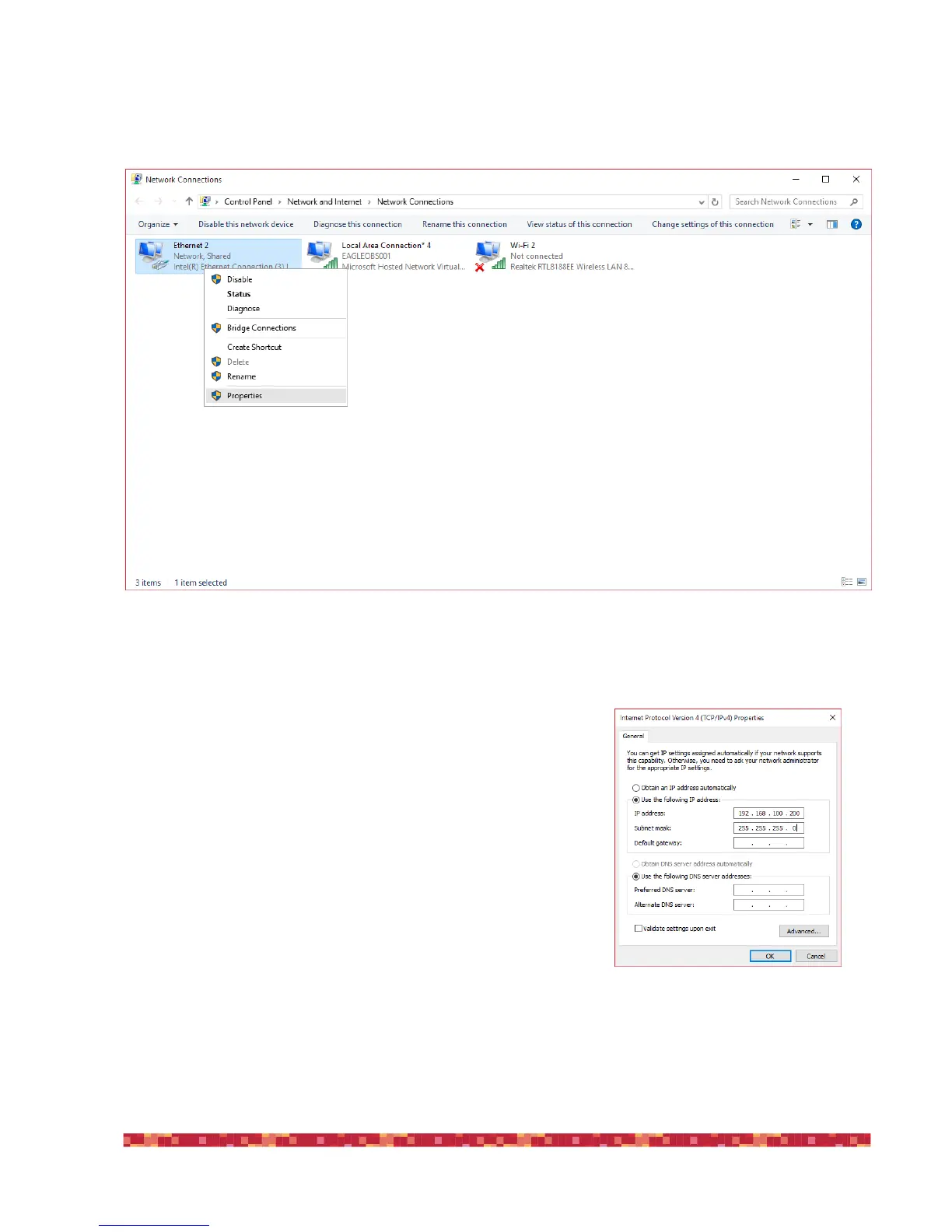
It is therefore necessary to set a static IP address for EAGLE. To do this, select the Start button and then click on Control
Panel and select " Network and sharing center." Mouse right click on "Ethernet" and select "Properties" (image 40).
In the window that opens, click on "Internet Protocol Version 4 " and press the "Properties" button.
In the window that opens, select the "Use the following IP address" and write
in the first two fields the following values :
IP address: 192.168.100.100
Subnet mask: 255.255.255.0
Then click OK to confirm . Also the computer you want to use to control EA-
GLE must have a static IP then, in this computer, repeat the steps above but
entering the following value :
IP address: 192.168.100.200
Subnet mask: 255.255.255.0
(they are the same numbers, it only changes the last digit of the “IP
address”). Then click OK to confirm (image 41).
In order to remotely turn on EAGLE, now you need a software that allows you
to send it a message called "Wake On Lan”. There are several free or pay-to-


 To Next Page