Installation and Wiring
158
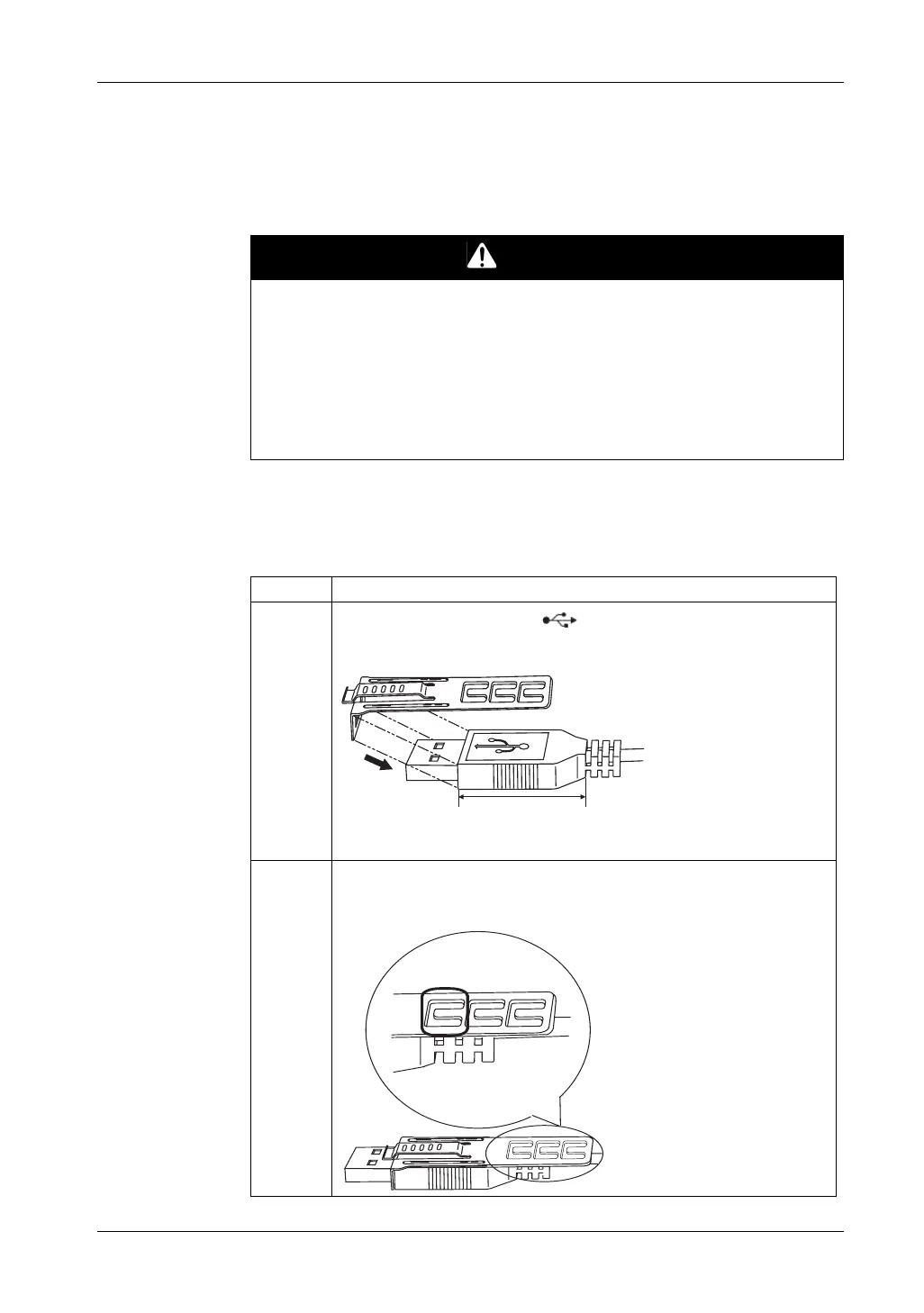
USB Cable Clamp for USB (Type A)
Introduction
When using a USB device, attaching a USB cable clamp to the USB interface to
prevent the USB cable from being disconnected.
Attaching the USB Cable Clamp
NOTE: Watch your fingers. The edge of the clip is sharp.
DANGER
POTENTIAL FOR EXPLOSION
z Verify that the power, input and output (I/O) wiring are in accordance with Class
I, Division 2 wiring methods.
z Substitution of any component may impair suitability for Class I, Division 2.
z Confirm that the USB cable has been attached with the USB cable clamp before
using the USB interface.
z Remove power before attaching or detaching any connectors to or from the unit.
Failure to follow these instructions will result in death or serious injury.
Step Action
1
Mount the clip to the USB mark connector shell so that it overlaps. The
clip matches the 27 to 43.5 mm [1.06 to 1.71 in.] length of the USB connector.
2 Align the clip and the USB cable connector shell. Adjust the position of the
holes where the clip is attached. To ensure stability, select the clip-hole
position that is closest to the base of the connector shell.
27 to 43.5 mm
[1.06 to 1.71 in.]
Pass the tie through here.





 To Next Page