PL-6930 / PL-7930 Series User Manual
5-6
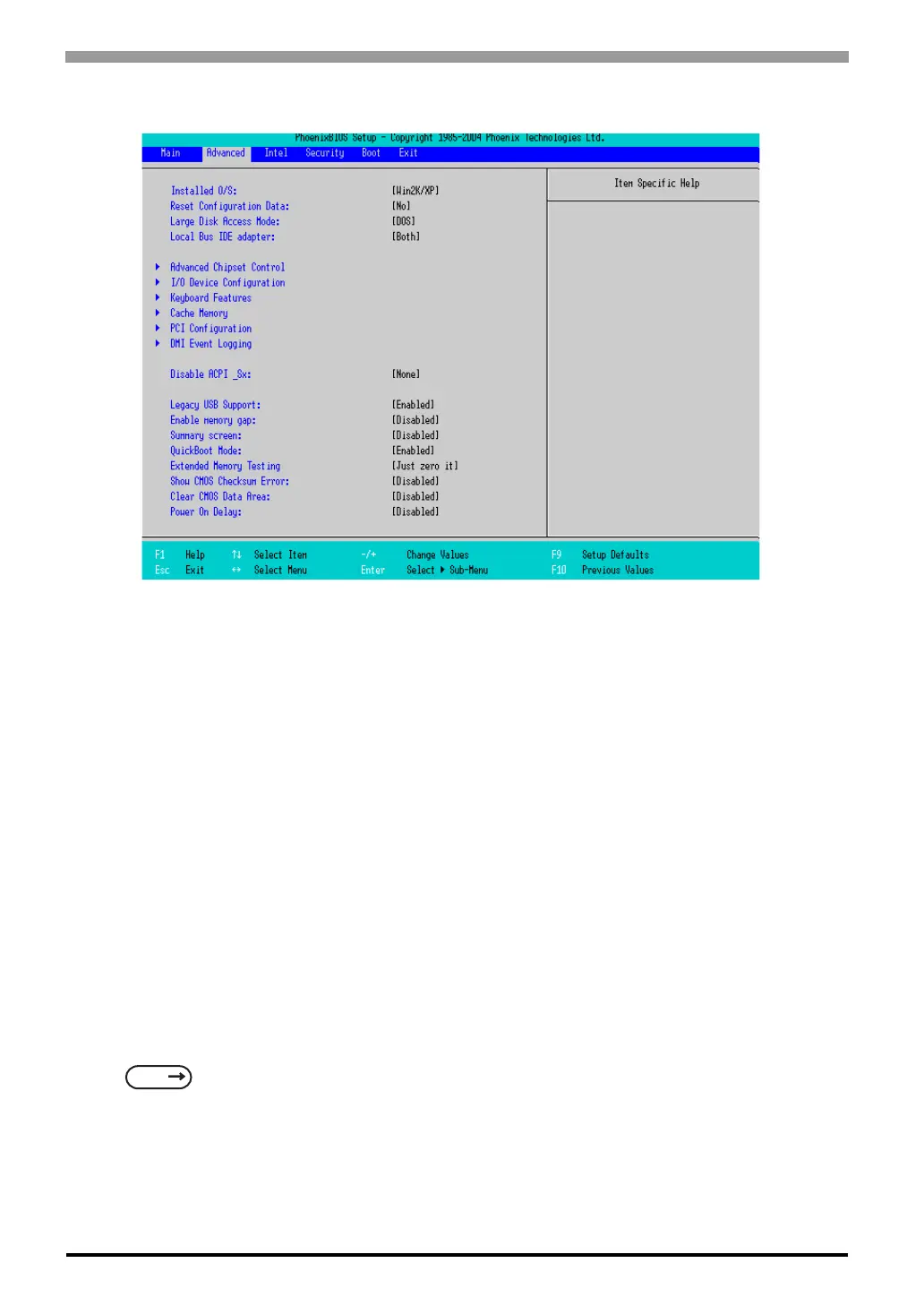
5.2.2 Advanced
Installed O/S
Specifies a type of OS of the unit. Select from [Other], [Win95], [Win98], [WinMe], or [Win2K/XP]. The
factory default setting is [Win2K/XP].
Reset Configuration Data
Specifies whether you want to reset the Plug & Play information which is recorded in the Extended System
Configuration Data (ESCD) Block of the CMOS RAM, when the system boots up next time. The choice is
[Yes] or [No] and the factory default setting is [No].
Large Disk Access Mode
When you use UNIX or NetWare for OS, the setting should be [Other]. The choice is [DOS] or [Other] and
the factory default setting is [DOS].
Local Bus IDE adapter
Specifies an enabled/disabled state for the IDE controller. Select from [Both], [Primary], [Secondary], or
[Disabled]. The the factory default setting is [Both].
Advanced Chipset Control
Point the cursor to the [Advanced Chipset Control] and press the [Enter] Key, so that you can set up details.
SEE
Advanced Chipset Control (page5-9)



 To Next Page