ASSEMBLY
Assembly requires two persons.
Place all parts in a cleared area and remove the
packing materials. Do not dispose of the packing
materials until you finish all assembly steps.
Left parts are marked '%" or "Left" and right parts
are marked "R" or "Right."
To identify small parts, see page 5.
In addition to the included tool(s), assembly
requires the following tools:
one Phillips screwdriver
Assembly may be easier if you have a set of
wrenches. To avoid damaging parts, do not use
power tools.
.
Go to www.proformservice.com/registration
on your computer and register your product.
• activates your warranty
saves you time if you ever need to contact
Customer Care
allows us to notify you of upgrades and offers
Note: If you do not have Internet access, call
1-888-533-1333 and register your product.
.
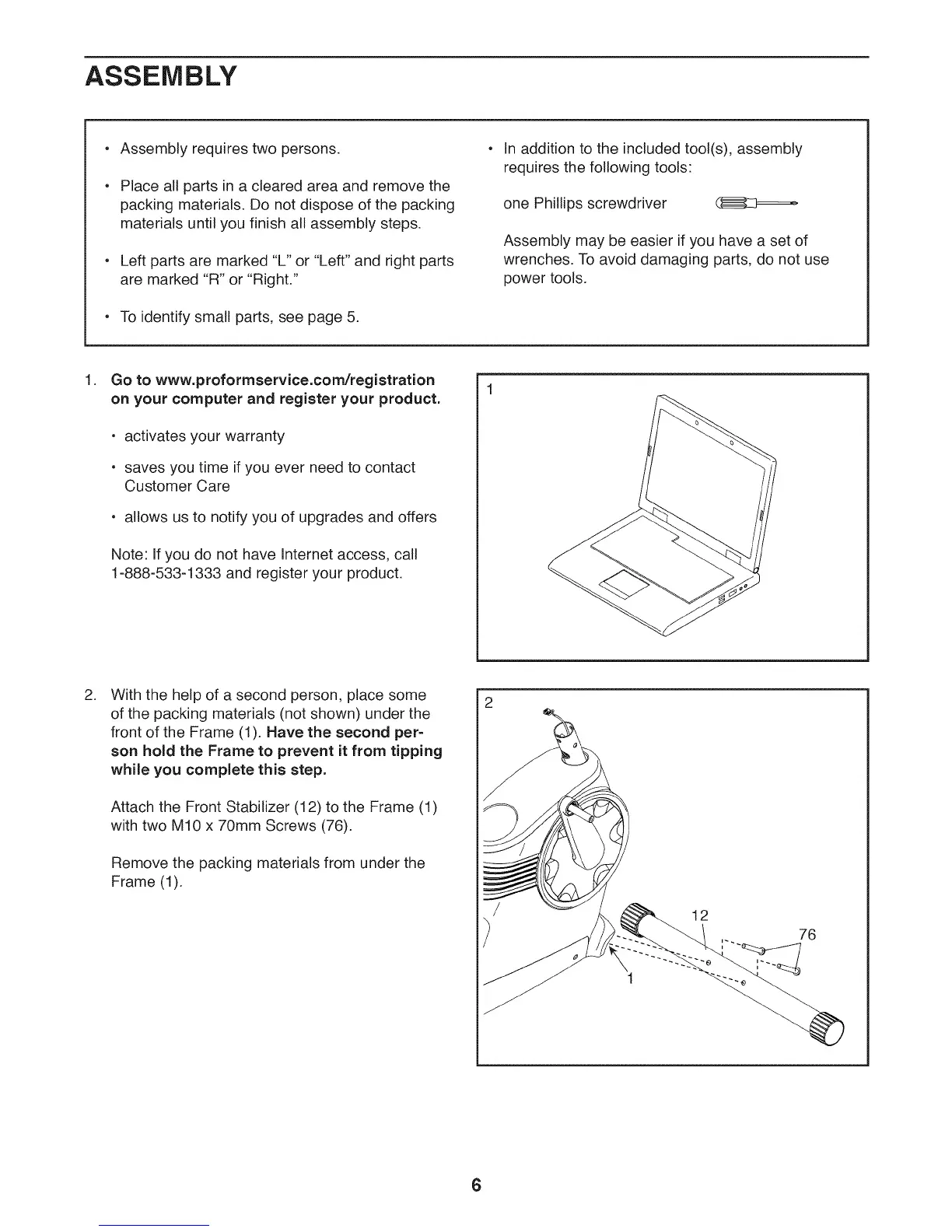
With the help of a second person, place some
of the packing materials (not shown) under the
front of the Frame (1). Have the second per-
son hold the Frame to prevent it from tipping
while you complete this step.
Attach the Front Stabilizer (12) to the Frame (1)
with two M10 x 70mm Screws (76).
Remove the packing materials from under the
Frame (1).
/
/
12
76
6





 To Next Page