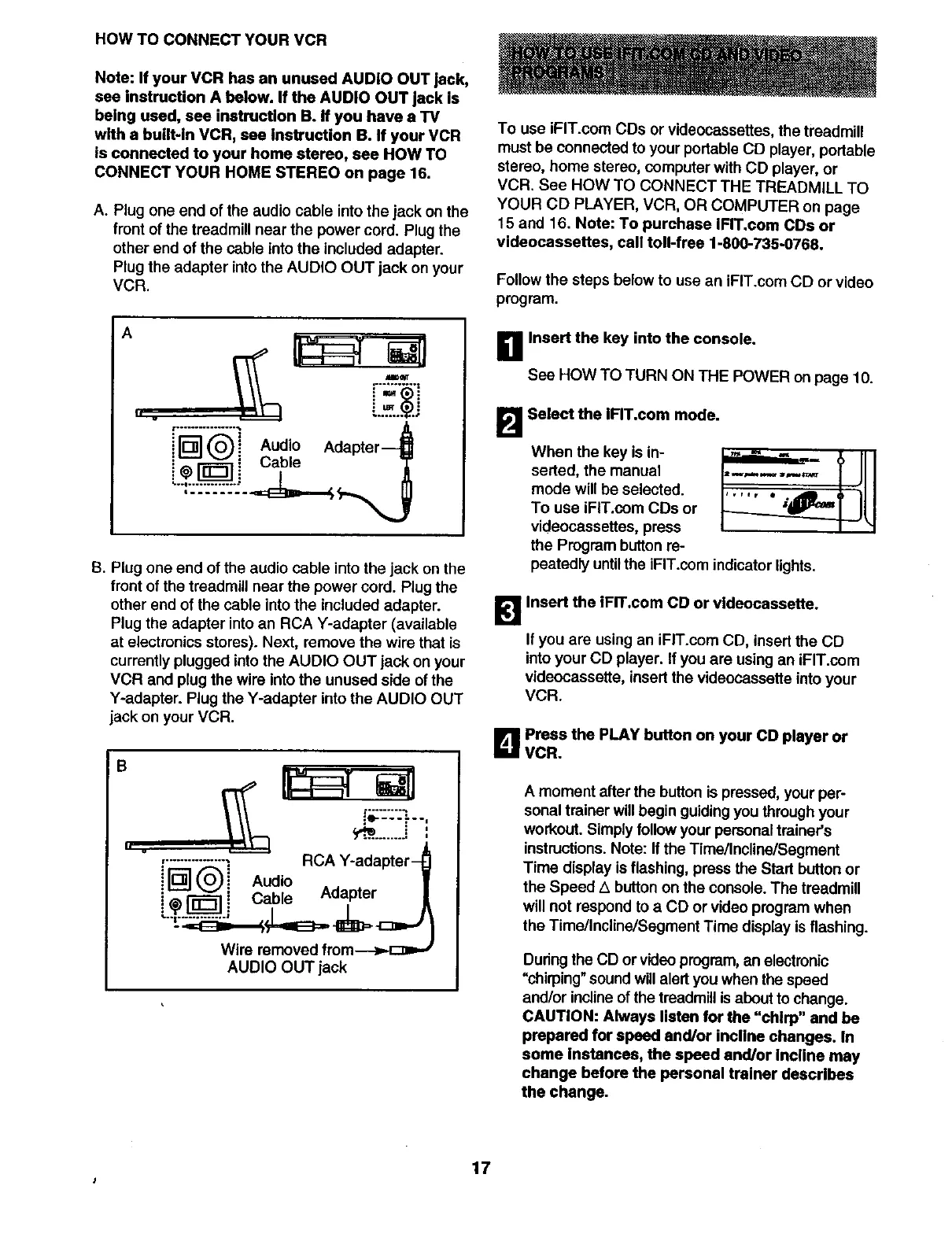
HOW TO CONNECT YOUR VCR
Note: If your VCR has an unused AUDIO OUT jack,
see instruction A below. If the AUDIO OUT jack is
being used, see instruction B. if you have a TV
with a built-in VCR, see Instruction B. If your VCR
is connected to your home stereo, see HOW TO
CONNECT YOUR HOME STEREO on page 16.
A. Plug one end of the audio cable into the jack on the
front of the treadmill near the power cord. Plug the
other end of the cable into the included adapter.
Plug the adapter into the AUDIO OUT jack on your
VCR.
A
S. Plug one end of the audio cable into the jack on the
front of the treadmill near the power cord. Plug the
other end of the cable into the included adapter.
Plug the adapter into an RCA Y-adapter (available
at electronics stores). Next, remove the wire that is
currently plugged into the AUDIO OUT jack on your
VCR and plug the wire into the unused side of the
Y-adapter. Plug the Y-adapter into the AUDIO OUT
jack on your VCR.
B
h .
{_:-_::-:...,
y_..........- ,
I
,.........._--: RCA Y-adapter-_
i_(0) i Audio |
i ,'_ I-_ [ Cable Adapter /
Wire removed from--->.c_=J
AUDIO OUT jack
To use iFIT.com CDs or videocassettes, the treadmill
must be connected to your portable CD player, portable
stereo, home stereo, computer with CD player, or
VCR. See HOW TO CONNECT THE TREADMILL TO
YOUR CD PLAYER, VCR, OR COMPUTER on page
15 and 16. Note: To purchase IFIT.coro CDs or
videocassettes, call toll-free 1-800-735-0768.
Follow the steps below to use an iFIT.com CD or video
program.
B Insert the key into the console.
See HOW TO TURN ON THE POWER on page 10.
B Select the IFIT.com mode.
When the key is in-
serted, the manual
mode will be selected.
To use iFIT.com CDs or
videocassettes, press
the Program button re-
peatedly untilthe iFIT.com indicator lights.
1_1 Insert the iFrr.coro CD or vldeocassette.
If you are using an iFIT.com CD, insert the CD
intoyour CD player. If you are using an iFIT.com
videocassette, insert the videocassette into your
VCR.
B Press the PLAY button on your CD player or
VCR.
A moment after the buttonis pressed, your per-
sonaltrainer will begin guiding you throughyour
workout. Simply follow yourpersonal trainer's
instructions.Note: If the Time/Incline/Segment
Time display isflashing, press the Start button or
the Speed z_button on the console. The treadmill
will not respond to a CD or video program when
the Time/Incline/Segment Time display isflashing.
During the CD or videoprogram, an electronic
"chirping" soundwill alertyou when the speed
and/or inclineofthe treadmillisabout to change.
CAUTION: Always listen for the "chirp" and be
prepared for speed and/or incline changes. In
some Instances, the speed end/or Incline may
change before the personal trainer deecrlbes
the change.
17




 To Next Page