Topurchasei-Fit.comCD'sandvideos(notincluded),
visityourlocaldepartmentstoreorsportinggoods
storeorgotowww.i-fit.com+
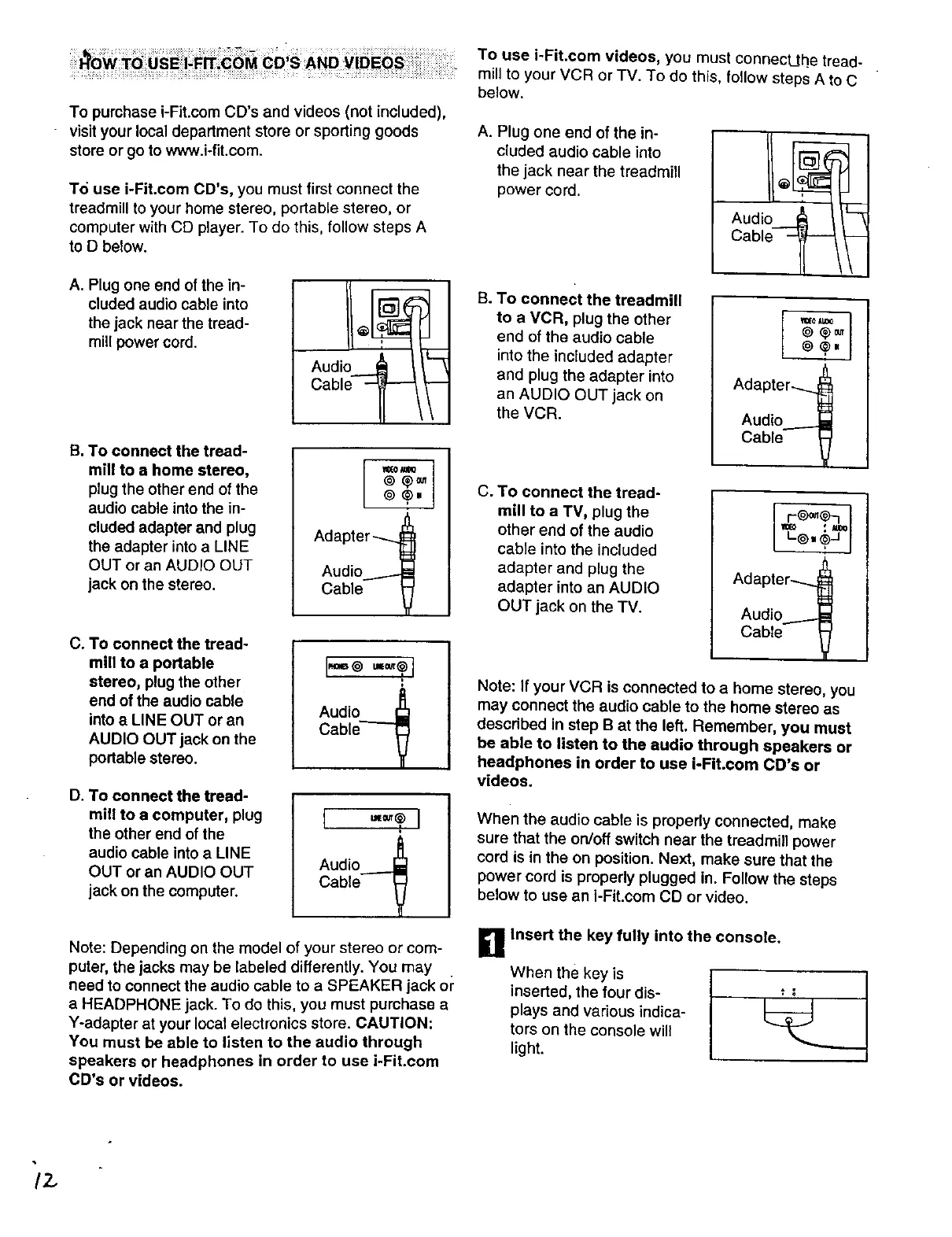
To use i-Fit.corn CD's, you must first connect the
treadmill to your home stereo, portable stereo, or
computer with CD player. To do this, follow steps A
to D below.
A. Plug one end of the in-
cluded audio cable into
the jack near the tread-
mill power cord.
i
Audio _
Cable'--_'--
B. To connect the tread-
mill to a home stereo,
plug the other end of the
audio cable into the in-
cluded adapter and plug
the adapter intoa LINE
OUT or an AUDIO OUT
jack on the stereo.
o+, j
Adapter-_
Audio._l
Cable V
C. To connect the tread-
mill to a portable
stereo, plug the other
end of the audio cable
into e LINE OUT or an
AUDIO OUT jack on the
portable stereo.
I.==o I
+
Audio I_
Cable _7
D. To connect the tread-
mill to e computer, plug
the other end of the
audio cable into a LINE
OUT or an AUDIO OUT
jack on the computer.
[ I
Audio _
Cable V
Note: Depending on the model of your stereo or com-
puter, the jacks may be labeled differently. You may
need to connect the audio cable to a SPEAKER jack or
a HEADPHONE jack. To do this, you must purchase a
Y-adapter at your local electronics store. CAUTION:
You must be able to listen to the audio through
speakers or headphones in order to use i-Fit.com
CD's or videos.
To use i-Fit.com videos, you must connectjhe tread-
mill to your VCR or TV. To do this, follow steps A to C
below.
A. Plug one end of the in-
cluded audio cable into
the jack near the treadmill
power cord.
B. To connect the treadmill
to a VCR, plug the other
end of the audio cable
intothe included adapter
and plug the adapter into
an AUDIO OUT jack on
the VCR.
C. To connect the tread-
mill to a TV, plug the
other end of the audio
cable into the included
adapter and plug the
adapter into an AUDIO
OUT jack on the TV.
Audio J_
Cable -_
o, ,j
Cable V
Cable V
Note: If your VCR is connected to a home stereo, you
may connect the audio cable to the home stereo as
descdbed in step B at the left. Remember, you must
be able to listen to the audio through speakers or
headphones in order to use i-Fit.com CD's or
videos.
When the audio cable is properly connected, make
sure that the on/off switch near the treadmill power
cord is in the on position. Next, make sure that the
power cord is properly plugged in. Follow the steps
below to use an i-Fit.corn CD or video.
D Insert the key fully into the console,
When the key is
inserted, the four dis-
plays and various indica-
tors on the console will
I_ght.
/2.



 To Next Page