11
9
3
69
68
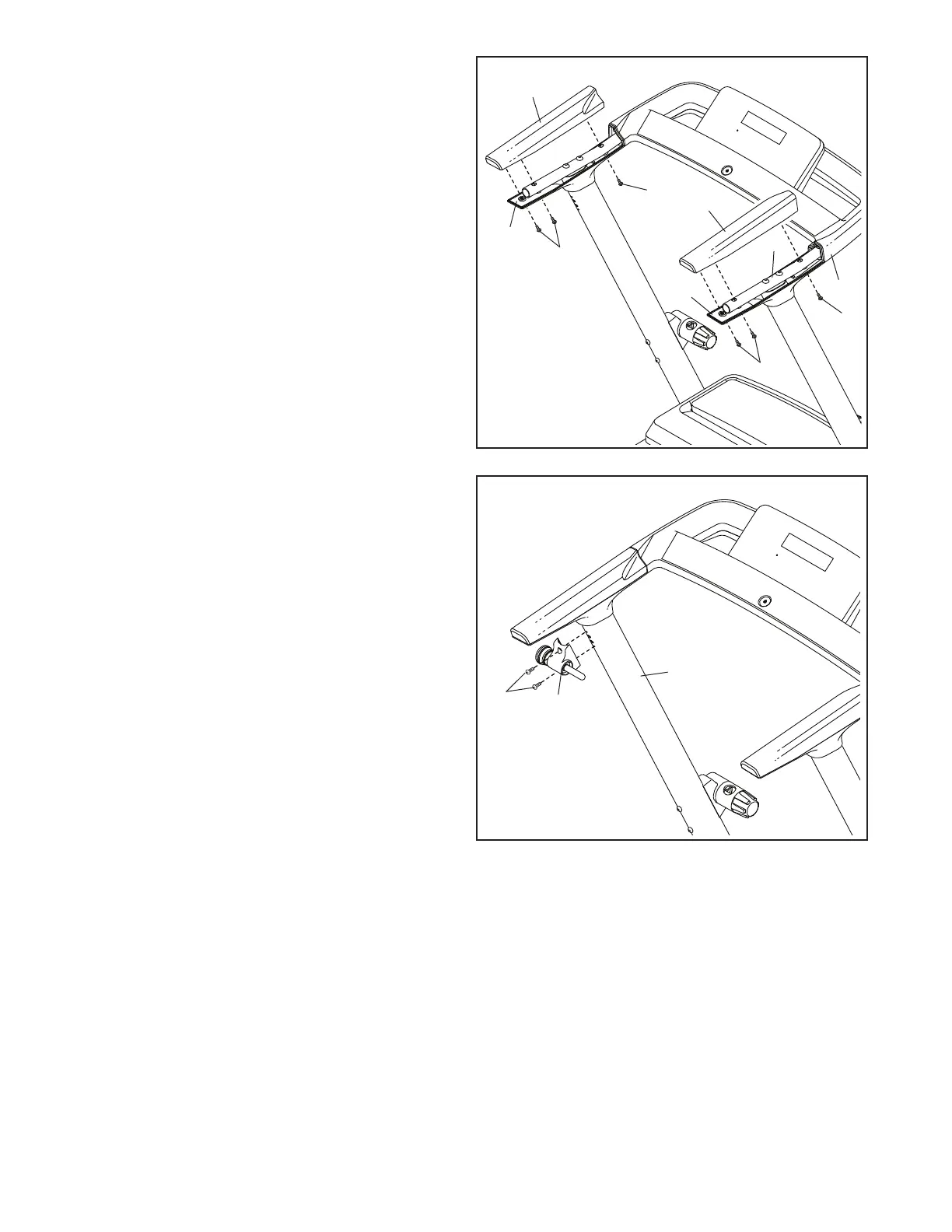
9. Orient the Storage Latch (68) as shown. Attach
the Storage Latch to the Left Upright (69)
with two M4.2 x 19mm Screws (3); start both
Screws, and then tighten them.
8
63
65
8. Identify the Right Handrail Top (63). Set the
Right Handrail Top on the Handrail (66) and slide
it forward against the Console Base (84).
Next, slide the Right Handrail Bottom (65)
upward. Make sure that the Upright Wire
(see step 7) is covered by the Right Handrail
Bottom and is not pinched. Attach the Right
Handrail Bottom to the Right Handrail Top (63)
with three M4.2 x 19mm Screws (3). Note: The
Screws need to be inserted at an angle as
shown. Do not overtighten the Screws.
Repeat this step on the left side with the
Left Handrail Top (62) and the Left Handrail
Bottom (64). Note: There are no wires on the
left side.
84
3
3
62
64
3
66
3





 To Next Page