17
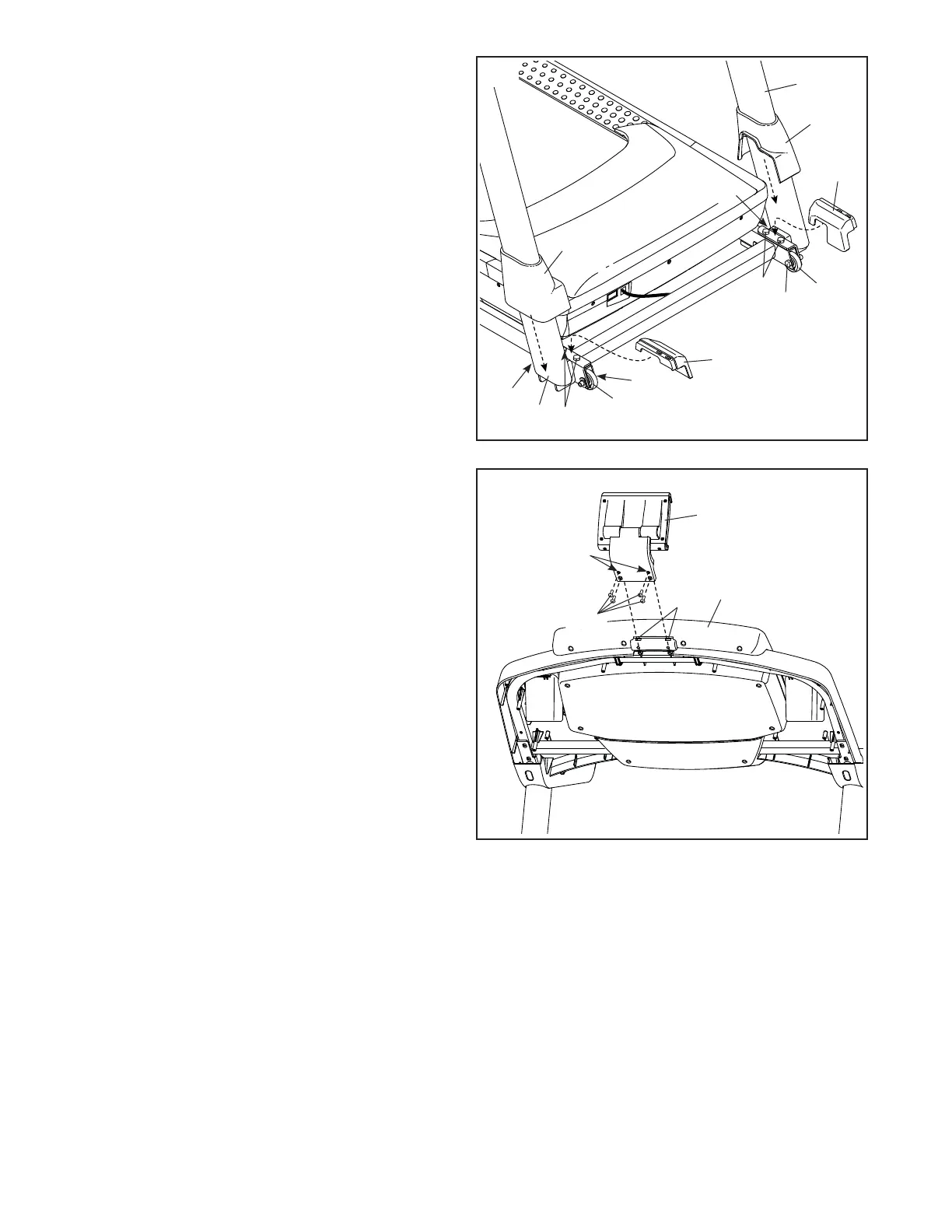
16. Firmly tighten the four 3/8" x 2 1/4" Screws (7)
and the two 3/8" x 1 1/4" Screws (63).
Next, tighten the two 3/8" x 1 3/4" Screws
(62); the Wheels (97) must turn freely.
Next, set the Left Inner Base Cover (107) onto
the lower end of the Left Upright (89). Slide the
Left Base Cover (82) downward and press it
onto the Left Inner Base Cover.
Then, set the Right Inner Base Cover (23) onto
the lower end of the Right Upright (90). Slide the
Right Base Cover (83) downward and press it
onto the Right Inner Base Cover.
107
83
82
62
89
7
7
63
62
23
63
16
90
18. Make sure that all parts are properly tightened before you use the treadmill. If there are sheets of plastic
on the treadmill decals, remove the plastic. To protect the fl oor or carpet, place a mat under the treadmill. To
avoid damage to the console, keep the treadmill out of direct sunlight. Keep the included hex keys in a secure
place; one of the hex keys is used to adjust the walking belt (see pages 31 and 32). Note: Extra parts may be
included.
17
17. Press the two tabs on the Tablet Holder (105)
into the slots (L) in the console assembly (J).
Attach the Tablet Holder (105) with four #8 x 5/8"
Machine Screws (26). Note: Start the two top
Machine Screws fi rst, and then start the two
bottom Machine Screws. Be careful not to
overtighten the Machine Screws.
IMPORTANT: The Tablet Holder (105) is
designed for use with most full-size tablets.
Do not place any other electronic device or
object in the Tablet Holder.
105
Start First
J
L
26
97
97





 To Next Page