11
10. IMPORTANT: To avoid damaging the
Crossbar (107), do not use power tools and
do not overtighten the #10 x 3/4" Screws (2).
Orient the Crossbar (107) as shown. Attach the
Crossbar to the Handrails (82, 83) with four #10
x 3/4" Screws (2) and four #10 Star Washers
(12); do not tighten the Screws yet.
Insert the Console Frame (102) into the
Handrails (82, 83). Attach the Console Frame
with four 1/4" x 1" Patch Screws (9); do not
tighten the Patch Screws yet. Be careful not
to pinch the Upright Wire (87).
Tighten one #10 x 3/4" Screw (2) in each end
of the Crossbar (107); do not overtighten the
Screws. Then, tighten the other #10 x 3/4"
Screw (2) in each end of the Crossbar.
Tighten the four 1/4" x 1" Patch Screws (9).
10
107
12
9
2
83
102
82
87
9
12
2
First
First
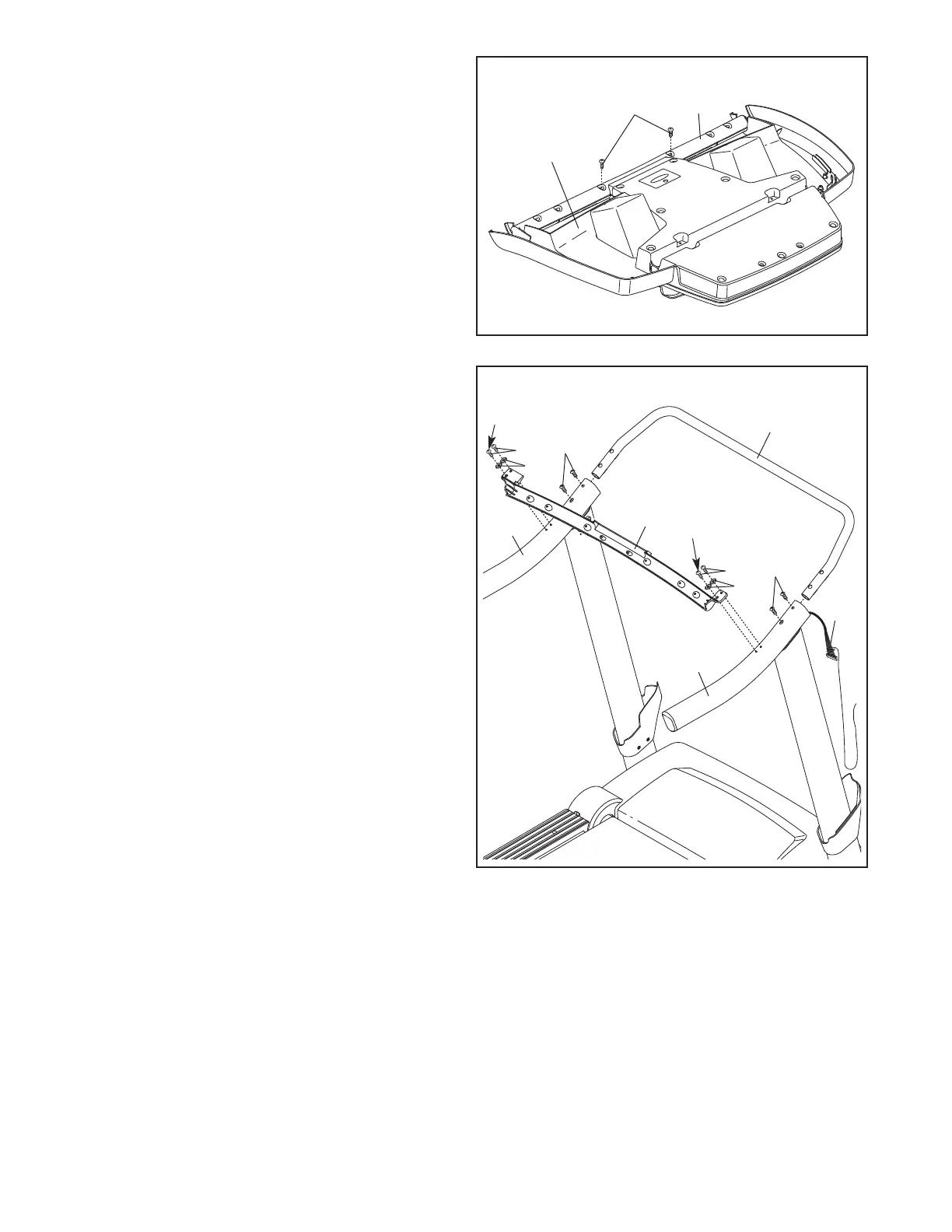
9. Set the console assembly face down on a soft
surface to avoid scratching the console assem-
bly. Remove the two #8 x 3/4" Screws (1). Lift
off the Crossbar (107).
9
107
Console
Assembly
1




 To Next Page