TEMPERATURE
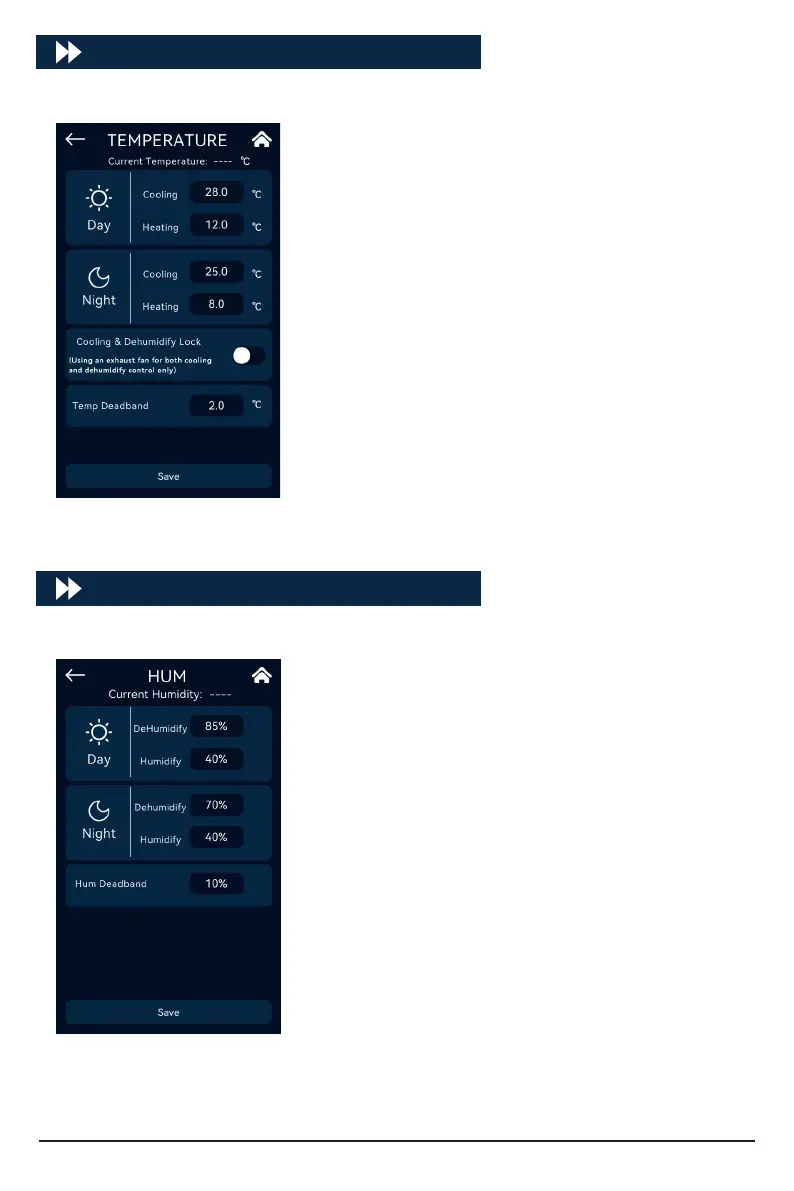
Click [TEMPERATURE] to enter the temperature control settings:
The setting dierence between cooling trigger value and
heating trigger value must be ≥ Temperature Deadband*2.
Cooling conditions:
Turn on when the Temperature Value ≥ Cooling Target
Temperature;
Turn o when the Temperature Value ≤ Cooling Target
Temperature - Deadband.
Heating conditions:
Turn on when the Temperature Value ≤ Heating Target
Temperature;
Turn o when the Temperature Value ≥ Heating Target
Temperature + Deadband.
Cooling and dehumidify lock: only select when using exhaust
fan for cooling and dehumidify control.
HUM
Click [HUM] to enter the humidity settings:
The setting dierence between the dehumidify trigger value
and the Tumidication Trigger Value must be ≥ Humidity
Deadband*2.
Dehumidify conditions:
Turn on when Humidity ≥ Dehumidify Target Value;
Turn o when Humidity ≤ Dehumidify Target Value - Dead-
band.
Humidication conditions:
Turn on when Humidity ≤ Humidify Value;
Turn o when Humidity ≥ Humidify Target Value + Deadband.
18



 To Next Page