CO2
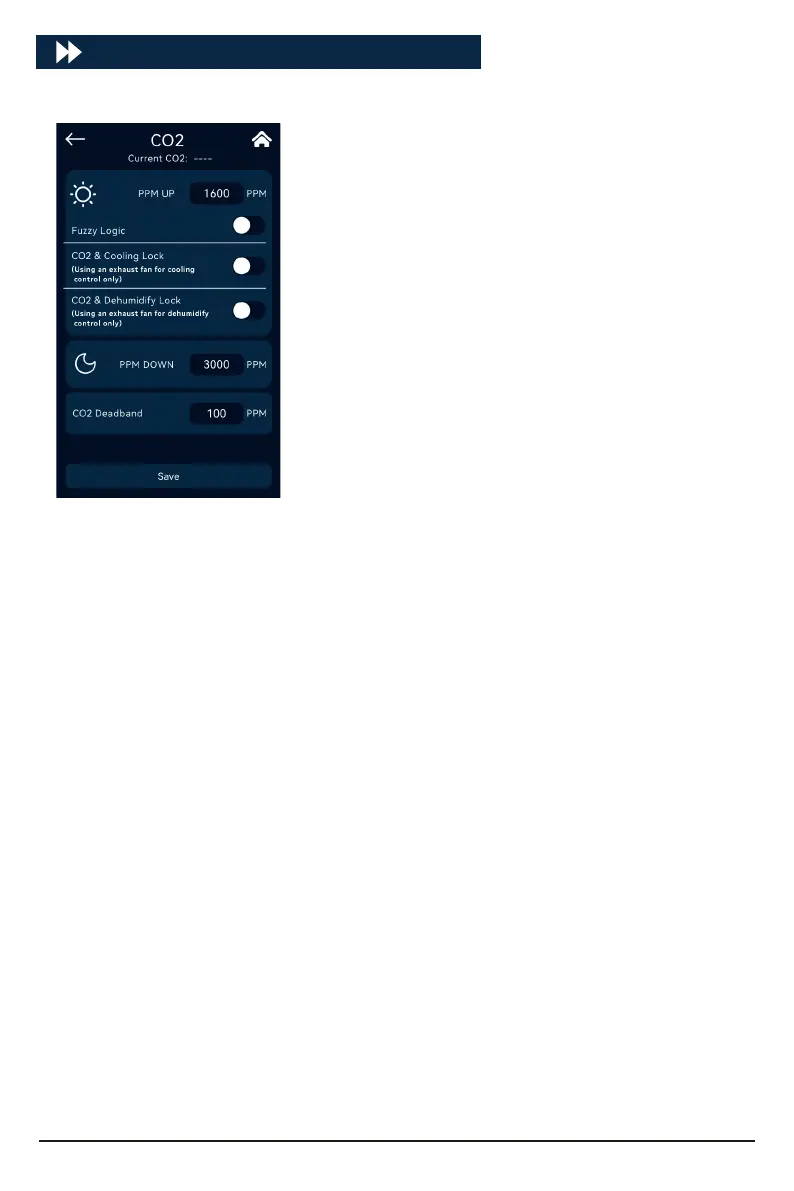
Click [CO2] to enter the CO2 settings:
PPM UP only takes eect during the day.
When PPM is UP, you can choose whether to use Fuzzy Logic
mode (using carbon dioxide cylinder).
CO2 and Cooling Lock: Select only when using the exhaust
fan for cooling.
Note: Locking is selected to avoid CO2 waste. When the
exhaust fan is used as a cooling device, if the cooling condi-
tion is triggered and the exhaust fan stas, the CO2 UP
output will be automatically turned o until the cooling is
stopped.
CO2 and Dehumidify Lock: Select only when using the
exhaust fan for dehumidify.
Note: Locking is selected to avoid CO2 waste. When using the
exhaust fan as a dehumidify device, if the dehumidify condi-
tion is triggered and the exhaust fan stas, the CO2 UP
output will be automatically turned o until the dehumidify
stops.
PPM UP conditions:
Turn on when CO2 value ≤ PPM UP target value;
Turn o when CO2 value ≥ PPM UP target value + CO2 Deadband.
PPM Down is only eective in dark conditions.
PPM Down conditions:
Turn on when CO2 value ≥ PPM Down target value;
Turn o when CO2 value ≤ PPM Down target value-CO2 Deadband.
19



 To Next Page