SENSOR & DEVICE
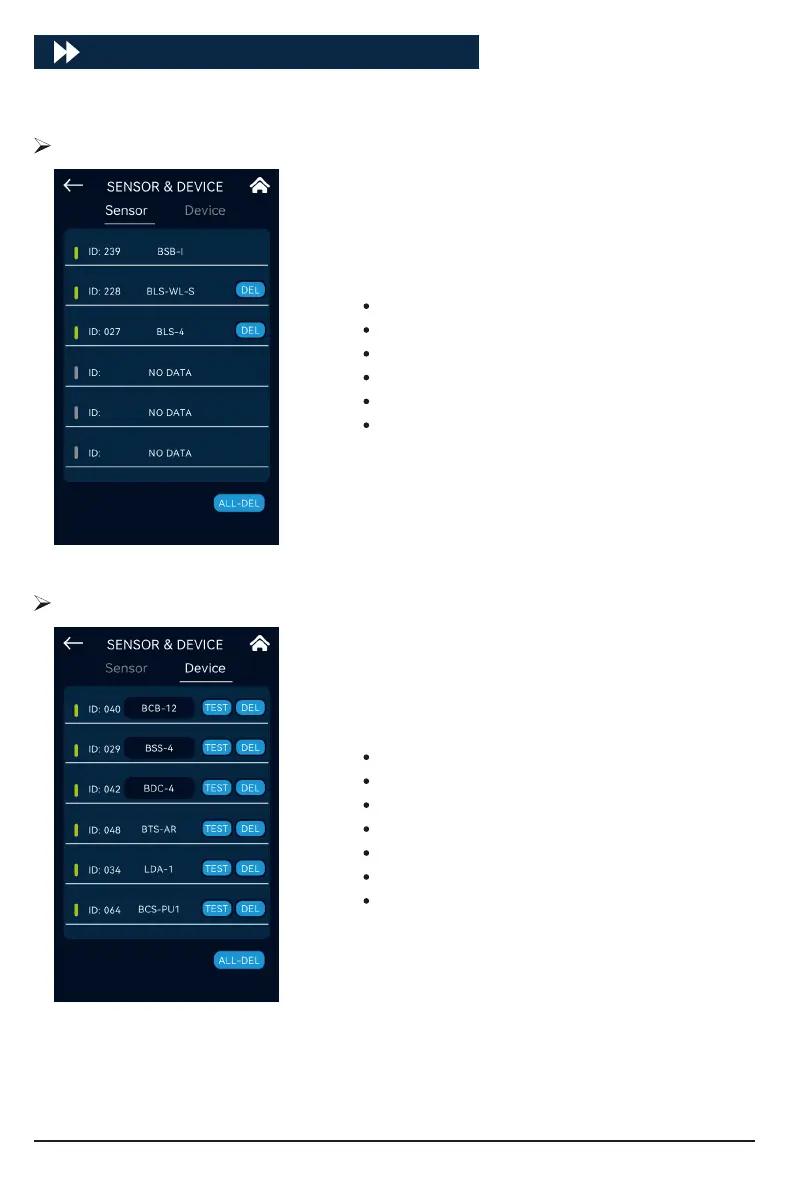
Click [SENSOR & DEVICE] to enter the sensor and device settings:
The inteace will display all connected sensors. The list of
suppoed sensors is as follows:
On registered devices, the corresponding sensors can be
deleted individually or collectively.
Sensor List
BLS-4:4 in 1 Sensor
BLS-WL:Water Level Sensor
BLS-SD:Smoke Dector
BLS-WD:Water Detector
BSB-I:pH/EC/Temp Sensor Board
BLS-MM:Moisture Monitoring
The inteace will display all connected devices. The list of
suppoed devices is as follows:
On registered devices, the corresponding sensors can be
deleted individually or collectively.
Click "TEST" to locate the device. After the locating is successful, the device will continue to ash for
1 minute. When multiple devices of the same type are connected to the host at the same time, use
this function to nd the corresponding device in the scene, and click the device’s ID to modify the
name or enter the corresponding po of the device to modify the po function catego.
Device List
BTS-AR:AC Remote Station
BCS-PU1:CO2 Device Station, PPM Up
BCB-12:Control Board
BDC-4:D Contact Station
BSS-4:Sma Socket 120-240V
LDA-1:Light Adapter
LDA-SPE:4 Channels Light Dimmer
20



 To Next Page