Using the Menu Interface
Screen Structure and Navigation
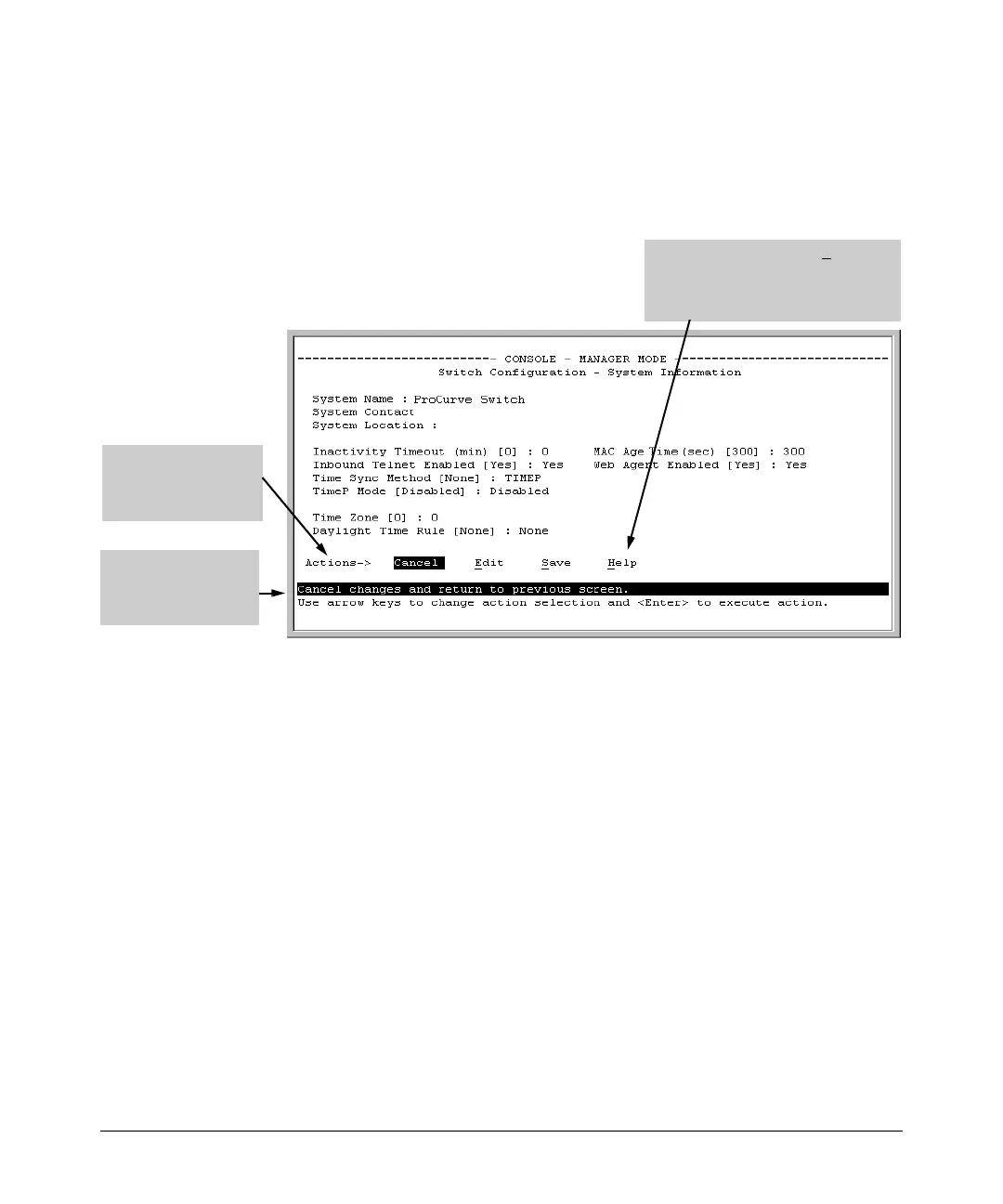
To get Help on individual parameter descriptions. In most screens
there is a Help option in the Actions line. Whenever any of the items in the
Actions line is highlighted, press
[H], and a separate help screen is displayed.
For example:
[H] i
] di
Hi
i i
l
li
Pressing or h ghlighting Help and
pressing [Enter splays Help for the
parameters listed in the upper part of
the screen
ghlight on any item
in the Actions line
nd cates that the
Actions line is active.
The He p line provides
a brief descriptor of
the high ghted Action
item or parameter.
Figure 3-5. Example Showing How To Display Help
To get Help on the actions or data fields in each screen: Use the arrow
keys ( [<], [>], [^], or [v] ) to select an action or data field. The help line under
the Actions items describes the currently selected action or data field.
For guidance on how to navigate in a screen: See the instructions provided
at the bottom of the screen, or refer to “Screen Structure and Navigation” on
page 3-9).)
3-11


 To Next Page