Copyright © 2015 RCA Communications Systems
13RDR3500
TM
/ RDR3600
TM
Professional Digital Two-Way Radio Instruction Manual
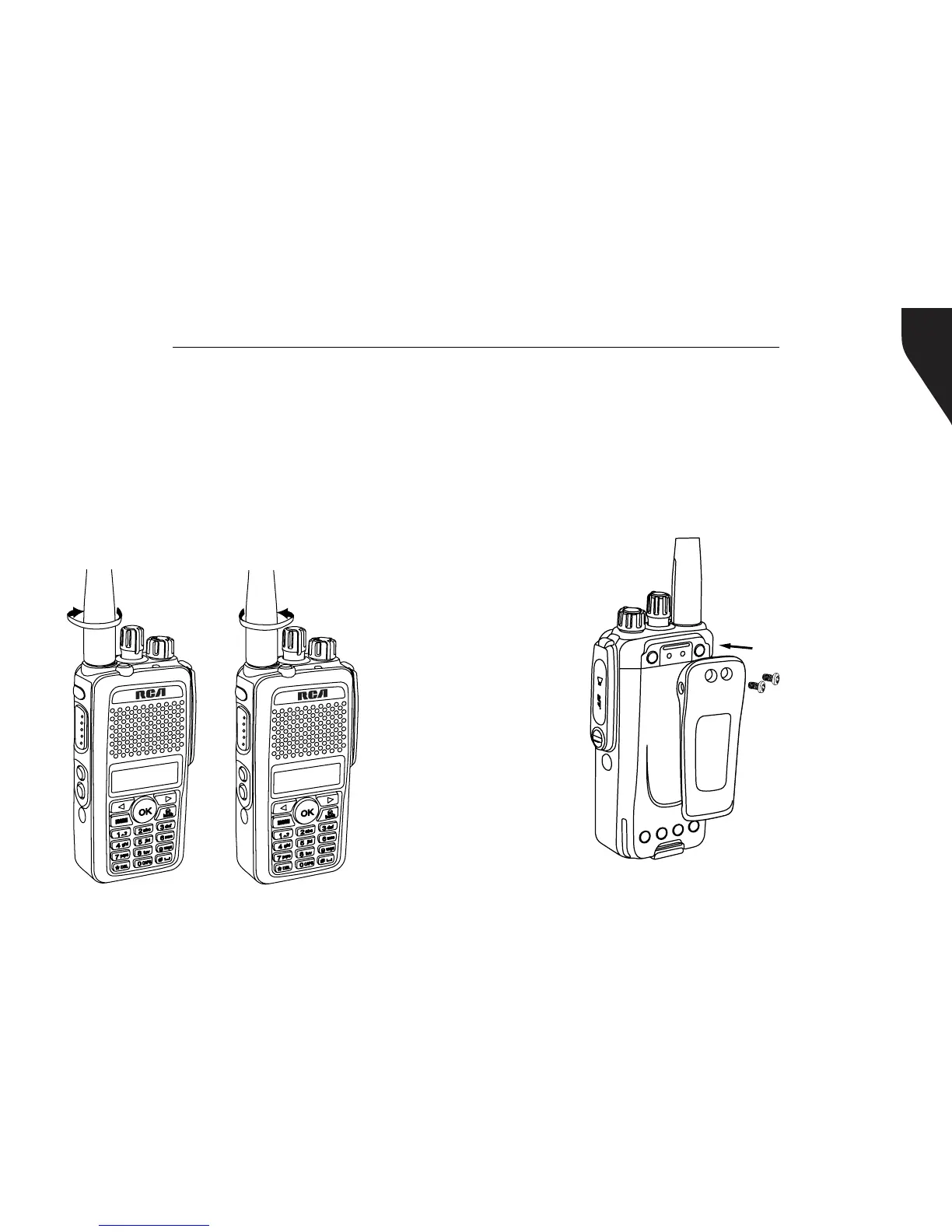
Attaching / Removing the Antenna
1. With the radio turned off, set the antenna
in its receptacle and turn clockwise until it
is screwed down. (See Figure 4)
2. To remove the antenna, turn the radio off
and turn the antenna counterclockwise.
(See Figure 5)
Note: Same procedure for RDR3500
TM
Figure 4
Figure 5
R
D
R
3
6
00
R
D
R
3
6
00
Attaching / Removing the Belt Clip
Using a small screwdriver, align the belt clip’s
screw holes to the radio’s chassis. Attach by
turning the screws clockwise into the belt clip’s
screw holes. Remove by doing the reverse.
(See Figure 6)
Figure 6
* If antenna needs to be
replaced, ensure that only
RCA Communications Systems
antennas are used. Damaged
Antennas may reduce your
radio coverage.


 To Next Page