Copyright © 2015 RCA Communications Systems
19RDR3500
TM
/ RDR3600
TM
Professional Digital Two-Way Radio Instruction Manual
Operational Status Indicators
Your radio indicates its operational status
through the following:
• Display Icons (RDR3600
TM
)
• Call Icons (RDR3600
TM
)
• Sent Item Icons (RDR3600
TM
)
• LED Indicator (RDR3500
TM
and RDR3600
TM
)
• Audio Tones (RDR3500
TM
and RDR3600
TM
)
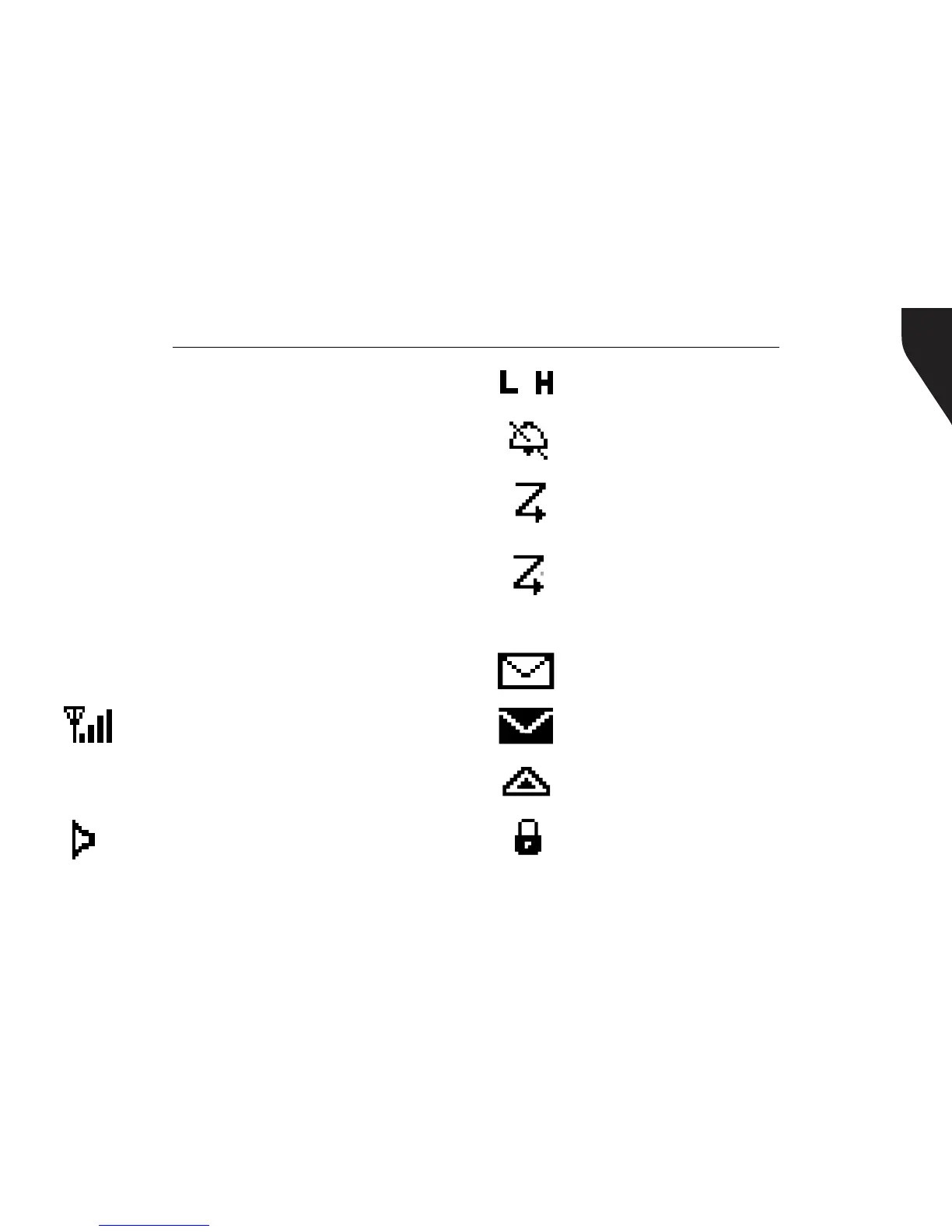
Display Icons
The LCD display shows radio status, text
entries, and menu entries. The following are
icons that appear on the radio’s display.
Received Signal Strength Indicator
(RSSI) - The number of bars displayed
represents the radio signal strength and
is only displayed while the radio is in
receiving mode.
Monitor - Selected channel is being
monitored.
Power Level - Radio is set at Low
power. Radio is set at High power.
or
Tones Disable - Tones are turned off.
Scan - Scan feature is enabled.
Priority Scan - Radio detects activity
on channel/group designated as Priority
1 (if • is blinking) or Priority 2 (if • is
steady)
Unread Message - The radio has
unread message(s) in the Inbox.
Inbox Full - The radio’s Inbox is full.
Emergency - Radio is in Emergency
mode.
Privacy - The Privacy feature is enabled.


 To Next Page