14. LINE OUT (XLR)
This male XLR connector provides a balanced line-level signal with the mix of the inputs picked up before
the MASTER and EQ controls. Connect it to the input of another audio system or powered speaker.
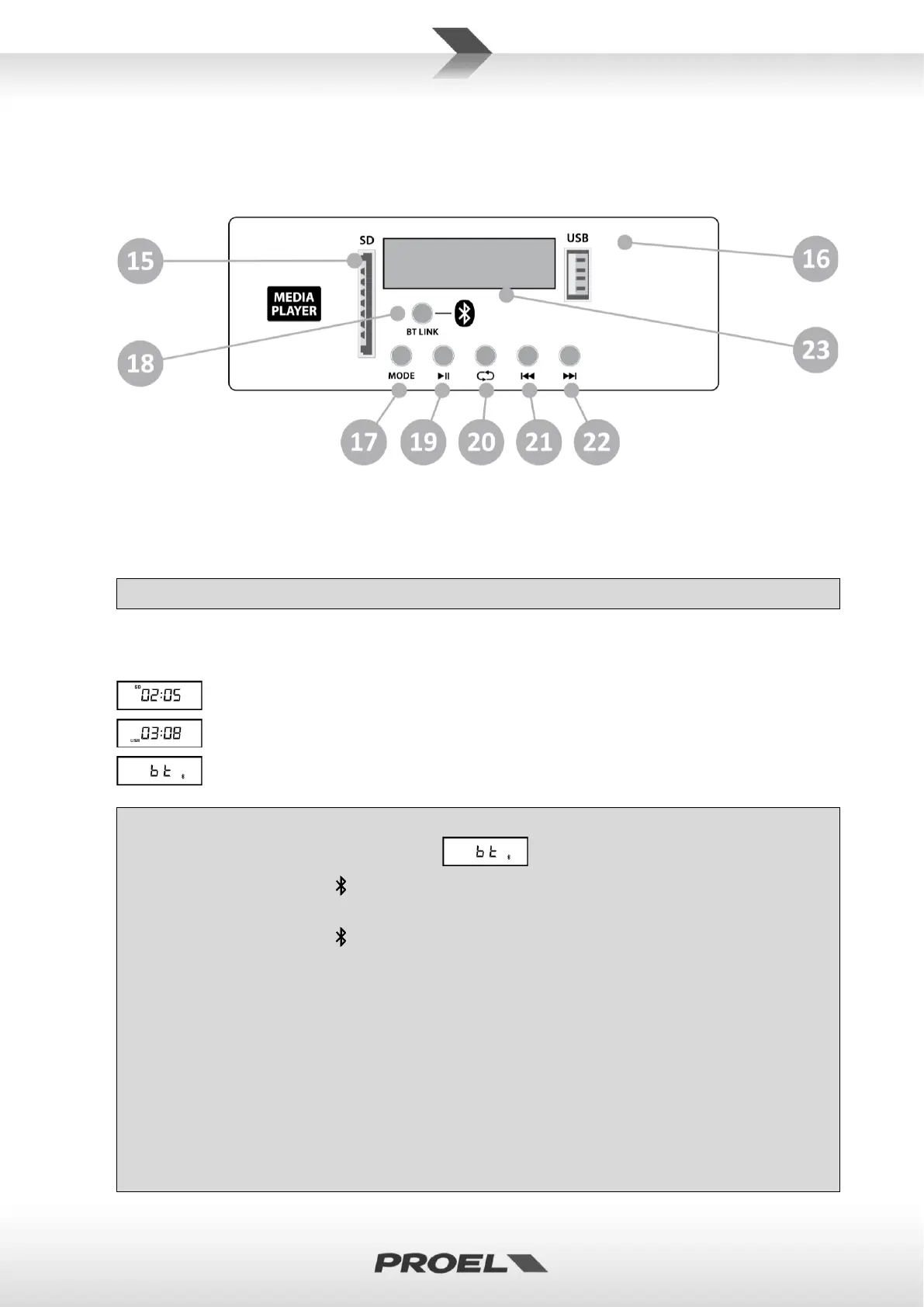
15. SD SLOT
This slot is where you can insert a SD MEMORY CARD containing audio files.
16. USB SLOT
This slot is where you can insert an USB FLASH DRIVE containing audio files.
✓ Preferably use only reliable memories (suggested brands are: SanDisk, Kingston, Lexar, Verbatim).
17. MODE SWITCH
Pressing this switch, you can select the source containing audio files between SD, USB or external
Bluetooth player device. A small icon on the display identifies the source currently used:
SD MEMORY CARD
USB FLASH DRIVE
BLUETOOTH DEVICE
✓ To connect a Bluetooth device, follow these instructions:
• Press MODE one or two times until the text appears.
• If the Bluetooth symbol in the display is steady on, your device is associated and linked to the
loudspeaker (a previously associated device will be relinked automatically).
• If the Bluetooth symbol in the display is flashing, there is no device associated.
• To associate a new device (smartphone, tablet, pc or other) you must turn on the Bluetooth in
your device.
• On the device in the list of Bluetooth devices a new device named “V WAVE” will appear and a
tone will be reproduced by the loudspeaker,
• To associate it to your device choose it and if the linking is successful another tone will be
reproduced by the loudspeaker.
• Now you will see “V WAVE” in the list of your recognized Bluetooth devices on your
smartphone or tablet and you are ready to play music with it using your preferred app.
NOTE: the audio file types and quality playable with Bluetooth connection depends on the
Bluetooth device used. The Bluetooth connection range is about 10 m (33 feet).


 To Next Page