12
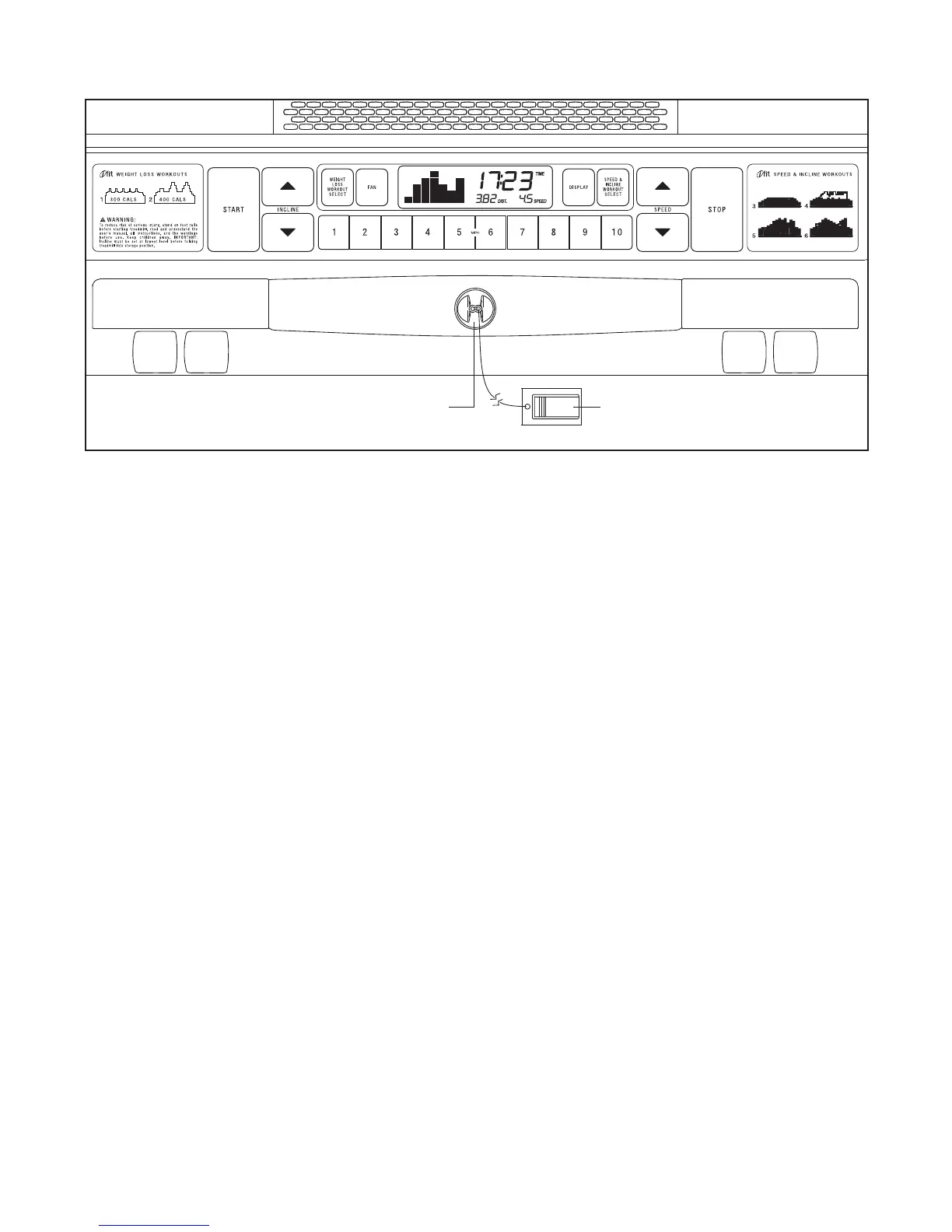
FEATURES OF THE CONSOLE
The treadmill console offers a selection of features
designed to make your workouts more effective and
enjoyable. When you select the manual mode of the
console, you can change the speed and incline of the
treadmill with the touch of a button. As you exercise,
the console will display continuous exercise feedback.
You can even measure your heart rate using the built-
in handgrip pulse sensor.
The console also features two iFit weight loss workouts
that control the speed and incline of the treadmill to
help you burn unwanted pounds.
In addition, the console offers four preset iFit speed &
incline workouts.
Each workout automatically controls
the speed and incline of the treadmill as it guides you
through an effective workout.
To use the manual mode of the console, follow the
steps beginning on page 13. To use a weight loss
workout or a speed & incline workout, see page 15.
MPORTANT: If there is a sheet of clear plastic on
the face of the console, remove the plastic. To pre-
vent damage to the walking platform, wear clean
athletic shoes while using the treadmill.
The first
time the treadmill is used, observe the alignment of
the walking belt, and center the walking belt if nec-
essary (see page 21).
Note: The console can display speed and distance in
either miles or kilometers. To find which unit of mea-
surement is selected, see THE INFORMATION MODE
on page 16
. For simplicity, all instructions in this man-
ual refer to miles.
CONSOLE DIAGRAM
Clip
Key




 To Next Page